
Cymatics VOXITY — Mac download
Download (97 MB) Earlier builds
Ticked
Compatibility: which Macs run VOXITY
The plugin works on macOS 10.14 and later. It supports both Intel and Apple Silicon Macs as a 64-bit plug-in. The interface language is English.
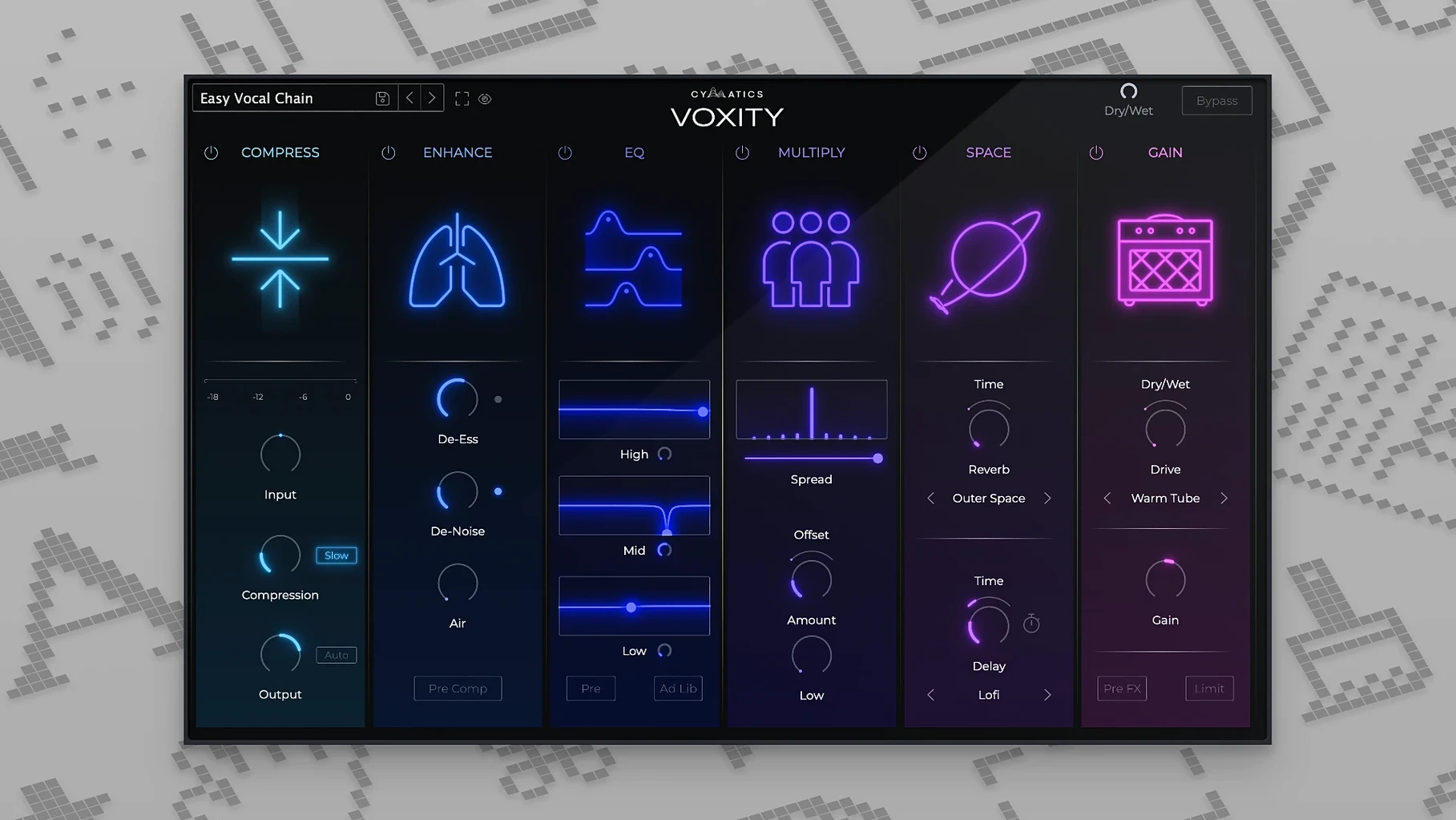
Wider stereo that holds the centre vocal steady
VOXITY widens the stereo image without collapsing the centre. The effect stays locked to the vocal, so the spread feels controlled rather than washed out.
What controls brightness and depth?
Dedicated processing adds top-end air and pushes the vocal forward in the mix. The two work together so the vocal gains presence without harshness.
How does the volume levelling behave under heavy dynamics?
Shift-drag fine-tuning and one-click parameter resets
VOXITY hides a few helpers that speed up dialling in a sound.
- Shift-drag on any knob slows the movement for fine-tuning. Works on brightness, width, depth — every control.
- Option-click a parameter resets it to the default value. Handy when a preset takes the echo too far.
- The output meter shows peak and RMS side by side. No need to patch in a separate meter plugin.
- Preset names hint at the genre they were built for. Names like "Lo-Fi Telephone", "Weeknd Air" and "Rap Upfront" make scanning the list quick.
- Breathing noise reduction is tied to the levelling circuit. It catches mouth clicks and inhales that ride up after gain is applied.
From a flat default to a genre preset in one pass
Here is how a typical pass looks when I process a lead vocal with VOXITY.
- Load the plugin on the vocal channel. The interface opens to the default state, flat.
- Browse presets by genre. I pick the one closest to the track's feel — for a dark pop vocal I choose "Moody Air".
- Check the levelling. The meter shows the quiet bridge sits 4 dB below the chorus. I raise the level knob until the RMS line steadies.
- Pull back the harshness. The top band of the brightness control is a touch sharp with this mic. I hold Shift and nudge it down half a point.
- Tighten the stereo width. The preset pushes the doubles wide. I narrow the spread so the centre vocal stays solid.
- Add a short echo. I tap in a note value that matches the track tempo — dotted eighth — and blend it to 15% wet.
- Dial in a small room reverb. Just enough to lift the tail of each phrase. The depth knob sits around 10 o'clock.
- Save my own preset. Three clicks: save, name it, done. Next song, same starting point.
The whole pass takes under three minutes. The vocal sits in the mix without extra de-essing, clip gain editing or a second reverb send.
Smooth GUI and low CPU on an M1 Mac
On an M1 Mac the plugin loads in about a second. GUI redraws stay smooth while playback runs — no lag dragging the width slider or switching presets. CPU use sits low; a single instance adds roughly the same load as a stock EQ.
On an older Intel MacBook Pro from 2017 the story is similar. Ten instances across a session with other plugins active kept the transport snappy. No sudden CPU spikes when flipping through presets mid-playback.
Stability has been solid across Logic Pro and Ableton Live. No crashes during preset changes, no dropouts when automating the bypass. The plugin recovers cleanly from sleep-wake cycles on a MacBook.
Deeper modules in Nectar, faster results in VOXITY
Three plugins come up in the same conversation as VOXITY. Each takes a different path to a finished vocal.
iZotope Nectar. Nectar packs deeper modules — de-esser, compressor, harmoniser. It does more but demands more clicks. VOXITY strips that back to six core controls. Faster results for someone who does not want to build a chain from scratch.
Waves CLA Vocals. CLA Vocals works on the same one-screen principle. Its tone leans bright and compressed, suited to rock and pop. VOXITY gives more control over stereo width and echo character. The built-in breathing-noise reduction gives it an edge for vocalists who track close to the mic.
Antares Vocal Reverb. Antares focuses on ambience. It does not level volume or tame harshness. VOXITY covers the full chain — dynamics, tone, space — in one window. For a producer who wants one vocal plugin instead of three, the difference matters.
Where VOXITY fits is the middle ground: fewer decisions than a modular chain, more shaping than a one-knob effect. That makes it a solid daytime tool for fast sessions.
The levelling catches peaks and lifts quiet phrases in one pass. It leaves the performance natural while keeping the vocal audible across the arrangement.
- macOS 10.14 or later
- Intel or Apple Silicon Mac (64-bit only)
Questions the team asks
Yes. Ready-made presets cover a range of styles so you can start from a polished baseline and tweak from there.





Comments 0
Sign in or create an account to add a comment.
No comments yet. They go up after moderation.