

EZbass — Mac download
Download (81 MB) Earlier builds
Ticked
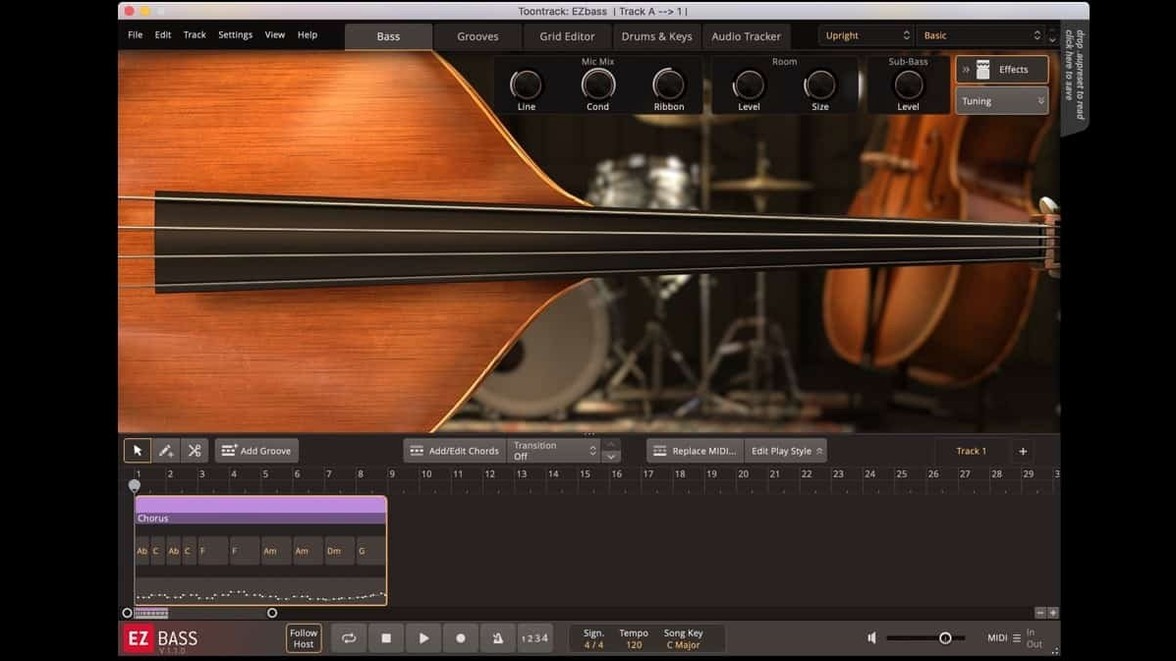
EZbass runs on any Mac with macOS 10.15 or later, both Intel and Apple Silicon. No separate installer for ARM — the same build handles both architectures natively.
Pick a style, shape the DI tone instantly
The core engine gives you a DI signal from a sampled bass, then hands it over to a built-in amp and effects chain. You choose a playing style — finger, pick, slap — and the timbre shifts immediately. A single knob called Character blends between a rounder, vintage tone and a cleaner modern sound. It is not subtle. Move it left and the low end thickens; right pulls the bass forward in the mix with more attack. The virtual amp section adds grit on demand, with Drive and Compression dials that sit right on the main panel. No menu diving.
Turning audio into bass parts
The audio-to-MIDI converter listens to a guitar track, a hummed line, or any monophonic audio and maps it to the bass sampler. From there you can swap the groove, change notes in the piano roll, or let the built-in basslines take over. The Grid Editor shows note pitches and velocities in a clean view, and you can drag parts between song sections without touching your DAW’s MIDI editor. If you own EBX sound expansions, they slot in here and the articulation mapping updates automatically — version 1.3.3 added right-hand mute support for the Rock Legend EBX, for example.
A songwriter's Sunday evening
A songwriter has a verse guitar part recorded but the bassline feels lifeless. She opens EZbass, drags the guitar audio onto the audio tracker, and watches the waveform turn into MIDI notes. She scrolls through the bassline browser, picks a Motown-style groove, and swaps the generated pattern into the chorus. Ten minutes. The DI tone sits clean in the mix and she nudges the Character knob left for a warmer bed under the vocal. She exports the MIDI, drops it into Logic, and calls it done.
Remap the audition note before it clashes
Open the Settings section and adjust two things before anything else.
- Keyboard shortcuts. Version 1.3.3 lets you remap several commands. Set the audition note to something comfortable — the default can clash with common DAW transport keys. Map 'next bassline' and 'previous bassline' to left and right arrows for faster browsing during playback.
- Audio export sample rate. The 1.3.3 update fixed timing drift when exporting at 48 kHz or 96 kHz. If your project runs above 44.1 kHz, confirm the export setting matches your DAW. Mismatched rates used to stretch transients slightly; that is now corrected.
- Added right-hand mute articulation support for Rock Legend EBX.
- Added support for changing some keyboard shortcuts in Settings.
- Updated Mac standalone and project icons to macOS Tahoe style.
- Fixed timing issues in audio export at sample rates other than 44.1 kHz.
- macOS 10.15 or later
- Intel or Apple Silicon Mac (64-bit)
Questions the team asks
Yes. Version 1.3.3 supports ARM and x86 64-bit Macs natively from macOS 10.15 onward.





Comments 0
Sign in or create an account to add a comment.
No comments yet. They go up after moderation.