
iZotope Insight — Mac download
Ticked
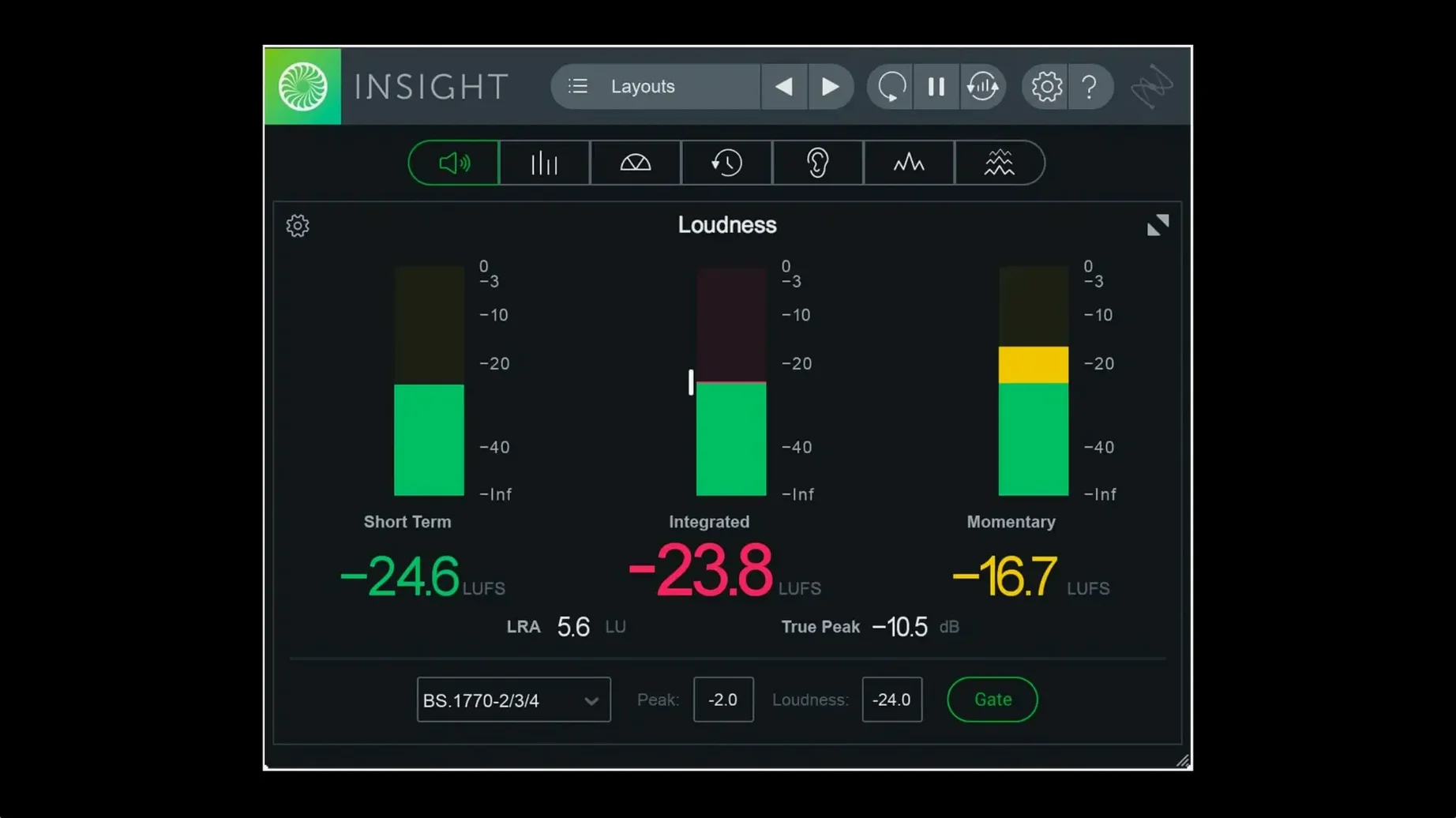
Insight 2 runs on any Mac with macOS Big Sur or later. It supports both Intel and Apple silicon processors natively, including arm64 AAX for Pro Tools 2023.3 and above.
| Quick facts | |
|---|---|
| Current version | 2.4.0 |
| Developer | iZotope |
| macOS | Big Sur or later |
| Architecture | Intel & Apple silicon |
Place Insight 2 on your master bus for loudness compliance and spectral balance checks. It monitors LUFS, true peaks and intelligibility in real time. Move it to a submix bus to catch problems in stems before they hit the master. On individual tracks, the spectrogram and vectorscope help verify stereo placement and frequency build-up. Resizable meters let you adapt the layout to a compact toolbar or a full-screen analysis panel. Colour signals flag issues as they happen, so you make decisions with visual confirmation alongside what you hear.
How Insight 2 compares with similar Mac metering tools
Three metering plug-ins dominate Mac-based post-production and mastering workflows. Each approaches the same core job differently.
iZotope Insight 2 vs. Waves WLM Plus
WLM Plus focuses on loudness and true-peak measurement with less spectral depth. It handles broadcast standards well, but the metering layout is fixed. Insight 2 gives you the 2D/3D spectrogram and surround scope on top of loudness tools — resizable and configurable to fit any screen layout. For dialogue intelligibility checks, Insight 2 pulls ahead. For a quick loudness read on a stereo mix, WLM Plus is lighter.
Insight 2 vs. NUGEN VisLM
VisLM is a loudness specialist built for compliance workflows. Its history graph and logging are more detailed than Insight 2's. But VisLM stops at loudness. Insight 2 adds spectral analysis, stereo field checks and a vectorscope in one window. If you need an all-in-one analysis station, Insight 2 covers more ground. If loudness logging is the only task, VisLM does that one thing deeper.
Insight 2 vs. Blue Cat's DP Meter Pro
DP Meter Pro is a customisable multi-channel meter with configurable thresholds and visual skins. It covers true peaks and RMS well. But it lacks the broadcast presets, intelligibility meter and Dolby Atmos 7.1.2 routing that Insight 2 includes out of the box. Insight 2 also integrates tighter with post-production standards. For sheer visual tweakability, DP Meter Pro wins. For compliance and diagnostics across multiple metrics, Insight 2 is the broader tool.
Workflow: verifying a mix for loudness compliance
- Load Insight 2 as the last insert on your master bus.
- Select the BS.1770-4 loudness preset from the preset manager tabs. This sets LUFS targets, true-peak limits and the loudness history graph to the correct standard.
- Play the entire programme from start to finish. Watch the Integrated Loudness readout. Note any sections where the short-term LUFS drifts more than ±2 LU from the target.
- Check the True Peak Meter. If the colour signal turns red, locate the overshoot point on the timeline and reduce the output ceiling of your final limiter.
- Open the Loudness History Graph. Scan for sudden jumps or dips. These often point to a scene change in post-production where dialogue levels shift without enough fill.
- Switch to the Stereo Vectorscope. Look for widening that pushes beyond safe limits — anything consistently outside the -0.5 correlation zone flags mono-compatibility risks.
- If the mix is for broadcast, verify the short-term loudness maximum and the momentary loudness maximum against the delivery spec. Note the values.
- Export a screenshot of the full Insight 2 window for the QC report and move on to the next deliverable.
What changed after version 2.4.0
- Native Apple silicon for Pro Tools — arm64 AAX support landed for Pro Tools 2023.3 and above. Users on M-series Macs no longer run Insight 2 through Rosetta inside Pro Tools sessions. Meter redraws feel snappier, and CPU usage drops noticeably on large Atmos projects.
- Preset manager with tabs — factory and custom presets got separate tabs. Switching between a broadcast loudness setup and a dialogue intelligibility layout now takes one click instead of scrolling through a flat list.
- Multi-user installation — studios and facilities with shared machines can install once for all user accounts. This cuts setup time on multi-seat Mac Pros and Mac Studios.
- Relay removed from the installer — Relay is no longer bundled directly. Users who relied on Relay for inter-plugin communication need to source it separately. Insight 2's metering routing still works via track and bus assignments without it.
- Authorization workflow changed — the method for activating the plug-in shifted. Returning users upgrading from older versions follow a different set of prompts than before.
- Native arm64 AAX support added — works with Pro Tools 2023.3+ on Apple silicon Macs
- Apple silicon install support now native
- Preset manager updated with factory and custom tabs
- macOS Big Sur or later
- Intel or Apple silicon Mac
Questions the team asks
Yes, Insight 2 includes multichannel support up to Dolby Atmos 7.1.2.



Comments 0
Sign in or create an account to add a comment.
No comments yet. They go up after moderation.