

iZotope Nectar — Mac download
Download (545 MB) Earlier builds
Ticked
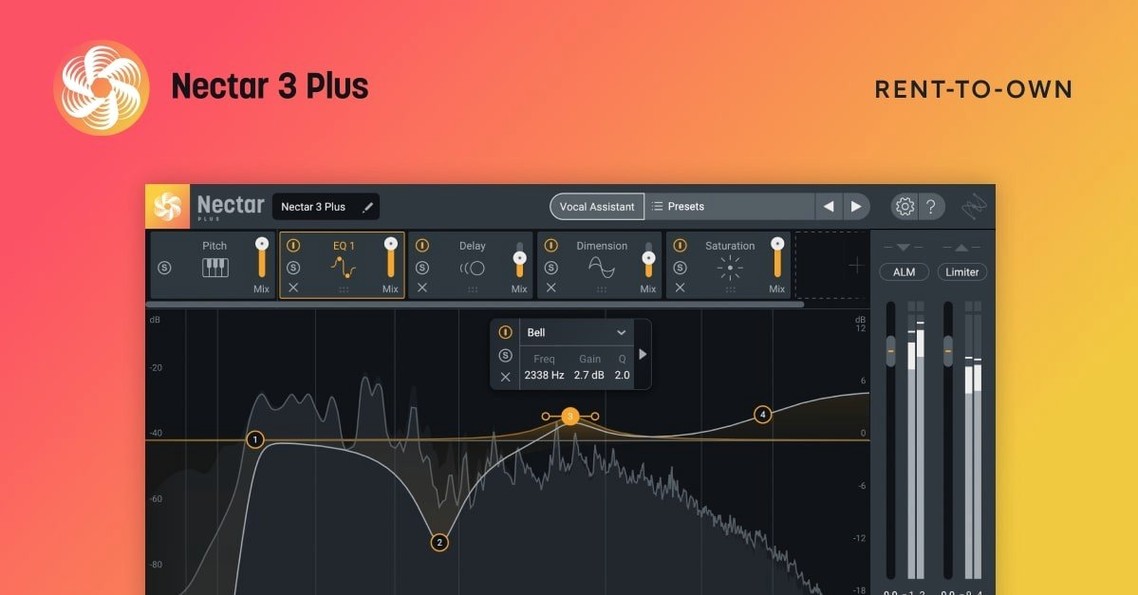
Auto-Level is the first module I reach for on a raw vocal track. It flattens the dynamics before anything else touches the signal. On the lead vocal bus, Voices handles double-tracking and widening, while Backer sits on a dedicated backing vocal bus to keep layers tight without eating up headroom.
Typical placement in a session
- Insert on audio tracks: lead vocals, ad-libs, spoken word — the full module chain runs here.
- Dedicated FX bus: Backer and delay throws sit well on a send, blending processed copies with the dry track.
- Bus processing: Groups of stacked harmonies run through an instance with Voices active, saving CPU on a dozen individual inserts.
What the Vocal Assistant covers
The AI-powered assistant analyses the incoming signal and sets gain, EQ shape, compression thresholds and de-essing. It gives you a starting point on a track insert in under ten seconds. From there, you tweak per section — verse, chorus, bridge — depending on how the arrangement shifts around the vocal.
A run-through: cleaning up a lead vocal
- Load Nectar 4 on the lead vocal insert. The interface shows the module chain — Vocal Assistant top-left, modules stacked below.
- Play a section where the vocal sits in the mix. The assistant listens for about five seconds, then applies a starting curve for EQ, compression, and de-essing.
- Switch on Auto-Level. Watch the waveform flatten as the vocalist's uneven distance from the mic gets tamed. Pre-gain adjustment is rarely needed after this.
- Move to Voices. Dial in a tight double-track with slight detune. Pan the original centre, push the double about 30% left — instant width without phasing.
- Check the De-esser band. The assistant often sets it conservatively. Narrow the frequency range by 200 Hz, drop the threshold 2 dB. Harsh syllables soften without dulling the top end.
- Send the track to a bus with Backer loaded. Pull the bus fader down to -12 dB. The layer fills space behind the lead without masking it.
- Bypass the whole chain once — compare. The raw take sounds thin and uneven. Re-engage. The vocal sits where it should.
Set the Vocal Assistant target curve to Warm first
- Vocal Assistant target curve. The default leans bright. Pull the tilt toward "Warm" if the mic is already bright or the singer has a sharp tone. Saves re-EQing later.
- Compressor attack time. The assistant sets it fast — 2–3 ms on most material. For ballads or legato phrases, push it to 8–10 ms. Lets the initial consonant through before gain reduction clamps down.
- Voices width control. Default is 100%. Drop it to 60–70% on a mono-check. Keeps the vocal solid in mono club systems or phone speakers while still feeling doubled in stereo.
Real-world scenario: a podcast editor
A podcast editor receives raw dialogue from two hosts recorded in a untreated room. One track has consistent plosives and breath noise. The other swings 6 dB between quiet and loud passages.
On the first track, the editor loads an instance of nectar 4 advanced crack and runs the Vocal Assistant. The de-esser clamps the plosives; the gate module cuts low-level breaths between sentences. A Backer layer is skipped — dialogue needs no doubling — but the EQ module gets a low-mid cut at 250 Hz to remove boxiness from the room.
On the second track, Auto-Level does the heavy lifting. The waveform evens out across the timeline. The editor pushes the output gain 3 dB and the track sits at a steady -16 LUFS without manual clip-gain edits. Both tracks finish in under two minutes each. The iZotope Nectar 4 torrent workflow, once set, becomes muscle memory — load, listen, tweak, print.
- Windows HiDPI support added across the interface.
- Fixed an iLok authorization failure affecting Nectar Standard.
- Updated supported DAW and NLE versions.
- Minimum macOS raised to Ventura 13.7.4.
- macOS Ventura 13.7.4 or later
- Intel or Apple Silicon Mac
Questions the team asks
Backer is available in Nectar 4 Standard and Advanced, not in the Elements edition.
Nectar 4 introduced Auto-Level for dynamics control, Voices for thickening and widening, and Backer for managing backing vocal layers.




Comments 0
Sign in or create an account to add a comment.
No comments yet. They go up after moderation.