

EZdrummer — Mac download
Download (786 MB) Earlier builds
Ticked
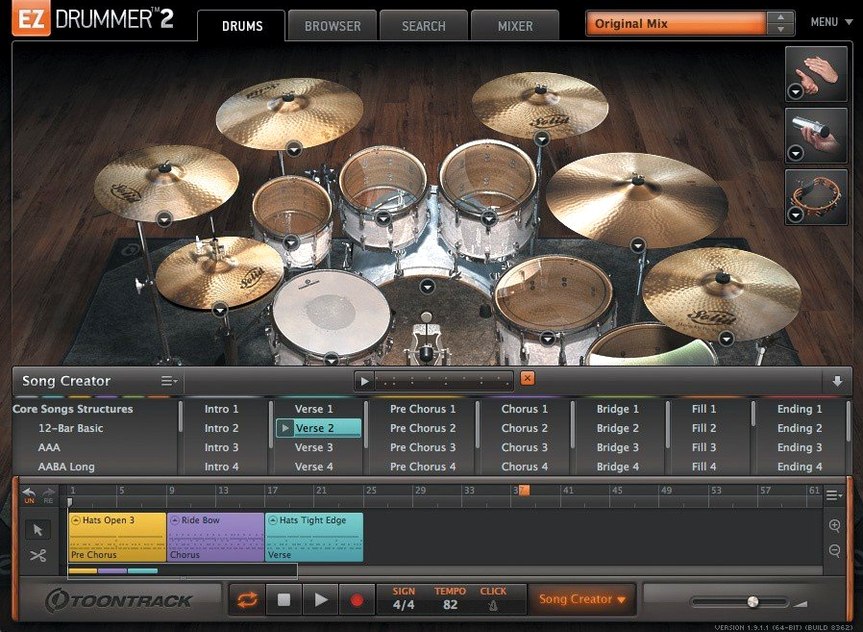
Programming drums stops a writing session cold. EZdrummer 3 for Mac solves that by generating a full drum track while you stay on one screen, following the song idea instead of the grid.
Tap a rhythm, get a groove
Tap2Find turns a tapped beat into a shortlist of matching grooves from the library. No browsing by genre name and hoping it fits. Star the ones that work, then drag a block straight onto the song track. On the track, cut, copy and paste parts to map out verses, choruses and fills quickly. Edit Play Style lets you switch a base groove in real time—push it harder or pull it back without swapping the whole pattern.
Mix across three rooms
The kit loads into a mixer where Solo and Mute let you audition individual mics and hear how the close, overhead and room channels stack. Toggling between three different rooms shifts the space around the drums—tight booth, live studio, big ambient wash—so the character of the track changes without touching a reverb plug-in. When the arrangement is solid, drag the multitrack stems out or keep the stereo mix inside the plugin. Everything stays editable on the song track until the part is locked.
Option-click groove previews without stopping playback
Several shortcuts sit just below the surface. They save a surprising amount of time once they become habit.
- Option-click a groove in the browser to preview it without stopping the current playback. Useful when auditioning fills while the song track loops.
- Command-drag from the song track to the desktop exports the selected block as a standard MIDI file. Quick way to share a part with a collaborator who uses another drum plugin.
- Right-click any pad in the drum view to assign it to an alternative articulation. The hi-hat pad can switch between tip, edge and pedal chick without opening a menu.
- Double-click a block on the song track to open it in the Grid Editor at exactly that position. No scrolling through the arrangement.
- Bandmate accepts dragged audio or MIDI and returns suggestions within seconds. Drop a guitar DI, a piano sketch or even a vocal melody line. It analyses the rhythmic profile and pulls grooves that lock to it.
First-week mistakes to avoid
New users tend to trip over the same things. Recognising them early keeps the workflow clean.
- Ignoring the tempo sync setting. If the DAW tempo changes and the drums sound off, check that the song track is set to follow host tempo. The toggle sits at the top of the song track window and is easy to overlook.
- Dragging grooves directly onto a DAW track instead of the internal song track. Both work, but the internal track preserves Edit Play Style and Song Creator edits. External MIDI locks the pattern in place.
- Leaving all mixer channels at unity. The mix-ready presets are a good starting point, but cutting 3–4 dB from the overheads and nudging the close snare mic forward can clean up a muddy blend in seconds.
- Forgetting that Solo and Mute states interact. Before version 3.1.2, toggling one could clear the other—a bug that bit users who auditioned mics rapidly. The fix is in, but the habit of checking both states before committing a bounce remains a good one.
Star 10–12 grooves to escape decision fatigue
Spend the first session building a shortlist of go-to grooves. The library is large, and decision fatigue creeps in quickly. Tap2Find helps narrow things down, but starring 10–12 grooves that match your usual tempo range and feel pays off in every session that follows.
Set up a default kit and room combination, then save it as a user preset. Loading the same tight, dry kit every time removes one decision before writing starts. The three rooms each suit a different job: the booth cuts through a busy mix, the live room sits well in rock and indie, and the ambient room works for intros and breakdowns.
Run the Song Creator on an eight-bar sketch within the first hour. Feed it a short MIDI block or a tapped rhythm, then watch how it builds an intro, verse, chorus and outro. The result won't be final, but it shows how the program thinks about song structure. Editing the arrangement that comes back teaches more about the song track than reading the manual.
If you grabbed the installer from an ezdrummer 3 mac search, the first launch after installation builds the sound library database. Let it finish. Cancelling partway leaves kits that refuse to load until the scan completes.
Native Apple Silicon binary with offline activation
On both Intel and Apple Silicon Macs, EZdrummer 3 loads as a native binary—no Rosetta layer involved. The disk image mounts cleanly and the standard installation places everything in the expected directories. Activation by Team V.R means no online check runs in the background.
The plugin launches in under four seconds on an M1 or M2 machine. Loading a full kit with all mic channels active takes a further two to three seconds. Memory use sits around 1.2 GB for the default kit with all bleed channels enabled. Switching to a lighter preset drops that to roughly 700 MB, which matters when the DAW is already carrying amp sims and sample libraries.
CPU draw is modest. A four-bar loop with a busy groove and three room channels active hovers at 4–6% on a modern Apple Silicon core. The Grid Editor adds almost nothing on top. Drag-and-drop from the browser to the song track stays instant even during playback.
Stability is solid. Crashes are rare in daily use and usually trace back to a DAW updating its plugin sandbox, not to EZdrummer itself. The 3.1.2 update patched the two most annoying workflow bugs—CC recording drops on the hi-hat pedal and the Solo/Mute recall glitch—so the mixer now behaves predictably during long arranging sessions. Anyone who grabbed an EZdrummer torrent or ezdrummer torrent link can get the latest disk image to bring the build current. The Mac experience feels polished, quiet and out of the way, which is exactly what a songwriting tool should be.
- Standalone and project icons updated to macOS Tahoe style.
- Internal improvements added for Infinity Grid EZX.
- Fixes for song-track CC recording and mixer Solo/Mute recall states.
- macOS 10.15 or later
- Intel or Apple Silicon Mac
Questions the team asks
Yes. Use Tap2Find to tap a rhythm, then drag the suggested grooves straight onto the song track to build an arrangement.
It alters a base groove in real time, giving you harder or softer variations without changing the underlying pattern.
Fixes cover hi-hat pedal and other CC recording on the song track, plus a mixer recall issue where toggling Solo or Mute could clear the opposite state.





Comments 0
Sign in or create an account to add a comment.
No comments yet. They go up after moderation.