

Slate Digital Fresh Air — Mac download
Ticked
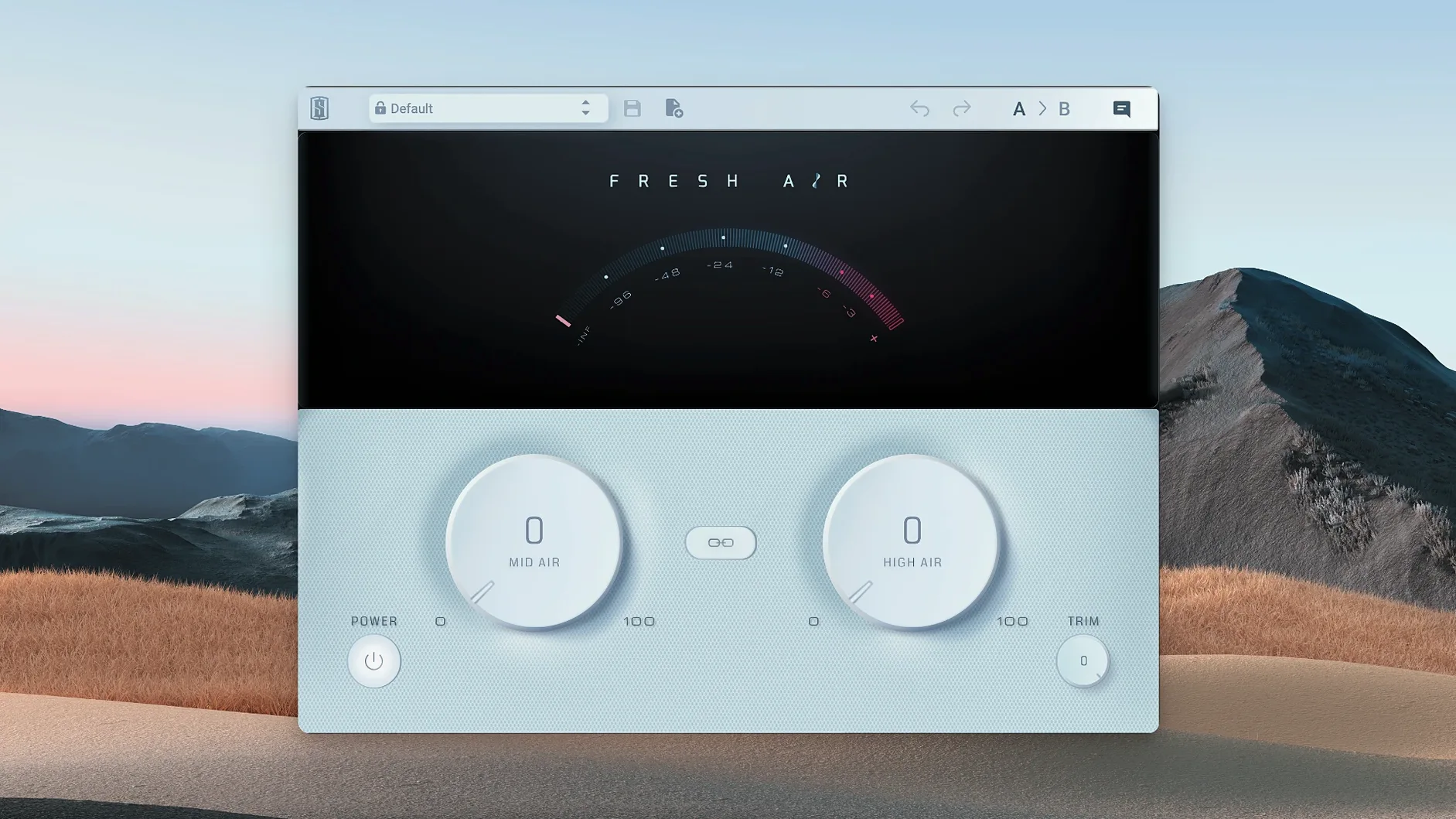
Fresh Air stays at version 1.0.9. No changes this release—just the same straightforward high‑frequency processing that slots into a Mac producer's toolkit without fuss.
| Quick facts | |
|---|---|
| Developer | Slate Digital |
| Version | 1.0.9 |
| macOS | macOS 11 or later |
| Architecture | Apple Silicon |
Two knobs. Mid Air lifts upper‑mid presence on a vocal that sits behind the mix. Air opens the top end of a dull drum bus or a finished master—brightness that doesn't bite. A Trim control keeps output level in check after the boost. It works where your channel EQ stops: adding sheen without phasey artifacts or the scratchiness a stock exciter can bring. On a Mac running Logic or Ableton, it's a fast fix for tracks that need to breathe.
First days with Fresh Air — a practical checklist
Install, activate, then open it on a session you know well. Don't audition it in solo. The plugin sounds different in context, and solo mode exaggerates the high end in ways a full mix won't.
- Start with the master bus. Set Mid Air to 10, Air to 8. Bypass, listen, repeat. Your ears need a reference point before you touch individual tracks.
- Try it on one vocal first. Mid Air around 15–20 often pulls a buried lead vocal forward. Air above 12 can get sibilant—back it off if the esses sharpen.
- Check gain staging. Both knobs add level. Use Trim to match output against bypassed volume. A perceived loudness boost isn't a better sound.
- A/B with no other inserts active. Isolate what Fresh Air actually contributes before you stack a compressor or EQ after it.
- Save two presets. One for "vocal air", one for "master sheen". Dial them modestly. You'll tweak per session, but a starting point saves minutes.
Mid Air past 30 brittle on a full mix
Most missteps come from turning the knobs too far. The interface is simple, so users assume the full range is useable. It rarely is.
- Mid Air above 30 on a full mix. Pushes upper mids into harsh territory—cymbals get brittle, vocals turn nasal. Stay under 20 unless you're rescuing a very dark recording.
- Air dimed on a master bus. Over 15 usually adds a hyped sheen that collapses on smaller speakers. Check translation on a phone or laptop before committing.
- Forgetting the Trim knob. More Air equals more level. Louder always sounds better in a quick comparison. Match volumes or the decision is meaningless.
- Stacking it on every track. Air builds up across a mix. Use it on two or three key elements—lead vocal, overheads, maybe the stereo bus—and leave the rest alone.
- Placing it before dynamic EQ or de-essing. Fresh Air excites the highs; let a de-esser catch any spikes after it, not before.
Daily use impressions — speed, stability, resource draw
Fresh Air loads instantly on Apple Silicon Macs. No splash screen, no authorisation delay after the first activation. On a Mac Mini M1 running Logic Pro, a single instance adds negligible CPU—less than 1% on the meter even at 96 kHz. Twenty instances across a dense session barely nudge the performance monitor. That's rare for a Slate Digital processor; many of their emulations run heavier.
Stability is uneventful in a good way. No crashes observed when inserting, removing, or bypassing during playback. Automation reads smoothly—knob movements don't click or zipper. The GUI is static at version 1.0.9, no animation quirks, no resizing glitches on Retina displays. It just sits there and works.
Latency is effectively zero. No oversampling mode to toggle, no lookahead buffer to worry about. You can track through it if you want, though most engineers insert it at mix stage. On a MacBook Air M2, the plugin survives sleep/wake cycles without dropping its authorisation state—something not every iLok-protected plugin manages.
If you've searched for a fresh air plugin free download mac you've probably seen how many exciters add phase smear or a brittle top end. This one doesn't. That's the real difference after weeks of use: you stop thinking about the plugin and just turn the knobs until the track breathes.
- macOS 11 or later
- Apple Silicon
Questions the team asks
Fresh Air is a dynamic high‑frequency processor that adds brightness and air to audio without introducing harshness or unwanted artifacts. It works on individual tracks like vocals and drums, as well as full mixes.
It has two main controls: Mid Air for upper‑mid presence, and Air for top‑end sheen. A Trim knob adjusts the output level after processing.




Comments 0
Sign in or create an account to add a comment.
No comments yet. They go up after moderation.