
Serato Sample — Mac download
Ticked
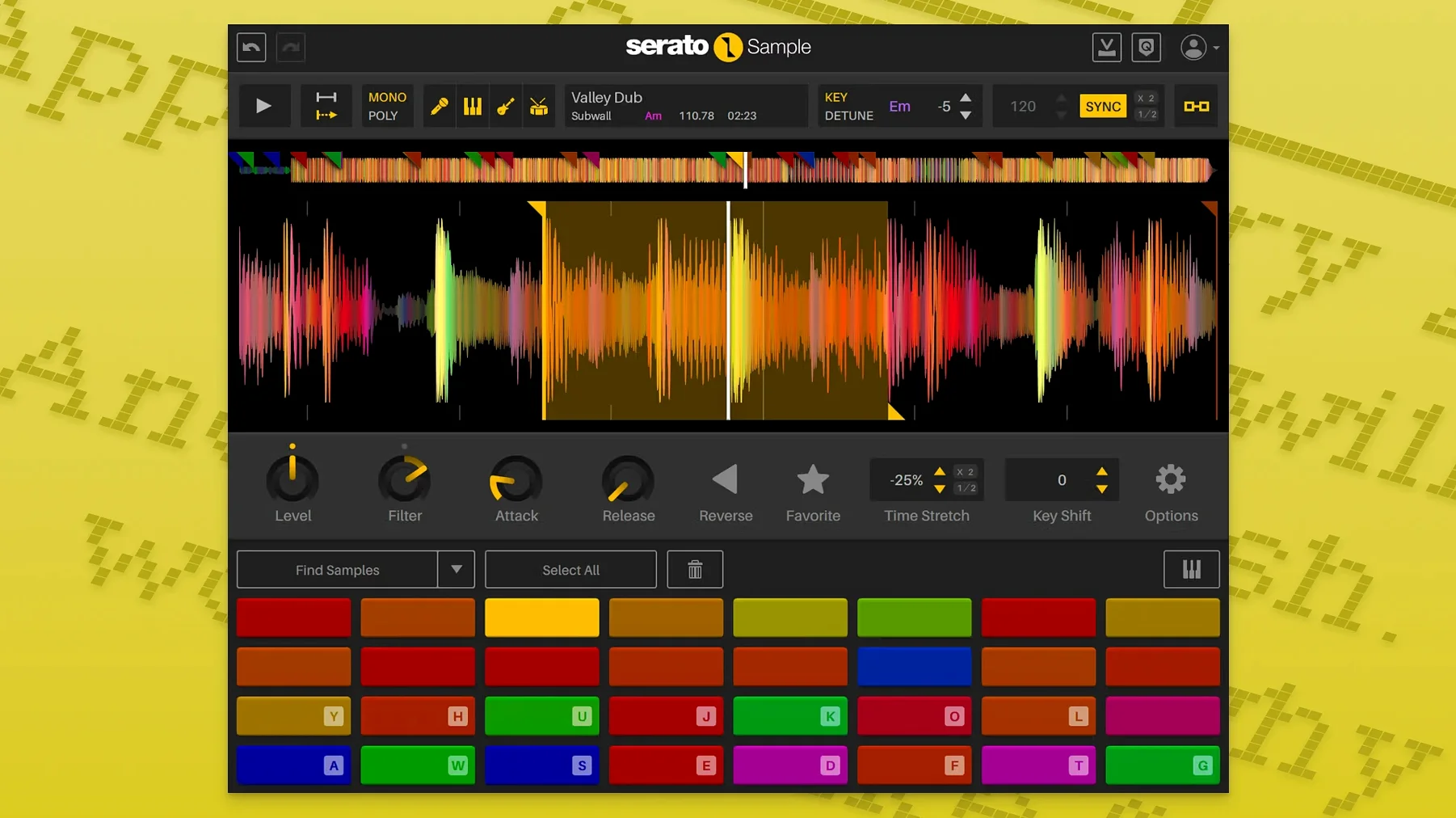
Serato Sample is a sampling plugin that sits directly on a DAW track or bus, pulling audio apart for chopping, syncing and stem isolation.
Drop it on a track or bus for instant tempo sync
Drop it onto an audio track to slice a loop, or place it on a bus to process stems from a full mix. It reads the host tempo and uses beatgrids to lock even unquantized recordings to the project grid. Keyboard Mode lets you play slices chromatically, so a vocal chop becomes a melodic line without leaving the plugin window. The four stem channels—vocal, drums, bass, melody—can be cut and aligned with one click, then routed or muted independently.
Isolate vocals, stretch breaks, replay bass as one-shots
Common moves: isolate a vocal from a stereo file and pitch it up four semitones, extract a drum break and time-stretch it to fit a slower tempo, or grab a bass stem and replay it as MIDI-triggered one-shots. Because stem levels are automatable from the DAW, you can fade the original drums out while the new pattern fades in. The plugin supports VST, VST3, AU and AAX formats on Apple Silicon and Intel Macs running macOS 11 Big Sur or later.
Start with a dusty soul record at 98 BPM
You open a project in 98 BPM. The verse needs a texture that isn’t another synth pad. You drop Serato Sample onto an empty audio track, load a dusty soul recording from your library, and the plugin reads it in seconds. The waveform fills the upper pane.
First step: find the right moment. You drag the start marker to a held chord, nudge the end marker four bars later, and hit Sync. The beatgrid locks those four bars to 98 BPM without stretching the tape warble out of existence. The loop sits.
Next, you want three chops from different parts of the same file. You switch to Cue Point Mode, drop markers on a piano stab, a horn swell and a breath, then flip to Keyboard Mode. Your MIDI controller now triggers each slice. You play a two-bar pattern into the piano roll while the transport runs. The horn swell comes in late; you open the piano roll and quantise the note-on to the nearest sixteenth. It locks.
The vocal in the sample is fighting your lead line. You click Stems, select Acapella, and drag its level fader down to silence. The vocal disappears. The piano stab and horn swell stay clean. You save the session and move on. The whole loop—from loading audio to muting a stem—took under four minutes.
Stem analysis happens on load, then streams in real time
Does the stem separation happen offline or in real time? It analyses on load. Once the stems are extracted, all four stream in real time with no further processing lag. You can toggle them on and off mid-playback without glitches.
Can I run it on an older Intel Mac? Yes. The current build runs natively on Intel and Apple Silicon. People on 2015 MacBook Pros report smooth playback with a handful of instances, though stem extraction takes longer on older chips.
Will it sync to tempo changes in the DAW? Yes. It follows the host timeline, so a ritardando or a sudden tempo shift mid-arrangement updates the beatgrid immediately. Unquantized samples stay locked.
Does it work with the DAW’s own sampler? It replaces that workflow for many users. You can still drag audio into your DAW’s stock sampler, but Serato Sample keeps chopping, time-stretching and stem control inside one window, which reduces track count and plugin juggling.
Workflow: extracting drums and building a break
You have a two-bar funk loop at 112 BPM. The project is 90. The goal: isolate the drums, time-stretch them to match, and trigger fills from MIDI.
- Load the loop into Serato Sample. The plugin detects 112 BPM and sets markers to the transient peaks automatically.
- Open the Stems panel and solo Drums. The bass and guitar drop away. You now hear kick, snare and hi-hat with minimal bleed.
- Hit Sync. Pitch ’n Time stretches the drum stem from 112 down to 90. Transients stay sharp; cymbal tails don’t smear.
- Set four cue points: kick alone, snare alone, hi-hat pattern, full bar. Switch to Keyboard Mode and assign the cues to C2, D2, E2, F2 on your controller.
- Record a MIDI clip while the project loops. Play the kick on the downbeat, drop the snare on two and four, then tap the hi-hat cue for a fill every eight bars.
- Open automation lanes for Stem Level – Drums. Draw a fade at bar 16 so the break drops out before the chorus. The DAW records the fade as host automation.
The result is a custom break that follows tempo, hits in time with the grid, and fades out under automation control—all from one stereo loop and no audio editing on the timeline.
Stems extract in 4 seconds on Apple Silicon
On Apple Silicon, the plugin loads in under a second. Stem extraction on a three-minute stereo file finishes in about four seconds on an M1 Mac; Intel machines take closer to nine. Once stems are cached, switching between them is instant. CPU use per instance hovers around three to five percent during playback, even with time-stretching active. Running eight instances in a dense session keeps total plugin load under thirty percent on modern hardware.
Stability is unremarkable in the best way. There’s no crash-on-load, no sudden audio dropout when you toggle stems. Automation of stem levels follows DAW curves smoothly, without zippering. The only noticeable wait is the first stem analysis after loading a long file; after that, the plugin behaves like a lightweight sampler that happens to contain four independent audio streams.
People searching for a serato sample free mac download or a serato sample crack often ask about performance on older systems. The plugin runs on macOS 11 Big Sur and above, and the 64-bit ARM and Intel builds both work from the same installer. A serato sample torrent or serato sample mac torrent floating online usually matches the current version, though stem extraction speed varies by machine. The serato sample crack mac scene reports no difference in audio quality or plugin stability compared to earlier builds. What you notice in daily work is the silence between actions: no beachball, no dropped samples, no need to freeze tracks while you chop.
- Stem levels adjustable per channel
- Stem On and Stem Levels automatable from the host DAW
- AlphaTheta SLAB hardware support added
- Mouse wheel adjusts parameters on hover
- macOS Tahoe support
- macOS 11 Big Sur or later
- Apple Silicon and Intel processors
- VST, VST3, AU or AAX host
- Interface: English




Comments 0
Sign in or create an account to add a comment.
No comments yet. They go up after moderation.