

Scaler 3 — Mac download
Download (1.4 GB) Earlier builds
Ticked
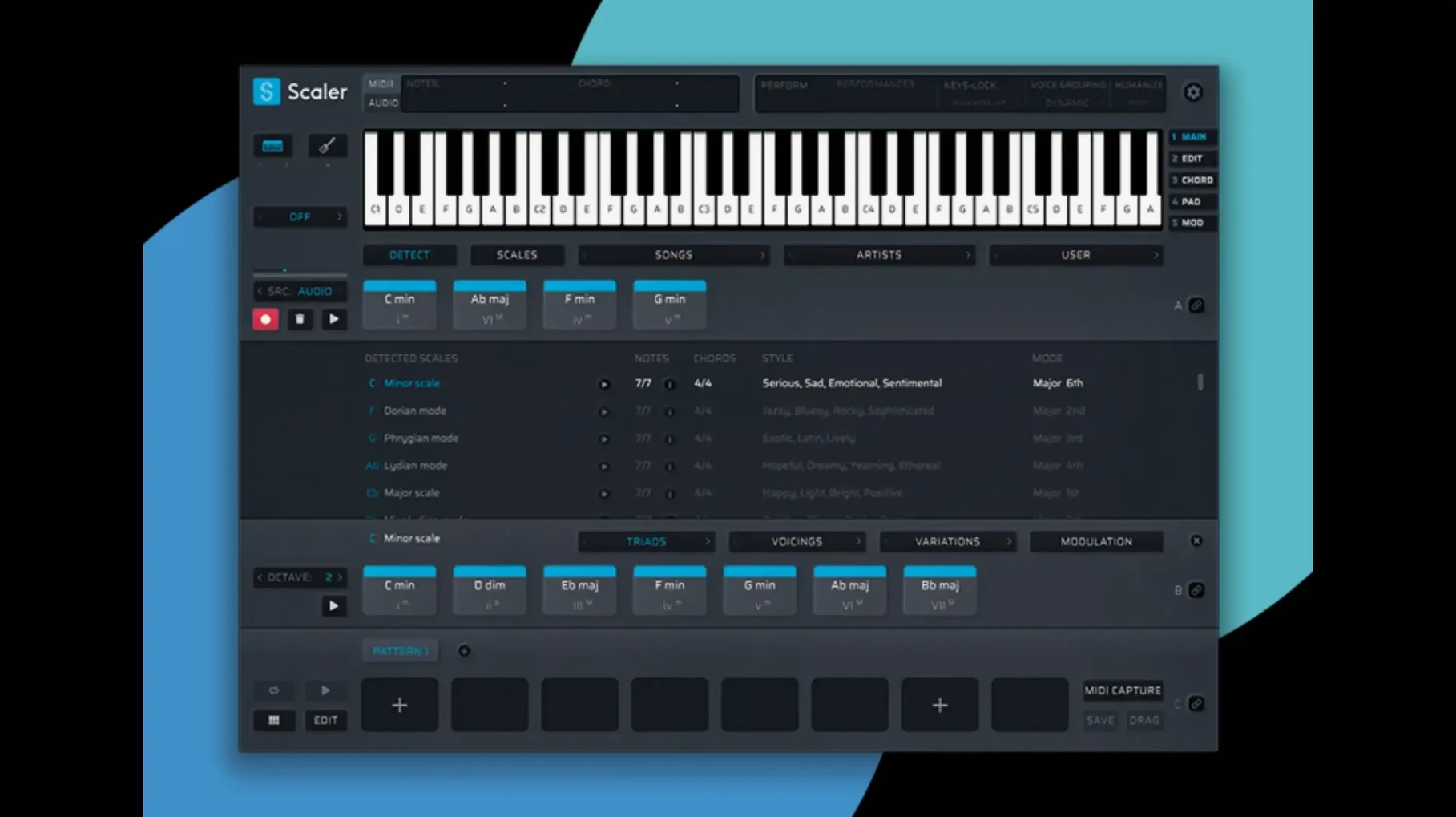
Staring at a blank piano roll with no harmonic direction eats up studio time. Scaler 3 puts a full music theory workstation inside your DAW to get ideas moving. Here is one realistic path through it.
You open the standalone app or plugin, pick a key, and browse the artist and genre presets. One click on a suggested chord slots it into the Multi-Lane Timeline. You add a bass lane, let it follow the root notes, then drop a melody lane on top. The MIDI Editor lets you tweak voicings and timing. When the progression feels right, you drag the exported MIDI straight into your DAW. Version 3.3.2 crops any empty silence from the start of the sequence automatically.
Name the feeling, not the chord
- Producers who know the sound they want but not the chord names
- Quickly building bass and melody lines from chord progressions
- Exporting clean MIDI without leading silence
English interface, no effects processing
- Interface is in English only
- macOS 10.15 or later required; 64-bit only
- It is a composition tool, not a multi-effect processor
One producer, one session
A lo-fi beatmaker has a drum loop and a sample that suggests a minor mood. She loads Scaler 3 as an AU plugin, sets the key to G minor, and scans the Artist tab. A Robert Glasper preset catches her ear. She drops three chords into the timeline, then adds a melody lane with the generated-phrase picker. Within four minutes she has a harmonic bed that fits the sample perfectly. She drags the MIDI to her DAW, crops the start automatically thanks to version 3.3.2, and starts chopping the result into her sampler.
Scaler 3 vs. the alternatives
Scaler 3 vs. Captain Chords
Captain Chords helps you build progressions fast, but it stays inside its own ecosystem. Scaler 3 works as a standalone app and a plugin that hosts other instruments. That means you can audition chords through your own synth patches without leaving the tool. The genre and artist preset library in Scaler 3 is also deeper for modern electronic and hip-hop styles.
Scaler 3 vs. Orb Composer
Orb Composer leans into generative composition with a block-based structure. Scaler 3 gives you more direct control over individual lanes for chords, bass, melody, and phrases. The Multi-Lane Timeline feels closer to a DAW, which suits producers who want sequence-level editing rather than auto-arranging. Scaler 3 also imports and exports MIDI with fewer steps.
Workflow: from blank session to arranged MIDI in four steps
- Choose your key and scale. Open Scaler 3, set C major or any key. The chord palette updates instantly.
- Browse and build. Click through genre presets or artist suggestions. Drag chords into the Multi-Lane Timeline in the order you want them to play.
- Add supporting lanes. Enable a bass lane and let Multi-Bind lock it to chord roots. Add a melody lane and pick a generated phrase that fits the rhythm of your track. Tweak notes in the MIDI Editor — version 3.3.2 fixes the display so every note lands where you expect.
- Export and arrange. Drag the exported MIDI clip into your DAW. The new auto-crop in 3.3.2 removes any blank space at the beginning, so the clip starts exactly on the first note.
- Fixed MIDI Editor display issues that could cause missing notes, incorrect chord representations, and unwanted blank space before chords.
- Exported MIDI now automatically crops empty space at the start of the sequence.
- macOS 10.15 or later
- Apple Silicon or Intel 64-bit processor
- 64-bit host or standalone operation
Questions the team asks
Yes. Scaler 3 supports both ARM and 64-bit x86 architectures on macOS.
It resolved MIDI Editor display bugs that caused missing notes, incorrect chord representations, and unwanted blank space before chords.

Comments 0
Sign in or create an account to add a comment.
No comments yet. They go up after moderation.