

Revoice Pro — Mac download
Ticked
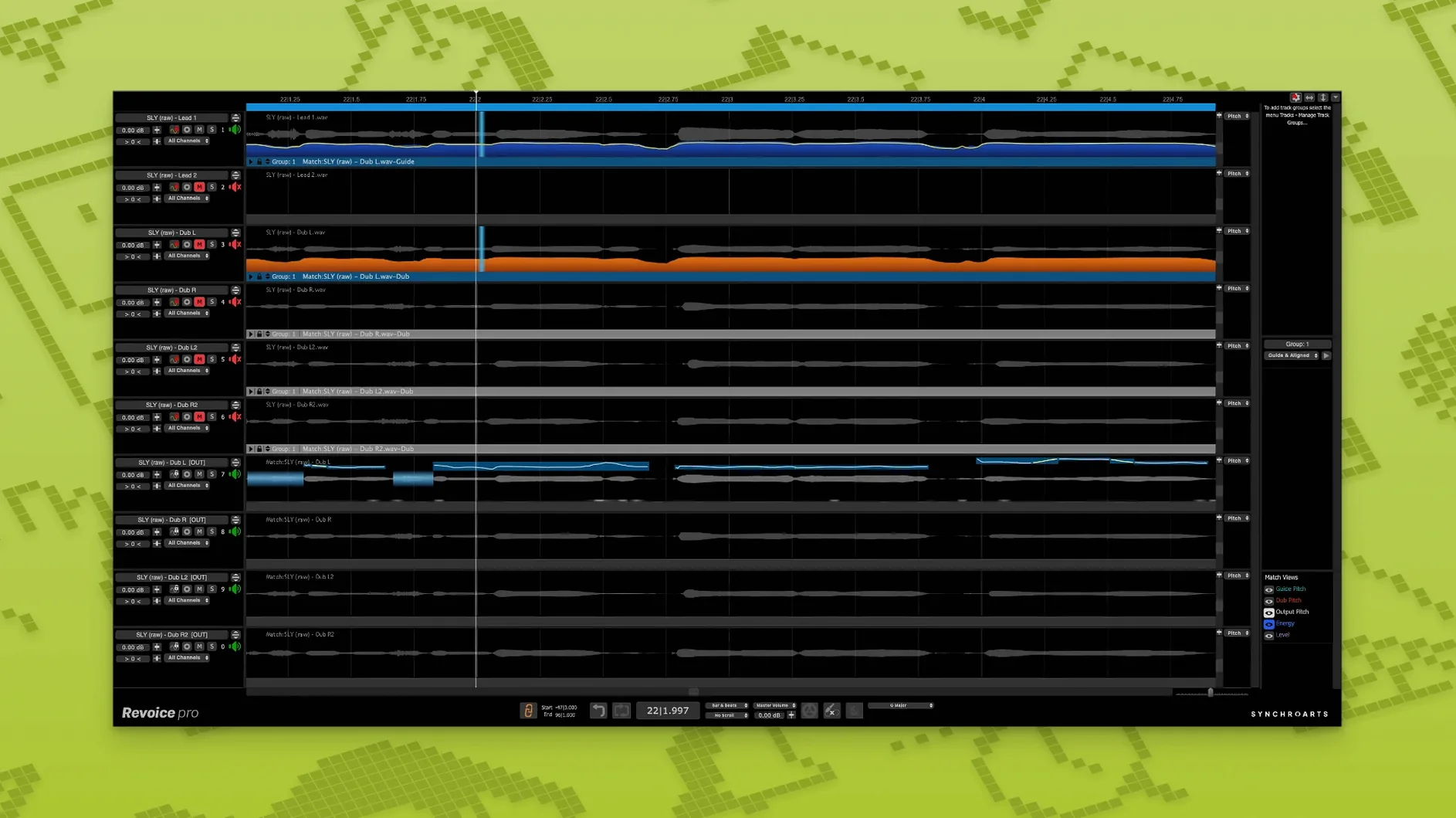
Mismatched double-tracking and loose harmonies eat up a session. Revoice Pro solves that by treating time, pitch, and loudness as three signals you can shape independently.
- SmartAlign — snaps doubles and stacks to the guide track, even when takes start or end at wildly different points on the timeline.
- SmartPitch — matches the pitch contour of a guide performance onto doubles or harmony parts, keeping the natural movement intact.
- Shaper Tool — adjusts pitch directly with a fast, visual workflow for quick corrections or creative warping.
- Three-signal processing — time, pitch, and loudness are extracted and edited separately, so tightening timing doesn't flatten the performance.
- Monophonic focus — built for voice and monophonic instruments; the algorithms assume one note at a time and deliver cleaner results for it.
The plug-in loads as AU, VST3, or AAX 64-bit on any Mac running macOS 10.14 or newer, with native support for both Intel and Apple Silicon processors.
Pull APT range to 50 ms for faster doubles
- APT default range — open Preferences > APT and pull the default time range down to 50 ms. The factory 200 ms setting is safe but sluggish for tight doubles. 50 ms forces faster decisions; adjust per track if the algorithm fights a loose performance.
- Pitch detection type — switch from Standard to Low Latency only when tracking in real time. For offline processing, Standard gives cleaner pitch curves on sibilants and breathy tails. The difference is small but audible on stacked harmonies.
- SmartAlign protection — enable Protect Formants before aligning doubled vocals. Without it, aggressive time-stretching can thin out vowel resonances on long held notes.
- Output routing — set the Capture output to a dedicated bus, not your monitor path. This keeps processed doubles out of the live headphone feed during recording, avoiding a confusing slap-back feel for the vocalist.
Scenario: a mixing engineer tidying a stacked chorus
A mix engineer receives a 24-track project. The chorus has eight unison vocal layers, recorded across two sessions with different mic positions. Some layers drift by as much as 80 ms against the lead; others waver in pitch on sustained words. The deadline is tight, and manual editing would take hours.
She loads the lead vocal into Revoice Pro as the guide, then captures all eight doubles. SmartAlign syncs the timing in one pass, pulling stray consonants into place without slicing transients. She switches to SmartPitch, sets the strength to 75%, and processes the doubles again — enough to lock pitch movement to the guide while preserving each singer's slight timbral differences. Within twenty minutes the chorus sounds tight and intentional, not phasey or smeared. The engineer exports the aligned tracks and moves on to the verses.
Solo the keeper vocal and insert as AU
- Open the DAW session. Identify the lead vocal take — the one that feels right for timing and pitch — and solo it for a quick listen to confirm it's the keeper.
- Insert Revoice Pro as an AU plug-in on the lead track. Route the first double into a second instance on its own track. Hit Capture on both, playing the full chorus section.
- Open the Revoice Pro stand-alone window. Drag the guide capture onto the upper lane, the double onto the lower lane. Select SmartAlign from the process menu and click Process. Watch the waveform snap into alignment — the visual display shows exactly how far each phrase shifted.
- Audition the aligned double against the guide. Flip between the two in mono to check for phase issues. On the second verse, a long "oh" vowel still wavers. Select that region and apply SmartPitch at 60% strength, just enough to follow the guide's pitch curve without sounding robotic.
- For the bridge, the producer wants a subtle artificial double. Capture the lead again, then use the Shaper Tool to nudge pitch up by 8 cents and delay timing by 15 ms. Process the whole phrase and listen back — the result is a wide, natural-feeling spread that doesn't read as a chorus effect.
- Spot-check sibilants. One "s" on the aligned double sounds smeared. Bypass Revoice Pro's processing for that single transient by trimming the capture region, then crossfade the original sibilant back in from the raw track.
- Export the finished doubles as new audio files. Label them clearly and drop them back into the DAW, panned wide and tucked 6 dB below the lead. The chorus now locks together without feeling stiff.
Revoice Pro 5 crack and Revoice Pro torrent searches sometimes surface while engineers hunt for faster workflows, but the plug-in's own batch capture and process queue already cuts repetitive alignment work to a few clicks. The time saving is in the tool itself — once SmartAlign and SmartPitch are set, a full verse of doubles processes in under fifteen seconds on Apple Silicon.
- Shaper Tool added for direct pitch adjustment on the waveform.
- SmartPitch matches pitch of doubles and harmonies to the guide.
- SmartAlign synchronises takes with different start or end positions.
- macOS 10.14 or higher
- Intel or Apple Silicon processor (ARM and x86 64-bit)
- AU, VST3, or AAX 64-bit host
Questions the team asks
It runs as AU, VST3, and AAX 64-bit inside compatible DAWs on macOS 10.14 or higher.
Yes. SmartAlign synchronises tracks to the guide part regardless of where each take begins or ends on the timeline.
It is designed primarily for voice and monophonic instruments, where its time and pitch processing works best.






Comments 0
Sign in or create an account to add a comment.
No comments yet. They go up after moderation.