

Swinsian — Mac download
Download (24 MB) Earlier builds
Ticked
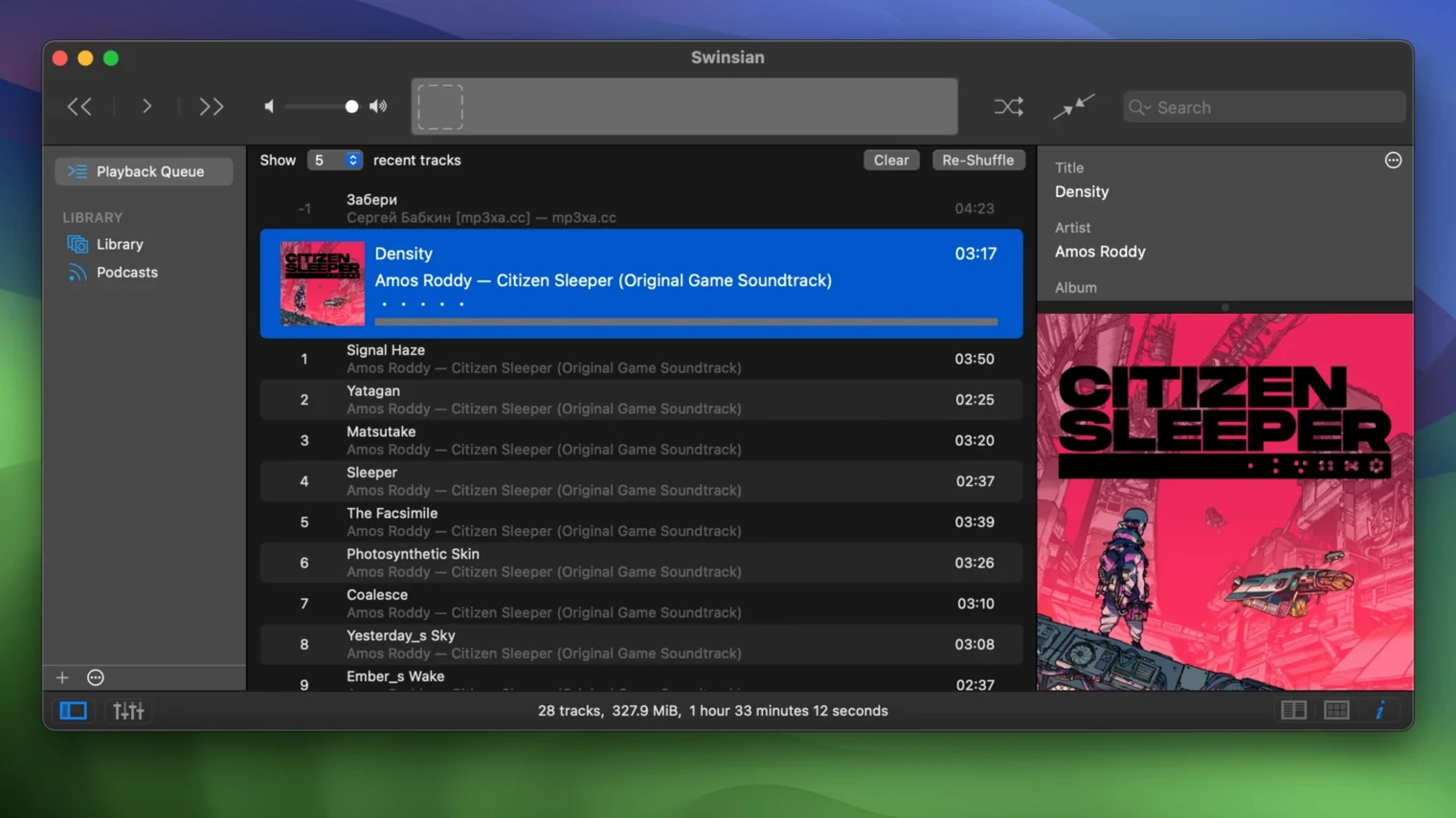
Folder watching, from setup to sorted
- Point Swinsian at a downloads folder. It picks up new FLAC, MP3, AAC, ALAC, Ogg Vorbis, WMA, WAV, Opus, AC3, AIFF, MusePack, DSF and APE files without a manual import.
- Open the tag editor on a messy batch. Fix artist, album and track numbers across multiple files at once.
- Check the art grid. Version 3.0.8 adds more label options, so you can show bit depth or sample rate at a glance.
- Switch the equalizer to 31-band and tame a boomy rip, or leave it at 10-band for quick tone shaping.
- Move the cleaned-up folder into your main library. Swinsian stays responsive with large collections.
Playback notifications confirm each step without pulling focus. If your library lives outside Apple Music, Swinsian keeps folder watching and tag work in one place — no separate tagger needed.
Drop a new album into a folder instead of adding to library
Does Swinsian replace Music.app entirely? It can. Import your existing iTunes library on first launch and Swinsian reads the same files. Folder watching means you never need to "add to library" again — just drop a new album into the watched folder.
Will a 200 GB FLAC collection choke it? No. The app was built to stay responsive with large libraries. Smart playlists, regex search and duplicate detection work across tens of thousands of tracks without beachballing.
Can I still use AirPlay? Yes. Swinsian sends audio to AirPlay devices directly. It also handles automatic sample-rate switching, so your DAC gets the right signal without manual adjustment.
What about cue sheets? Supported. Swinsian reads both external cue sheets and embedded cue metadata. A single FLAC with a full album rip splits into playable tracks inside the player.
Comparison with other Mac players
Swinsian vs. Vox
Vox leans on streaming integration and a minimal interface. Swinsian skips streaming and doubles down on local library management. If you edit tags with regex, run smart playlists on custom fields, or rely on folder watching, Swinsian covers ground Vox leaves untouched. Vox handles hi-res playback well, but Swinsian adds cue sheet support and automatic sample-rate changes for external DACs.
Swinsian vs. Fidelia
Fidelia makes a strong first impression with its brushed-metal looks and focus on headphone listening. Swinsian does not try to be beautiful; it tries to be fast. Where Fidelia handles a few thousand tracks comfortably, Swinsian stays responsive with libraries ten times that size. Fidelia lacks folder watching and regex tag editing entirely — two features that make Swinsian feel like a power tool rather than a playback appliance.
Swinsian vs. Colibri
Colibri aims for simplicity: a single-window player with native macOS styling and basic library features. Swinsian offers separate playlist windows, Last.fm scrobbling, podcast downloads and AppleScript control. If your goal is double-clicking an album and pressing play, Colibri works. If you manipulate tags in bulk, maintain multiple playlist views and want global keyboard shortcuts from any workspace, Swinsian fits better.
Your first two days
- Set up two watched folders: one for incoming downloads, one for your finished library. That separation keeps half-tagged files from mixing into smart playlists.
- Run the duplicate-track detector early. Large collections hide doubles in different formats. Swinsian finds them before they clutter an iPod playlist.
- Customise the art grid labels. Version 3.0.8 lets you show bit depth, sample rate, or codec right on the album thumbnails — useful when you maintain FLAC and AAC versions of the same record.
- Enable global keyboard shortcuts for play, pause and rating. You rate tracks as you work, and smart playlists build themselves from those ratings later.
- Check the Complete Tags window on a small test batch. Fixing sorting quirks there, improved in 3.0.8, saves time before you tackle the whole library.
- macOS 10.13 or later
- Apple Silicon or Intel 64-bit Mac
Questions the team asks
Yes, Swinsian can import an iTunes library, which helps when moving a large collection into a standalone player.







Comments 0
Sign in or create an account to add a comment.
No comments yet. They go up after moderation.