

Adobe Dimension — Mac download
Download (3.5 GB) Earlier builds
Ticked
Which Macs run Adobe Dimension?
Adobe Dimension 4.1.7 requires an Intel Mac and macOS 11 (Big Sur) or later. Apple Silicon machines run it through Rosetta 2; native support is not yet available.
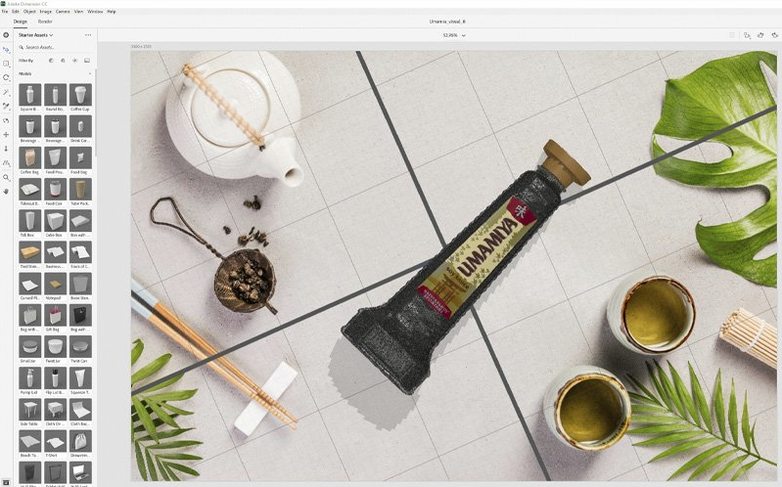
Drag label art onto a bottle and watch the lighting adapt instantly
You start with a blank scene, drop in a bottle model from Adobe Stock, and drag your label artwork onto its surface. Dimension matches the perspective and lighting in real time. Adjust the camera angle, pick a background, and hit Render. The whole thing stays inside one app—no round-tripping to a separate renderer.
Send layered masks to Photoshop for highlight and shadow edits
Export the final image or send the scene layers straight to Adobe Photoshop CC. You get separate material and object masks for fine-tuning highlights, shadows, and colour grading without rebuilding anything.
Who finds it useful?
Packaging designers, brand teams, and anyone who needs client-ready product visuals but doesn’t work in full 3D software. The interface is built for people with no 3D background.
Alt-drag duplicates a model with all materials intact
- Hold Alt while dragging to duplicate. Select a model, hold the key, drag—instant copy with all materials intact. Faster than copy-paste when you're building shelf lineups.
- Match Image works in two clicks. Drop a photo into the background slot, then choose Camera > Match Image. Dimension guesses the focal length and light direction. You tweak, not start from scratch.
- Cmd+Shift+G groups selected objects. Handy once you have more than five items in a scene. Grouped models move and scale together.
- Right-click a material slot and pick 'Select all objects using this material.' One change updates every can, bottle, or box that shares the finish. No hunting through the scene tree.
Jagged viewport previews are not your final render
Models look jagged in the viewport. That's the preview renderer, not the final output. Switch to Ray Trace mode (Render > Preview Mode > Ray Trace) for a closer match to what the final render will deliver. Bear in mind it slows the viewport on older Intel Macs.
Artwork on a curved surface stretches at the edges. Dimension applies decals as planar projections by default. Select the graphic layer, switch the placement mode to Cylindrical or Spherical in the Properties panel, and the distortion straightens out.
Renders come out darker than expected. Check the Environment Light intensity. The default HDRI sometimes sits at 50%. Bump it to 80–100% or add a distant light pointed at the product face. The difference is immediate.
Dimension won't open an older .dn file. Scenes saved in the CC 2018 era sometimes stall on import in 4.1.7. Create a fresh document, then use File > Import > Merge 3D Scene and point it at the stubborn file. It usually pulls in the geometry cleanly.
The app feels sluggish during material edits. Reduce the viewport resolution (View > Preview Quality > Low) while you rough out the scene. Crank it back to High only before the final render. On an Intel Mac, this buys you smoother scrubbing through material presets.
- Resolved security vulnerabilities in version 4.1.7.
- macOS: 11 (Big Sur) or later
- Architecture: Intel (Apple Silicon via Rosetta 2)
- Languages: English, German, Spanish, Italian, Simplified Chinese, Korean, Portuguese, French, Japanese
Questions the team asks
Yes. You can import standard 3D formats, or search Adobe Stock directly inside the app for models already optimised for Dimension.







Comments 0
Sign in or create an account to add a comment.
No comments yet. They go up after moderation.