

Neural DSP Archetype Petrucci — Mac download
Ticked
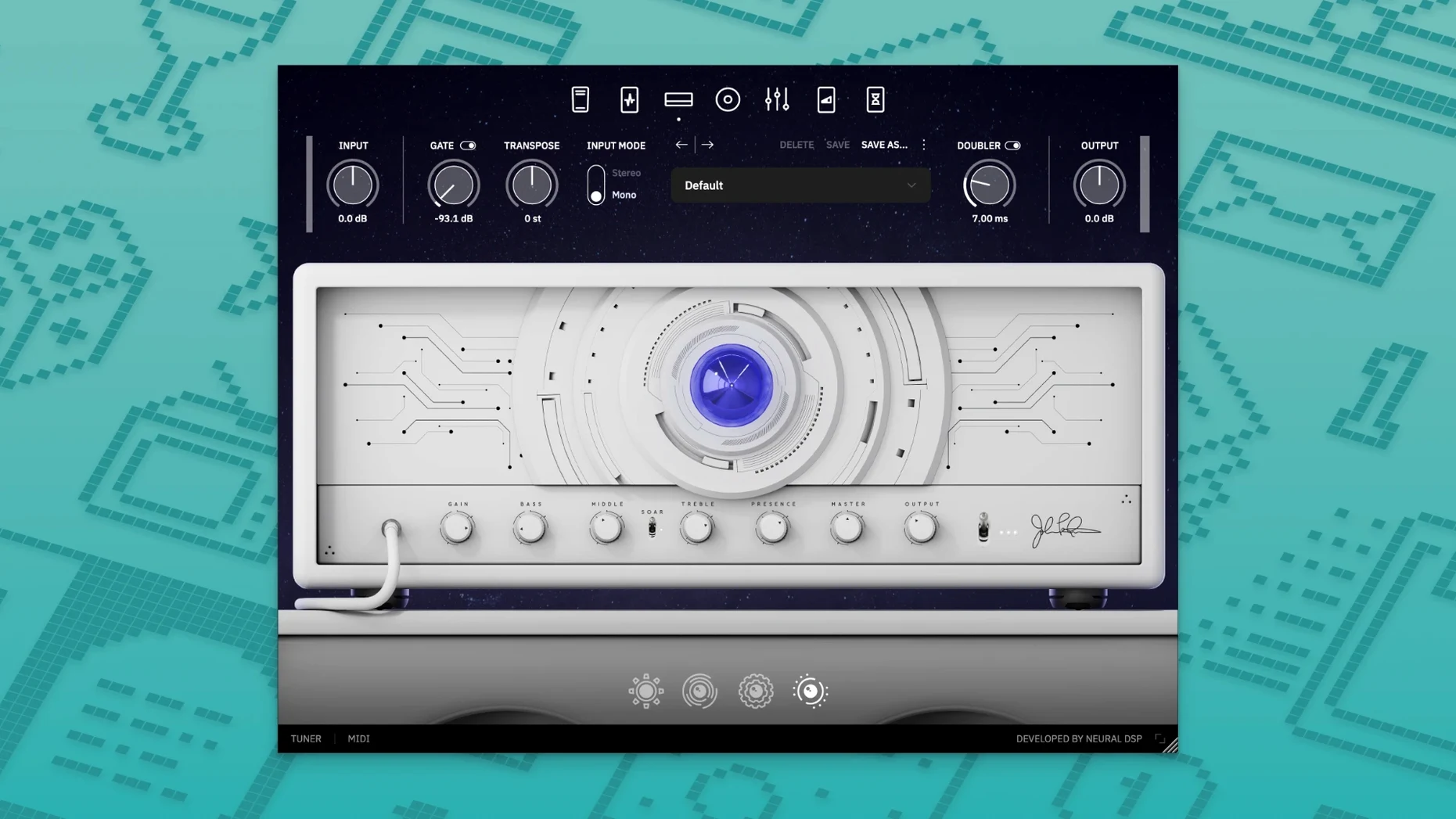
Archetype Petrucci is a guitar plugin shaped by John Petrucci's precise, powerful sound.
Which plug-in formats does it use
It runs in 64-bit VST2, VST3, AU, and AAX formats. A standalone version is also included.
What are the Mac requirements
You need macOS 10.15 or later. It has native Apple Silicon support, so M-series chips run it without Rosetta.
Quad Cortex hardware integration
Yes. The plugin is compatible with Quad Cortex and Quad Cortex mini hardware.
What does it sound like
Three things you notice the first time you load it
Version 1.0.0 is the launch release. There is no upgrade path from an earlier build to compare against. That means the experience now is the baseline.
In practice, three things stand out once you load it into a session:
- Silicon-native load times. On an M1 or M2 Mac, the plugin opens without translation overhead. AU validation in Logic Pro finishes in seconds, not minutes.
- Preset browsing feels snappy. Switching between the amp models and cab sims happens with no audible gap in Standalone mode. Inside a DAW, the lag is negligible.
- Quad Cortex behaviour is predictable. If you use the hardware, the plugin mirrors your block chain without fuss. Capture integration works the same way on day one.
Nothing in version 1.0.0 adds or removes features. It is a clean, stable starting point.
Tame the hot input meter and other defaults
Out of the box, the plugin loads a default preset that shows off the amp range. It is not neutral. A few quick tweaks make it easier to work with.
- Input gain trim. The input meter runs hot on active pickups. Drop the input gain by 3–4 dB before you dial in the amp tone. Your clean channel will thank you.
- Gate threshold. The noise gate is aggressive by default. Raise the threshold until it clamps only when you stop playing. Otherwise, sustained notes cut off too early.
- Cabinet mic mix. The stock cab blend leans heavily on a single ribbon mic. Pull the second mic fader up to about 40% for a wider stereo image without losing the centre focus.
- Reverb routing. The reverb sits after the cab by default. Move it to a parallel send in your DAW for more control over the tail. The plugin's internal routing cannot do this, but a dry/wet aux track gets the same result.
- Buffer size. In Standalone mode, the buffer defaults to 512 samples. For tracking, drop it to 128 or 64 samples if your interface can handle it. The native Silicon build keeps round-trip latency low.
One player covering clean arpeggios, tight rhythms, and a lead that cuts
Consider a session player who gets a call for a progressive metal track. The brief asks for clean arpeggios in the intro, a tight rhythm tone for double-tracked verses, and a lead sound that cuts through a busy mix.
They load the plugin on a MacBook Pro M1 Max. Three instances sit on separate tracks in Logic Pro. The first instance uses the clean amp model with the compressor block engaged and the reverb set to a short room. The second instance switches to the high-gain amp, with the overdrive pedal in front and the gate set tight. The third instance layers the same high-gain amp with a mid-boost EQ and a touch of delay.
They track the clean part in one pass with the buffer at 64 samples. No perceptible latency. For the rhythm parts, they double-track left and right using the same preset, panning hard. The gate keeps the chugs tight between palm mutes. The lead part gets a volume boost from the post-amp EQ block, so it sits above the rhythm tracks without touching the channel fader.
By the end of the session, they have printed six tracks. No re-amping needed. The producer keeps every DI for safety, but the tones are ready to mix as they are.
Fixing the most frequent support tickets
Plugin does not appear in the DAW
After a fresh install, some DAWs need a manual rescan. In Logic Pro, go to the Plug-in Manager and run a full Audio Unit rescan. In Ableton Live, hold Alt and click Rescan in Preferences. If the plugin still does not show, restart the Mac. The AU and VST3 components install to the standard system folders, but a reboot forces the cache to refresh.
Standalone mode has no sound
Open the Audio/MIDI Settings pane inside the Standalone app. Check that the output device matches your interface. The default often picks the built-in Mac speakers even when an interface is connected. Select the correct device, then test with the input meter visible.
High CPU usage in a session
The plugin is not light. Running four or more instances on an older Intel Mac can spike the CPU meter. Freeze tracks you are not actively editing. If you need to track with multiple instances live, bump the buffer to 256 or 512 samples and disable the reverb and delay blocks until mixdown.
Preset sounds different after a DAW restart
This usually happens when the plugin loads in a different sample-rate session than the one where you saved the preset. The cab block impulse responses do not always scale cleanly. Match the sample rate to the original session before you save your final preset. If you search for neural dsp for mac tips, most forum threads mention sample-rate mismatch as a common culprit.
The character is restrained and tightly tuned. It suits players who want a focused, high-clarity tone without excessive colour.
- Initial 1.0.0 release for Windows and macOS.
- macOS 10.15 or later
- 64-bit host
- Native Apple Silicon support
- Intel and Apple Silicon compatible
Questions the team asks
Version 1.0.0, released on 2024-11-21 for Windows and macOS.
Yes. The official page states it has native Apple Silicon support.





Comments 0
Sign in or create an account to add a comment.
No comments yet. They go up after moderation.