
Steinberg SpectraLayers Pro — Mac download
Download (3.9 GB) Earlier builds
Ticked
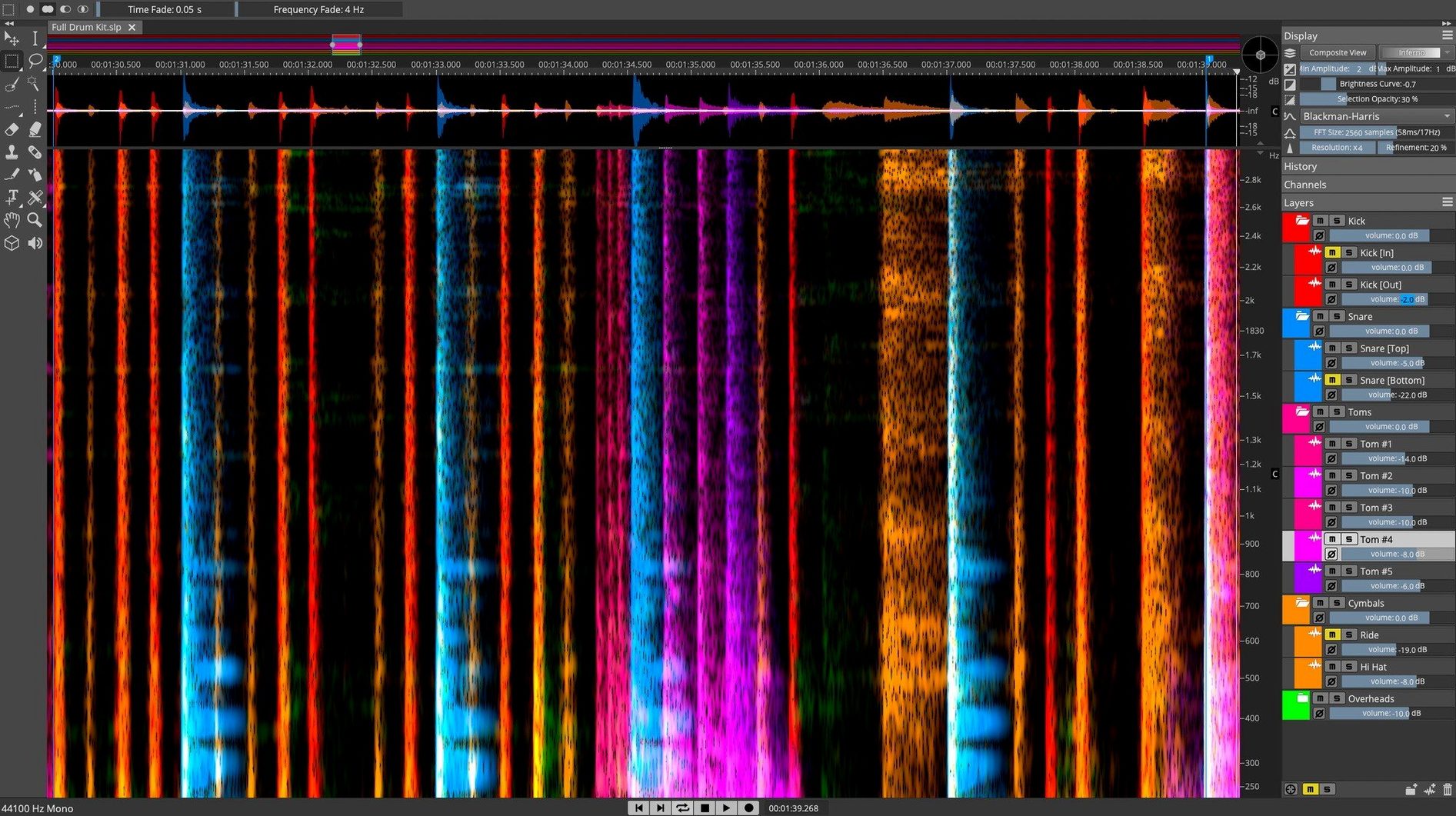
Over 70 spectral editing layers. SpectraLayers Pro 13 treats audio as a visual workspace—extract, repair, and reshape sound by interacting directly with its spectral data.
| Quick facts | |
|---|---|
| Version | 13.0.20 |
| Developer | Steinberg |
| macOS | 12 or later |
| Architecture | Intel and Apple Silicon |
Three jobs define this release. First, track-to-stems unmixing pulls vocals, drums, and instruments from a finished mix using trained AI models. Second, the Pattern Finder scans the spectrum to locate matching sound events for batch clean-up—handy for footsteps, clicks, or chair squeaks across a long recording. Third, the 3D visualisation maps amplitude over frequency and time, letting you grab and edit sound layers other editors cannot reach. ARA 2 support slots the engine directly into Cubase and Nuendo sessions without intermediate renders.
Unmix AI now isolates hard-panned instruments cleanly
Version 13 brought four workflow shifts that matter once the project clock is ticking.
- Unmix AI refinements. Stem separation now resolves transients more cleanly. A hard-panned guitar stays in its channel instead of bleeding into the centre vocal stem. Good when rebalancing a mix you did not track yourself.
- Pattern Finder speed. Mark one chair squeak, run the finder, and every occurrence populates the layers panel in seconds. Bulk silencing or extraction happens in one command instead of hunting each hit manually.
- 3D view responsiveness. Rotating a dense spectrogram used to stutter on longer files. v13 redraws fluidly on Apple Silicon, which makes selecting harmonics in a vertical stack much less frustrating.
- De-esser one-click mode. The new auto-de-esser maps sibilant zones across the file. You still tweak threshold and width, but the initial mask saves ten minutes of scribble-selection on a forty-minute voiceover.
ARA 2 integration also matured. Cubase and Nuendo now reflect layer edits instantly in the arrange window. No offline render, no overwritten source files until you commit.
Rescuing dialogue by lassoing hum in spectral view
Good for
- Post-production editors cleaning location dialogue. Spectral view turns background hum into something you can lasso and notch out without touching the voice underneath.
- Remix producers working from stereo mixes. Unmix AI gives usable stems for re-arranging, even when original multitracks are long gone.
- Sound designers building layered textures. Copy a spectral region—say, a metal resonance—and paste it onto another file to create hybrid timbres that EQ alone cannot shape.
- Mastering engineers chasing intermittent noise. Pattern Finder spots every click, thump, or mobile-phone chirp across a sixty-minute concert recording.
Not for
- Quick trim-and-fade jobs. The spectral workflow is overkill if you only need top-and-tail edits. A conventional wave editor is faster.
- Composers who work entirely in MIDI. SpectraLayers excels with recorded audio, not virtual-instrument programming.
Reduce separation strength to fix phasey-sounding stems
New users hit the same half-dozen bumps. Here are the fixes.
- Stem separation sounds phasey. The AI splits by energy, not by phase coherence. Reduce the separation strength slider before processing. For critical parts, separate into three stems (vocals, drums, other) rather than five. Fewer splits mean fewer artefacts.
- Pattern Finder returns too many false matches. Tighten the similarity threshold and limit the frequency range to the problem zone. A 60 Hz hum pattern should not scan above 200 Hz—widen the search and you collect unrelated low-mid content.
- 3D view lags on Intel Macs. Drop the visualisation resolution in Preferences. The spectral data stays full-quality; only the display decimates. Also close other OpenGL-heavy apps—SpectraLayers fights for GPU cycles.
- De-esser catches consonants it shouldn't. Lower the frequency ceiling from the default 12 kHz to roughly 8 kHz for male voices, 10 kHz for female voices. Then brush out any false positives with the eraser tool in the layers panel.
- ARA 2 edits vanish from Cubase. The DAW must be saved after the SpectraLayers session closes. If Cubase crashes before saving, the ARA state reverts. Force a save immediately on returning to the arrange window.
Cleaning a field recording from spectrogram to broadcast
You get a stereo field-recording: two minutes of interview audio with a low HVAC drone and occasional chair knocks. The brief says clean it for broadcast.
- Open the file. SpectraLayers draws the full spectrogram and an amplitude waveform side by side.
- Zoom into 100–200 Hz. The drone sits as a steady orange band. Select the Lasso tool, draw around the band across the first ten seconds, then run Pattern Finder. Every section of matching drone lights up in the layers list.
- Apply a -12 dB gain envelope to the drone layer across all matched regions. Play back. The room tone drops but the voice stays intact because you never touched the higher frequencies.
- Spot a chair knock around forty-five seconds in—visible as a short vertical spike from 80 Hz up to 2 kHz. Select it with the Time-Frequency selection tool, then use the Attenuate brush at 50% strength. Two passes, transient gone.
- Switch to 3D view to check sibilance. A ridge at 5–8 kHz shows where the speaker's 's' sounds spike. Run the auto-de-esser, listen to a few examples, then lower the threshold by 2 dB to catch a couple it missed.
- Send the cleaned file back to the DAW via ARA 2. The timeline updates without a bounce. Render the final clip and move on.
That whole session took under eight minutes. Before spectral editing, the same fix would mean iZotope modules, clip-by-clip fades, and a prayer that the noise profile held steady.
- Installer release notes available for version 13.0.20
- macOS 12 or later
- Intel or Apple Silicon Mac
Questions the team asks
Yes, it runs as a standalone editor and also integrates with DAWs via ARA 2, VST 3, and AU plug-in formats.
It is an AI process that separates a mixed stereo file into individual stem tracks—such as vocals, bass, percussion, and other instruments.
Steinberg Cubase and Nuendo support ARA 2, allowing SpectraLayers to operate as an extension inside the session without bouncing audio.



Comments 0
Sign in or create an account to add a comment.
No comments yet. They go up after moderation.