
Superior Drummer — Mac download
Download (625 MB) Earlier builds
Ticked
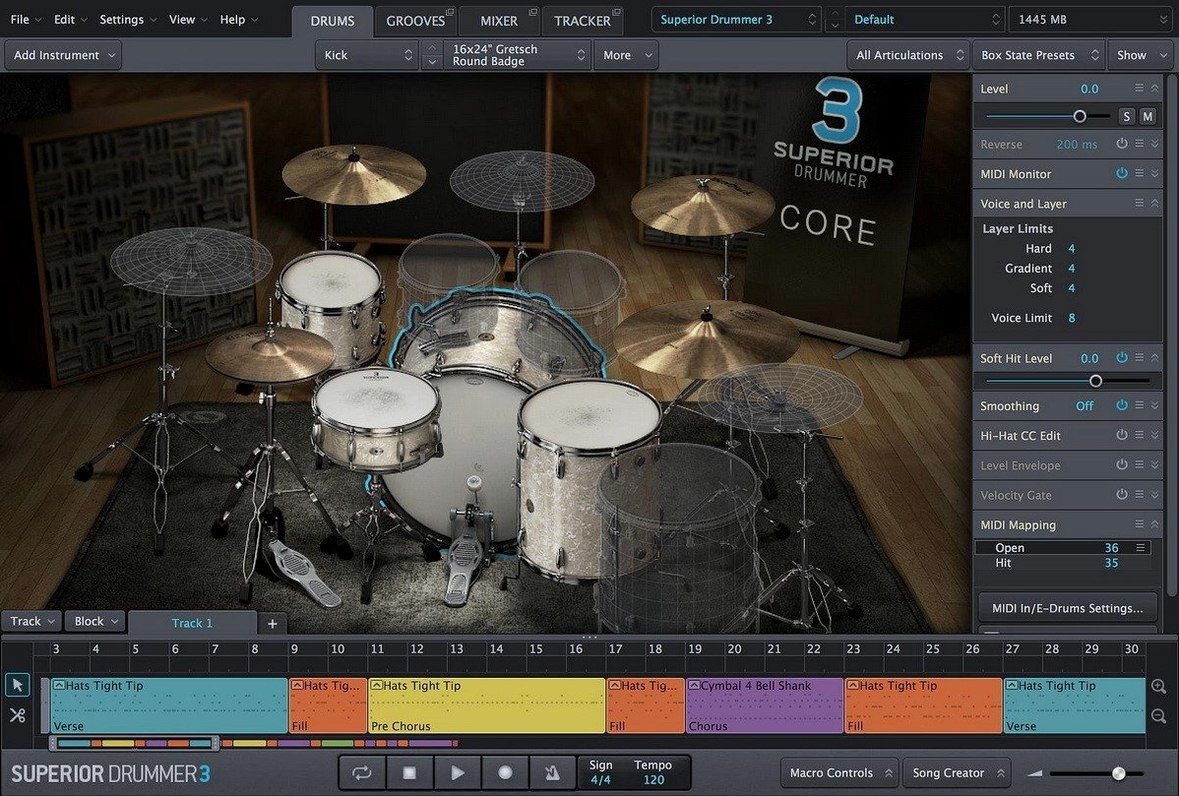
Superior Drummer 3 is a virtual drum studio for Mac, built to create drum sounds in a full production environment rather than just play loops.
| Key detail | Value |
|---|---|
| Current version | 3.4.4 |
| Developer | Toontrack |
| macOS | 10.13 or later |
| Interface | English |
New users should start with its seven included kits before buying anything extra. Load one, open the mixer, and audition the 35 built-in effects. Then test the MIDI side: drop in an acoustic drum recording and use the audio-to-MIDI conversion to trigger the virtual kit. That one workflow shows how the plugin bridges acoustic and electronic drum production. After that, check the download package contains a disk image and run the standard installer in sequence.
Right-click any fader to reset it
Superior Drummer 3 hides a few daily shortcuts that save real studio time. Most users find them by accident months in.
- Right-click any fader to reset it to zero. Works on the mixer, the mic bleed controls, and the effects rack. No tiny double-click targets.
- Option-drag a kit piece to copy all its processing. EQ, compression, sends — the whole channel strip moves to another drum in one gesture.
- Command-click multiple drums in the Construct window to edit mic assignments as a group. Set bleed levels for the whole kit in one pass instead of seven trips through the menus.
- The envelope follower in the Gate plugin tracks a sidechain source. Feed it the kick drum signal to tighten a bass-heavy room mic without drawing automation.
- Drag a MIDI groove onto the Song Track, then hold Shift while dragging the right edge to stretch it in time. No tempo-matching maths required.
What to check before you install
Native ARM support, no Rosetta needed
Yes. Version 3.4.4 includes native ARM support. The installer places both architectures, and the plugin host picks the right one automatically. Intel Macs get the x86 build, M-series Macs get the ARM build — same disk image, same install steps.
How much drive space does 230 GB really need?
The full library takes about 235 GB after installation. You can pick which kits and mic positions to install during setup. Bleed mics and surround channels are the biggest space-eaters; deselect those and a basic install lands under 80 GB. External SSDs work fine for the sample library if you point the Toontrack Product Manager to the right folder after installation.
SD2 and EZdrummer 2 libraries load natively
Superior Drummer 3 reads SD2 and EZdrummer 2 libraries natively. They appear in the browser alongside the factory content. No conversion, no import wizard — just point the library path and they show up.
Don't treat it like a preset machine
New users often treat Superior Drummer 3 like a preset machine. Load a kit, scroll through grooves, bounce. That skips half the engine.
- Ignoring the bleed controls. Every mic channel has a bleed section. Crank the snare bleed into the overheads and the stereo image widens noticeably. Leave them at factory zero and the kit sounds unnaturally clean.
- Using only the Close mics. The Ambience and Room faders shape the drum sound more than any EQ move. Mix with the full multi-mic balance, then tweak individual channels.
- Not setting velocity curves per pad. The MIDI mapping page has a velocity curve editor per trigger. An e-kit hi-hat that feels stiff is usually a curve problem, not a sample problem.
- Stacking effects in the wrong order. The insert slots run top to bottom. Putting a compressor before the gate on toms changes how the gate opens. Small routing habits that change the result.
- Converting audio to MIDI without cleaning the source first. A drum recording with heavy cymbal wash confuses the transient detection. Hi-pass the source track before conversion and the MIDI data lands tighter.
3.4.0 is now the minimum for new expansions
Version 3.4.4 is a maintenance release, but it arrives alongside a bigger under-the-hood shift. Toontrack stated that version 3.4.0 is required for any Superior Drummer 3 products launched from Q2 2025 onward. In practice, that means the sample browser and kit loader now expect a newer file structure. Older installs missing the 3.4.x update will not see new SDX packs in the browser.
The audio-to-MIDI detection feels slightly faster on M-series Macs since the ARM-native build arrived. No official numbers, but the hit-point analysis on a three-minute drum stem finishes in under ten seconds on a recent MacBook Pro. The grid editor also responds more cleanly when zooming into transient-level detail, something that lagged on older versions running through Rosetta.
One quiet improvement: the download package now uses a standard disk image with a straightforward step-by-step installer. No separate library installers, no manual plist edits. Run the sequence, point to the content location, and the plugin appears in your DAW.
- Version 3.4.4 is available.
- Version 3.4.0 or later is required for Superior Drummer 3 products released from Q2 2025 onward.
- macOS 10.13 or later
- Intel or Apple Silicon
- 64-bit host support


Comments 0
Sign in or create an account to add a comment.
No comments yet. They go up after moderation.