
Supertone Air — Mac download
Ticked
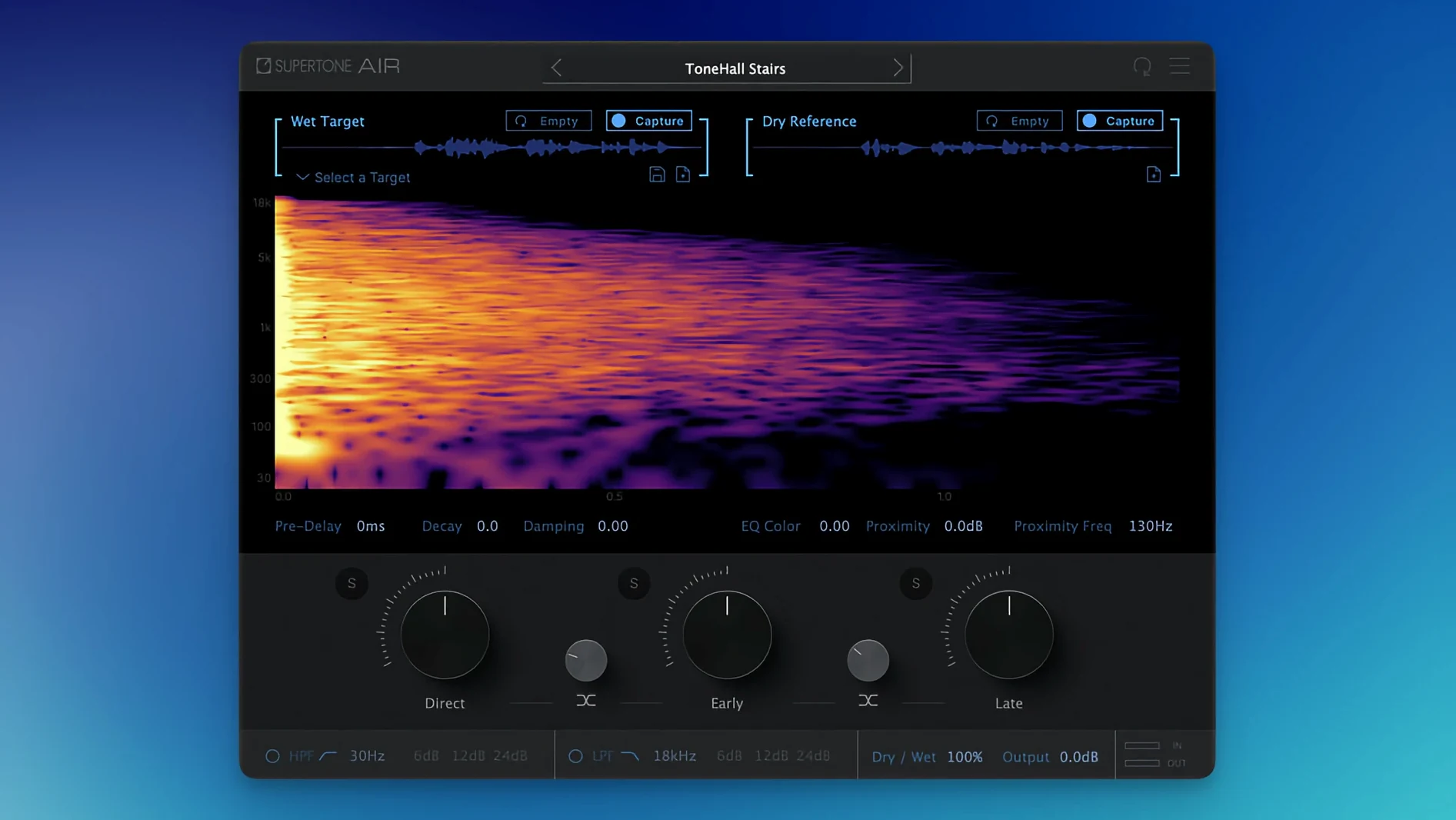
Supertone Air is a dialogue match plug-in that aligns ADR reverb and EQ to production audio.
Apply a room match as an AudioSuite insert or on a dedicated print aux
- AudioSuite track insert. Select a clip, capture a space from production audio, then apply the match to the ADR take on the same track.
- Dedicated print track. Route the dry ADR through an aux with Air inserted as AudioSuite isn't real-time. Process, render, check against the guide.
- Dialogue bus check. After matching, bus all dialogue to a group track. The EQ and space match keeps the edit point from pulling focus.
What moves across a session
Captured spaces export as WAV files. Air profiles import and export too, so an assistant can capture a location reverb on one system and hand it to the editor. Reverb controls for decay, damping and proximity stay adjustable after the capture—the match is a starting point, not a locked print.
Air handles the spatial match—you still de-noise and de-click before it
Does Air replace my dialogue reverb chain? Not entirely. It handles the match—capturing the original space and applying it to ADR. You still reach for a de-noiser or de-clicker before Air in the chain. Think of it as the final polish on a well-cleaned track.
AudioSuite only—no real-time? Correct. The processing is offline. You capture, adjust, render. For real-time monitoring during recording, you would need a different tool. But for the editor conforming ADR after the session, AudioSuite is where you live.
Will it open old Sound Particles Air sessions? The plug-in name changed from Air to Supertone Air in this version. That name change was what fixed the installation conflict with Sound Particles Air. Old sessions referencing "Air" need a plug-in reassignment.
Does it handle heavy noise floors? Capture from a quiet section of the production clip. If the source has background hum or traffic, the neural network picks that up as part of the space. Clean source, clean match.
Renamed from Air to Supertone Air to end a Mac install conflict
The jump to 1.0.1 [GUISEPPE] was small but practical. The plug-in file name changed from Air to Supertone Air, which ended a known installation conflict for anyone who had Sound Particles Air on the same Mac. Before that fix, the two plug-ins could step on each other during a scan. Now they sit side by side without issue.
No new knobs, no algorithm changes in this release. The focus was purely on making the install reliable across systems where both Air-named plug-ins existed. For a dialogue editor in the middle of a conform, that reliability matters more than a feature bump.
A short scenario from an ADR editor's afternoon
A dialogue editor receives ADR takes for a scene shot in a stone hallway. The production track has a short, bright slapback. The ADR was recorded in a treated booth—dead quiet, no tail.
She opens the AudioSuite menu, inserts Supertone Air on the ADR clip. From the production track, she selects a half-second of room tone between two lines and captures it. The early reflections fill in immediately; the late tail follows. She pulls the decay back slightly—the stone hallway was a little too lively—and nudges the proximity control to bring the actor forward in the space. Render. The edit point between the last production word and the first ADR word disappears on the dialogue bus. No one at the mix stage asks which line was replaced.
- Plug-in file renamed from Air to Supertone Air.
- Fixed an installation conflict for users with Sound Particles Air installed.
- macOS 10.13 or later
- Apple Silicon or Intel processor
- Supports 44.1 kHz, 48 kHz, and 96 kHz sample rates



Comments 0
Sign in or create an account to add a comment.
No comments yet. They go up after moderation.