
Pulsar Audio IPA — Mac download
Ticked
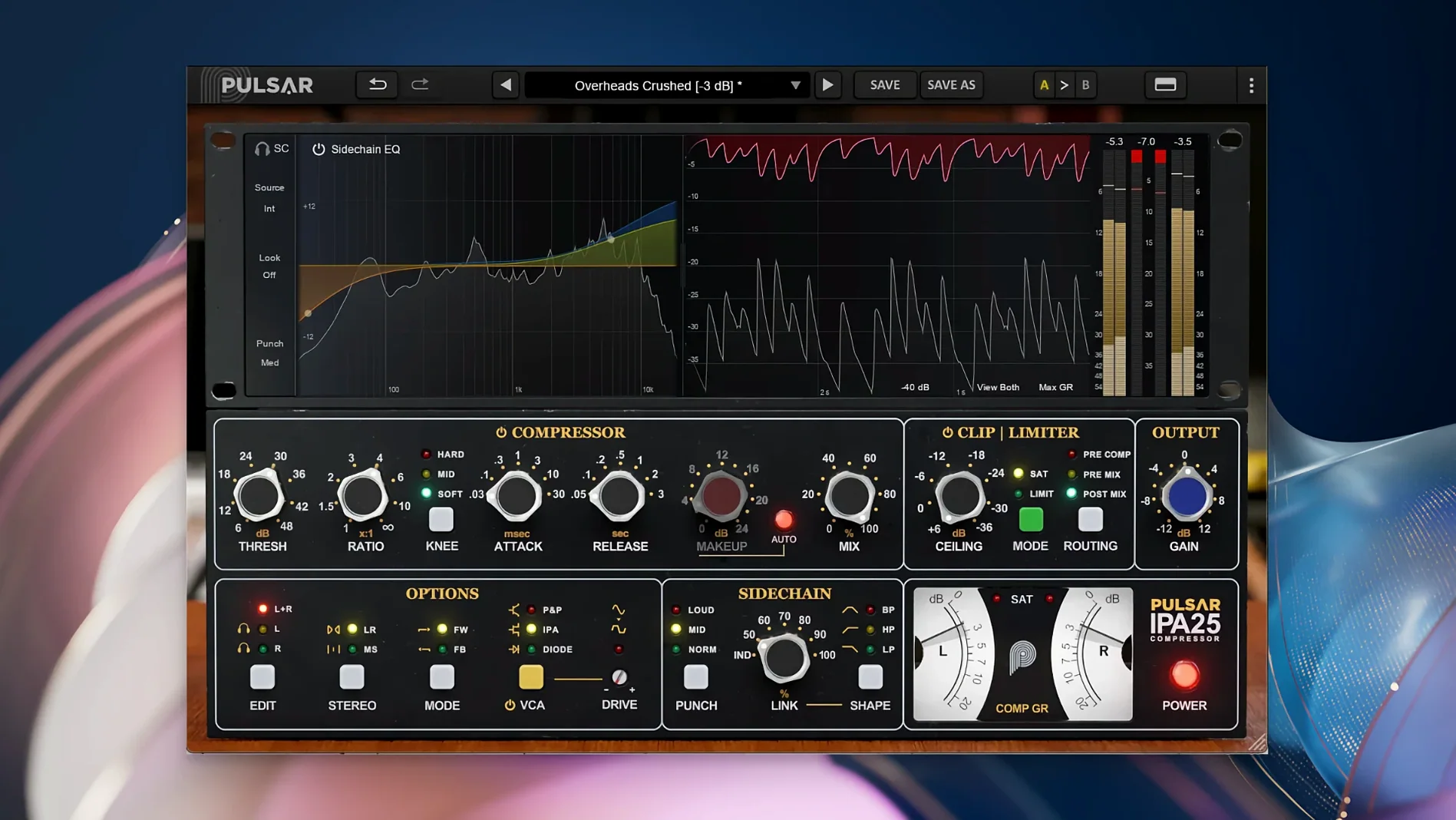
The IPA mode is the core. It’s a forward-sounding VCA character that grabs transients quickly. The other two modes swap the topology completely.
What do the three VCA modes do?
You get IPA, P&P/Mu, and Diode. IPA is the modern, snappy VCA style. P&P/Mu softens the knee into a smoother, program-dependent curve. Diode brings a coloured, rounded saturation reminiscent of older hardware. Each mode changes the detector’s behaviour, not just the tone.
How does the sidechain section work?
A visual EQ inside the sidechain lets you filter precisely what the compressor hears. You can duck a vocal from a guitar bus or stop a kick drum from pumping the whole mix with a few clicks. The display shows the curve clearly, so you work fast.
Why include a clipper and limiter?
The clipper shaves off stray peaks transparently before they hit the limiter. The limiter then catches the rest without working too hard. It’s a two-stage safety net that keeps a mix loud and clean, particularly on drum and master buses.
A practical workflow: drum bus glue
Start with a drum bus that already has basic balance and panning. Insert IPA across the stereo bus.
The steps:
- Set VCA mode to IPA. The default attack and release are good starting points — leave them for now.
- Engage Mid/Side processing. Unlink the channels so the compressor reacts independently to centre and side information.
- On the mid channel, pull the threshold down until you see 3–4 dB of gain reduction on snare hits. Keep the ratio at 4:1.
- On the side channel, set a gentler ratio (2:1) and a slightly slower attack. This keeps cymbals and room ambience breathing while the centre stays tight.
- Open the sidechain EQ. Add a high-pass filter at 60 Hz on the mid detector only. The kick still punches through, but the compressor no longer overreacts to sub information.
- Enable the clipper at –3 dB. Dial the limiter threshold to –0.5 dB with a fast release. The bus stays glued without flattening transients.
Switch the VCA mode to Diode briefly and listen. On room-heavy drums, the darker saturation can pull the ambience forward in a pleasing way. For punchy rock drums, stick with IPA. For a softer 70s-style kit, try P&P/Mu with a slower attack.
Loads under two seconds, draws instantly on 4K
IPA loads quickly — under two seconds in most DAWs on Apple Silicon Macs. The GUI draws instantly, even on 4K displays. No lag when dragging threshold or attack knobs during playback.
CPU usage sits around 2–3% per instance on an M1 Pro at 48 kHz. A session with eight instances across drum, bass and vocal buses hovers near 15%. Oversampling is not user-selectable; the plugin handles internal processing cleanly without a heavy overhead. No crashes observed during heavy automation writing or rapid preset switching.
Latency is low enough for tracking through the clipper and limiter chain on a live input, provided the DAW buffer is at 64 samples or below. The Mid/Side routing adds no additional delay.
Alt-click reset and interactive EQ graph
- Alt-click on any knob to reset it to default. Works on threshold, ratio, attack, release, and the sidechain EQ bands.
- The sidechain EQ display is interactive — drag nodes directly on the graph instead of using the knobs below. Much faster for surgical cuts.
- Holding Shift while adjusting the attack or release gives fine control, stepping in 0.1 ms increments.
- The output gain automatically compensates when you switch VCA modes. Loudness stays consistent as you audition different characters.
- Double-click the limiter threshold to bypass just the limiter section; the clipper stays active independently.
- The VU meter can be toggled between input, output and gain reduction. Right-click it to switch — no menu diving.
Many users chasing a particular vocal compression tone search for the pulsar ipa 25 or the pulsar audio ipa 25 variant, but the plugin’s flexibility across sources makes it far more than a one-trick preset machine. On bass lines, the P&P/Mu mode with a slow release and a sidechain high-cut at 2 kHz delivers a controlled, even sustain that sits under a mix without poking out.
- macOS 11 or later
- Apple Silicon Mac
- A DAW that hosts 64-bit VST 2.4, VST 3, AAX Native, or Audio Unit plugins




Comments 0
Sign in or create an account to add a comment.
No comments yet. They go up after moderation.