
Astro Gold — Mac download
Ticked
Astro Gold for Mac runs on macOS 10.13 (High Sierra) and later. It supports both Intel-based Macs and Apple Silicon machines, so you are covered whether you are on an older iMac or a new M-series MacBook Pro.
The software includes the full set of Swiss Ephemerides, so you do not need to source separate data files. Chart creation covers natal work, transits, and synastry analysis for comparing two charts. Asteroid positions come built in — Chiron and Proserpina are standard, not hidden extras.
For relocation work, you get planetary lines in astrocartography. Chart styles include round and square formats, with or without aspect lines drawn across the wheel. Everything runs in a single English-language interface.
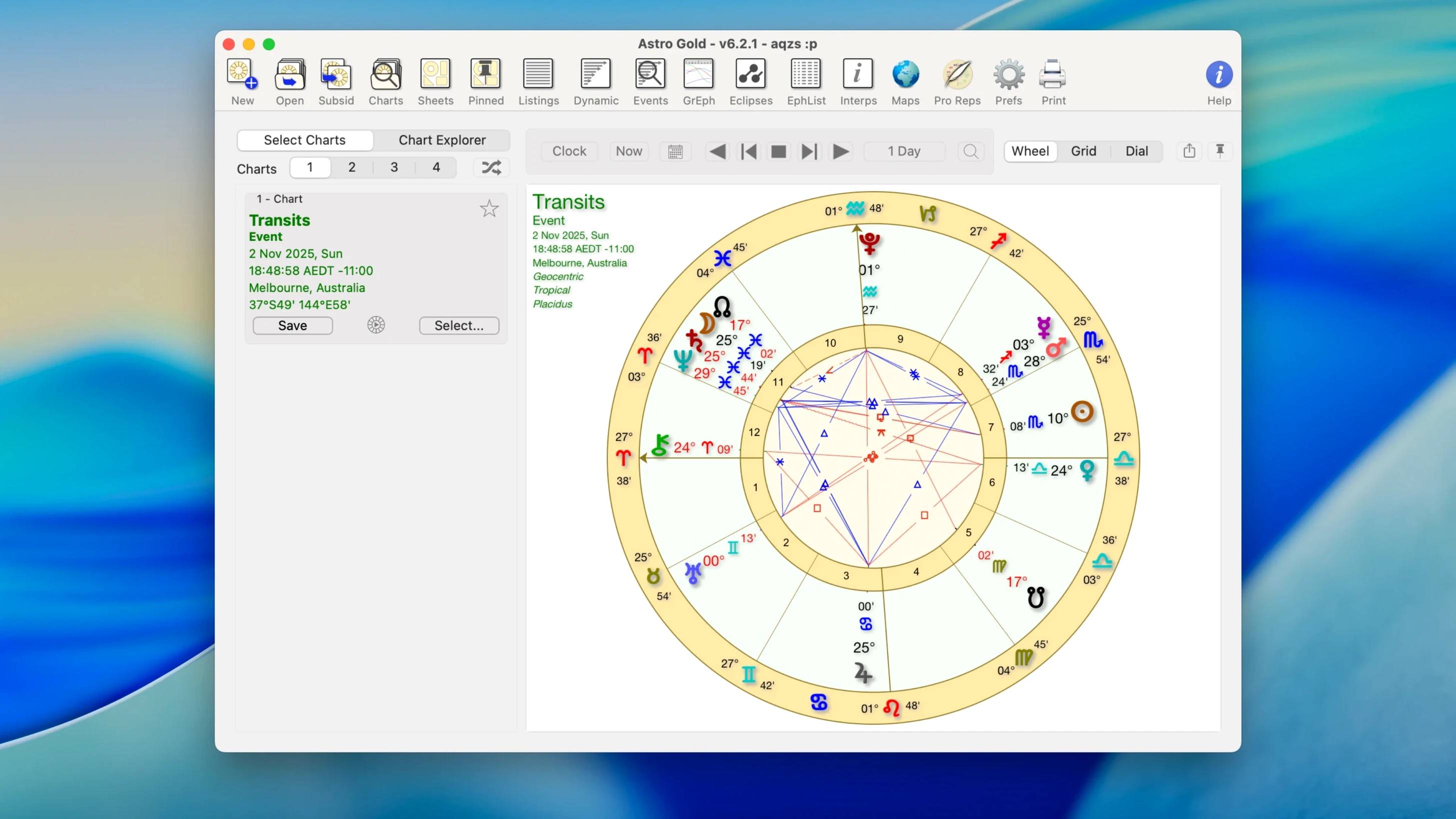
Natal chart with transits opens in seconds
Professional astrologers who need speed. A natal chart plus transits and progressions opens in seconds, not minutes. If you bill by the session, that matters.
Students drilling chart interpretation. The fixed star catalog and asteroid positions sit right there — no flipping between books and software. Set your orb, aspect, and planet filters once, then work through a stack of charts with the same rules applied.
Relocation consultants. The astrocartography module overlays planetary lines on a world map. Switch between solar returns and secondary progressions for a client considering a move, all inside one session file. No need to juggle separate apps.
Good for: astrologers who mix modern and medieval techniques without switching tools.
Not for: anyone who wants a flashy interface. The design is functional, not decorative.
Default zodiac is tropical, not sidereal
- Forgetting to set the zodiac system before casting. The default is tropical. If you work sidereal, switch it in preferences or your Vimshottari dashas will look wrong.
- Leaving aspect orbs at defaults without checking them. A wide orb on a quincunx can clutter a chart wheel with lines you do not need.
- Overlooking the composite and Davison chart options, tucked in the same menu as synastry. New users often cast a synastry bi‑wheel and stop there.
- Ignoring the relocation chart feature entirely. It is not the same as astrocartography. A relocated natal chart recalculates house cusps for a new city — useful for electional work.
- Casting a return chart without confirming the reference date. Solar and lunar returns default to the next occurrence, which might not be the one you intended.
Right‑click a chart wheel to copy it instantly
- Right‑click any chart wheel to copy it as an image. Paste it straight into a client report or an email. No export dialog, no file naming.
- Hold
Optionwhile switching chart types to keep your current planet and aspect filter set. Normally the filters reset. - The ephemeris view accepts a date range typed directly — double‑click the start or end date field instead of clicking through a calendar.
- In astrocartography,
Command‑clicka planetary line to drop a pin and see the relocated chart for that spot instantly. Faster than navigating menus. - The fixed star catalog is searchable by name and by degree. Type
Regulusor enter29Leoto jump straight there.
Download the disk image, drag the app to your Applications folder, then launch it from Launchpad. No extras to install.
- macOS 10.13 or later
- Intel or Apple Silicon Mac
Questions the team asks
Yes. It runs natively on both Intel and Apple Silicon machines.
It creates natal charts, transit charts, and synastry charts for two people.
Yes. The Swiss Ephemerides are built in, so no extra data downloads are needed.








Comments 0
Sign in or create an account to add a comment.
No comments yet. They go up after moderation.