

attn LED — Mac download
Ticked
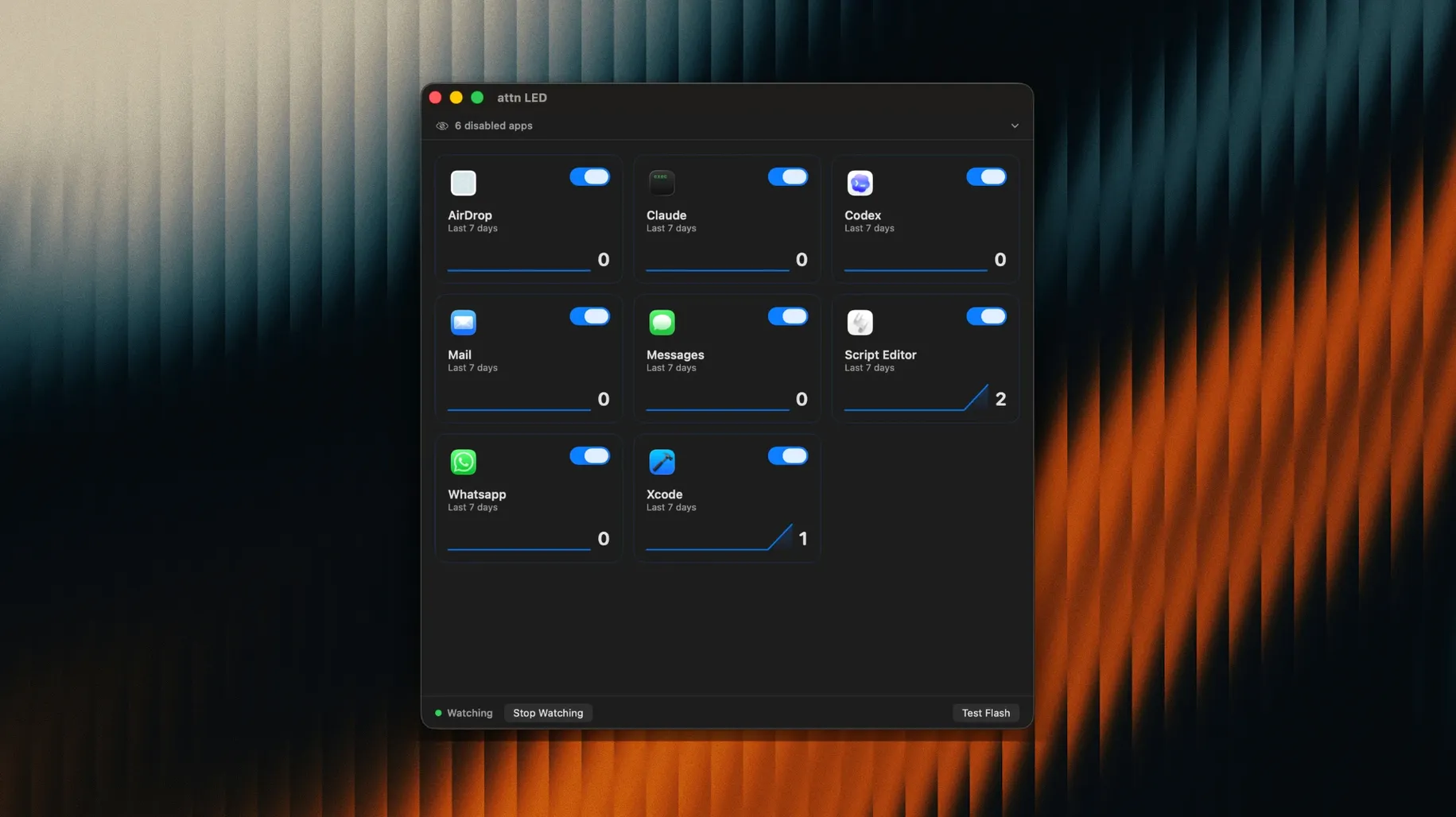
You flip your MacBook into Focus mode, silence the banners, and get to work. An hour slips by. You glance up and see the camera LED blinking steadily. Slack has a message from your team lead.
Which apps can trigger the LED?
Set it to watch specific apps only. Slack, Mail, Messages, Discord, Teams, and Telegram are all supported. Filtering keeps the light meaningful rather than a constant distraction.
Does it interrupt video calls?
No. attn LED pauses automatically during FaceTime and other video conferences. The light won't blink while your camera is genuinely in use.
Bypasses Focus and Do Not Disturb completely
It monitors the notifications database directly, bypassing the limits of Focus and Do Not Disturb. You get a silent visual cue with no sound and no banner.
Visible across the room, no need to walk back
LED not blinking when notifications arrive
Check two things. First, open System Settings > Notifications and confirm the app you want is allowed to send notifications. Second, open attn LED and verify that app is ticked in the app list. If the app was installed after attn LED, use the Detect new apps feature to pick it up.
App not appearing in the attn LED list
attn LED scans your notification database. A freshly installed app might not show until it has sent at least one notification. Send a test message to yourself in that app, then click Detect new apps inside attn LED. The app should appear within a few seconds.
Blinks won't stop after checking the app
The LED keeps blinking until you open the app that triggered the alert. Opening a notification banner is not enough — you need to bring the app window to the foreground. If it persists, quit and reopen the app that sent the notification.
Camera LED status confusion
Some MacBook models use the LED as a system status indicator. If you see a steady green light with no blinking, another app may be using the camera. Check for open video call apps or browser tabs with camera access.
Pairs with app-specific Focus filters
- Glance from across the room. The LED is visible at a distance. Leave your MacBook open on a desk while you step away and catch alerts without walking back.
- Works with app-specific Focus filters. If you let Slack through Focus but block Mail, attn LED respects your existing notification permissions. No double setup.
- No dock clutter. attn LED runs in the background. You won't see an extra icon bouncing for attention — that is the whole point.
- Pair with a dark room setup. The blinking LED is especially noticeable in low light. Useful for late-night coding sessions where screen glare is already minimal.
- Launch at login. Add attn LED to your Login Items in System Settings so it is always running when you start work.
How attn LED compares with similar Mac apps
attn LED vs. Banners and sounds (default macOS)
Default notifications demand your eyes or your ears. Banners slide in and steal focus. Sounds break concentration in shared spaces. attn LED gives you a cue that is physical and silent. You check on your terms, not Apple's.
attn LED vs. dedicated notification monitors
Some apps put a persistent dot in the menu bar or a floating widget on the desktop. Those still occupy screen space. attn LED moves the alert off-screen entirely — onto the hardware itself. If you work with a clean desktop or a single full-screen app, that matters.
attn LED vs. smart light integrations
Smart bulbs and LED strips can flash on notifications, but they need extra hardware, a stable network, and configuration in a separate app. attn LED uses the camera light already built into your MacBook. No pairing, no Wi-Fi hiccups, no desk clutter.
- macOS 12 or later
- Apple Silicon or Intel MacBook
Questions the team asks
The camera LED keeps blinking until you open the app that sent the notification.
Yes. The camera LED is visible from anywhere in the room, so you don't need to be at your desk to notice it.
It requires macOS 12 or later and runs on both Apple Silicon and Intel MacBooks.








Comments 0
Sign in or create an account to add a comment.
No comments yet. They go up after moderation.