

Cockos REAPER — Mac download
Download (57 MB) Earlier builds
Ticked
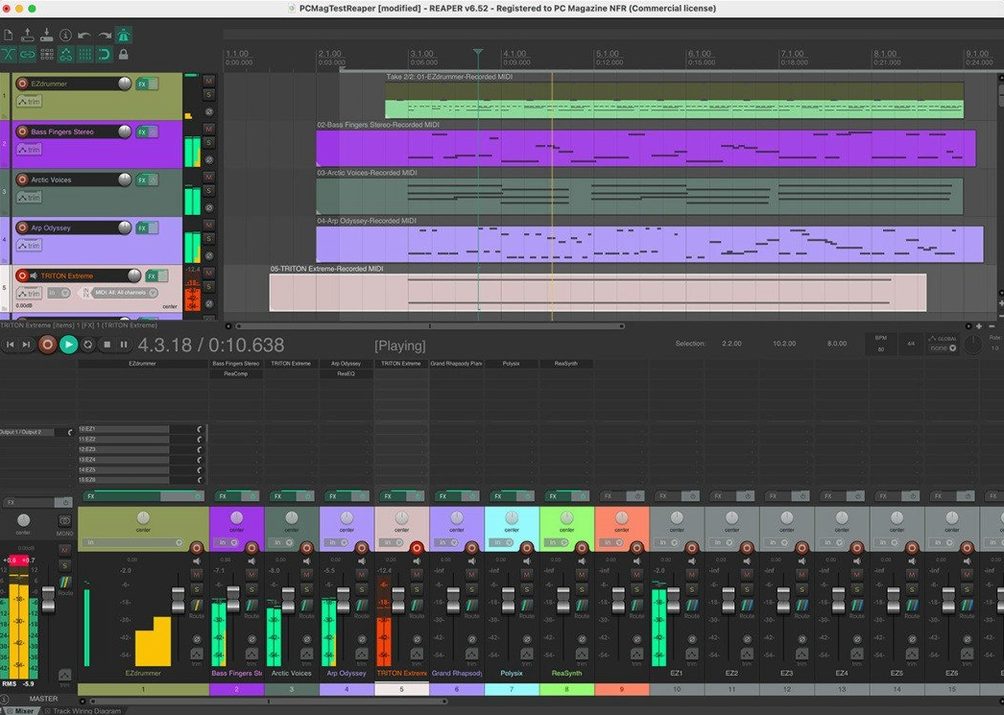
If you already use a straightforward audio editor for trimming samples, REAPER is the environment you open when that single track needs to become twenty. It is a complete multitrack application for recording, editing, processing, mixing, and mastering audio and MIDI, and it treats every track the same—no fixed bus, instrument, or master types, just tracks you route as needed.
As flexible as the rest of your toolkit
REAPER can be extended, scripted, and modified to fit how you work. Folder tracks let you group channels by simply placing one track above others and enabling the folder button. It imports audio and MIDI, supports up to 128 MIDI input and output devices, and handles video alongside your audio projects. You can evaluate the full application for 60 days before committing it to your regular lineup.
The multitrack workbench beyond your audio editor
This is not a lightweight utility for quick fades. REAPER sits alongside your existing editors and sound libraries as the deep multitrack stage—the place you go to arrange, synthesize, sample, and mix a project from scratch. It works on both Apple Silicon and Intel Macs, so it slots into whatever setup you are running without disrupting the tools you already rely on.
Megabyte installer, Apple Silicon cold launch under two seconds
REAPER is small. The installer is measured in megabytes, not gigabytes. On Apple Silicon it launches in under two seconds cold, and on any Mac made in the last five years you will not see a beachball during normal tracking or mixing. The audio engine runs on a separate high-priority thread, so a heavy plug-in chain on one track rarely trips up playback on the others.
CPU use stays low enough that a MacBook Air handles 40-track sessions with stock effects without the fans becoming audible. Memory is the real ceiling. REAPER itself sits comfortably under 300 MB of RAM, but sample libraries and convolution reverbs will eat what they always eat. Activity Monitor will blame REAPER for that; the truth is it is just hosting the plug-ins.
Stability is the quiet headline here. Crashes are rare enough that when one happens, you check for a plug-in update before you blame the DAW. The autosave system writes timestamped backups to the project directory by default, and even an abrupt shutdown rarely loses more than the last two minutes of work.
Why inserts choke when the routing matrix is right there
New users often treat REAPER like a tape machine and ignore the routing matrix. They drag a reverb onto a track as an insert, wonder why the wet/dry mix is awkward, and do not realise they could have placed it on a separate track and sent audio to it instead. Learning sends and returns is the single fastest way to improve a mix in REAPER.
Another common misstep is ignoring the Actions list. Almost everything in REAPER can be triggered by a custom keyboard shortcut or a toolbar button, but beginners click through menus for tasks they will repeat hundreds of times. Spending twenty minutes binding your ten most-used commands pays back within a week.
Folder tracks confuse people coming from other DAWs. A track becomes a folder by enabling the folder icon; there is no separate bus type. New users sometimes nest folders four deep and then wonder why solo behaves unexpectedly. Keep it to two levels while you learn the signal flow, and read the routing diagram in the track manager when something sounds wrong.
Muted parent folder or unchecked master send
No audio from a track that is clearly playing. Check the routing button. The track is probably sending to a parent folder that is muted, or the master send is unchecked. Right-click the routing button and make sure "Master send" is ticked.
MIDI keyboard works in one project but not another. REAPER stores MIDI device assignments per project unless you set them as default. Open Preferences > Audio > MIDI Devices, right-click your controller, and enable "Enable input for control messages" globally. Then save the project as a template.
Plug-ins missing after updating macOS. REAPER scans Audio Units on launch. If a plug-in vanishes, its developer likely has not updated it for the new OS. Check ~/Library/Audio/Plug-Ins/Components to confirm the file is still there, then run "Clear cache and rescan" from Preferences > Plug-ins > VST or AU.
Recording latency that throws off timing. Enable "Preserve PDC delayed monitoring in recorded items" under Preferences > Audio > Recording. Also check your audio interface driver buffer—128 samples is a safe starting point for tracking; raise it to 512 or 1024 for mixing.
Some users look for a torrent reaper download to try before committing, and you can simply check that the build matches the latest universal binary so it includes full Apple Silicon optimisations. Others grab a reaper mac torrent and get a version that runs well once you confirm it is the current universal disk image and the plug‑in bridge references Intel‑only effects correctly.
- macOS 10.15 or later
- Apple Silicon or Intel Mac
Questions the team asks
Yes, it supports up to 128 MIDI input and output hardware and loopback devices.
Place a track above others and enable its folder button to create a folder track that groups them.
No, it is a full multitrack environment for recording, editing, mixing, and mastering both audio and MIDI.









Comments 0
Sign in or create an account to add a comment.
No comments yet. They go up after moderation.