
Camo Studio — Mac download
Ticked
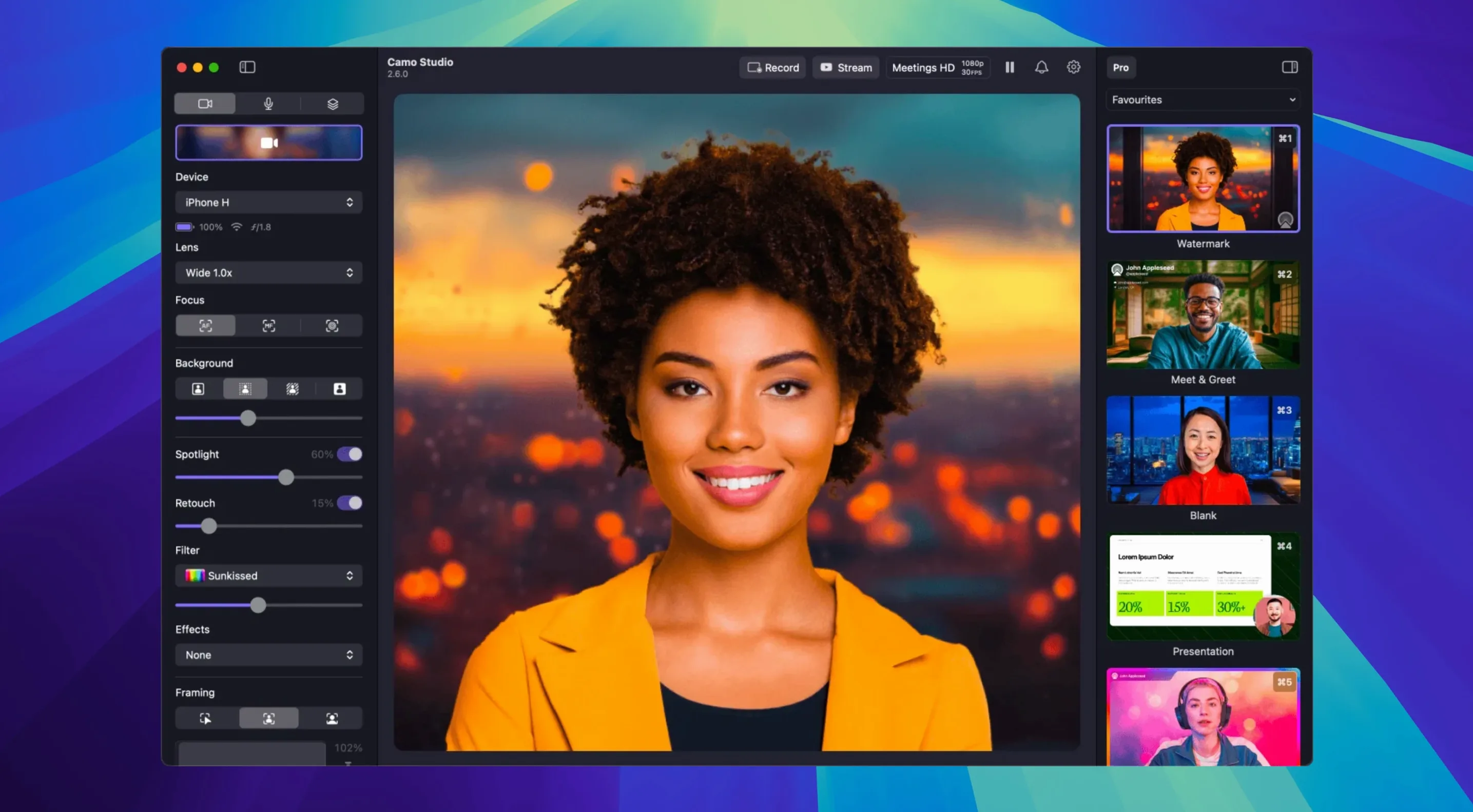
Streamers who build multi-layer scenes. Presenters who need a clean backdrop without a physical green screen. Anyone who runs a phone as their main Mac camera and has outgrown basic controls. That’s where Camo Studio fits.
What does the virtual green screen actually handle?
It cuts out the background without a physical screen, even with uneven lighting. The processing stays on the phone so the Mac isn’t taxed, which matters when you’re also running OBS or Zoom.
Can you layer more than just a face on screen?
Yes. Overlays and scenes support text, logos, web overlays and image layers. You build the composition in Camo Studio and feed the finished output to any app that recognises a camera.
How does the audio noise reduction work?
Version 2.9.0 added on-device noise reduction on macOS. It’s separate from the isolated recording feature, so you can clean up the mic feed and capture a distinct audio track at the same time.
What keeps the picture steady when the desk gets a knock?
Treated as a native camera by Zoom, Teams, and OBS
Camo Studio talks to anything that expects a camera feed. Zoom, Teams, OBS, QuickTime — they all see it as a regular source. No virtual-camera plugins to install separately. On macOS the app hooks into CoreMediaIO directly, so the feed appears in every picker from FaceTime to a browser-based calling tool.
Pair it with OBS for scene switching and audio routing. Let Camo handle the phone's lens, focus, and framing; leave overlays and stream deck bindings to OBS. For recorded content, feed the clean Camo output into QuickTime or ScreenFlow and grab the isolated audio track at the same time.
Phone not appearing: check the USB-C cable first
- Phone not showing in the source list. Check the cable first — USB-C to USB-C works more reliably than USB-A adapters. Wi-Fi mode needs both devices on the same network and Bluetooth enabled for discovery.
- Frame rate stuck at 30 FPS. Some apps cap the feed. Check the receiving app's video settings; OBS needs the camera set to "Device Default" or the resolution manually configured.
- Portrait mode greyed out. The phone model matters. Portrait and the virtual green screen need an iPhone XR or newer, or an Android with a depth-capable sensor.
- Audio out of sync after noise reduction. Toggle the noise reduction off and on again, or restart the Camo session. The 2.9.0 processing pipeline sometimes drifts after a long call.
Plug in, grant permission, set 1.3x zoom
- Plug the phone into the Mac. Launch Camo Studio. The phone asks for camera permission — grant it once and the feed appears.
- Set the framing. Drag the zoom slider to 1.3x, switch on automatic framing so it tracks slight head movement, and check the exposure isn't blowing out the window behind.
- Turn on Portrait mode. Dial the blur to 40%. The background softens without looking fake.
- Apply a LUT. The built-in "Warm Daylight" filter pulls the colour temperature closer to the desk lamp.
- Open OBS. Add a video capture source, pick "Camo Studio" from the device list, and set the resolution to 1080p at 60 FPS.
- Enable audio noise reduction in Camo's sidebar. In OBS, set the audio input to the Camo mic feed — not the system default — so the cleaned signal lands directly in the stream.
- Hit record in OBS for the isolated track, or go live. Camo sits in the background; all adjustments stay in its own window.
Digital image stabilization corrects minor shakes in real time. Combined with Portrait mode’s bokeh, the result is a stable, polished shot without extra hardware.
- Dual-format streaming and recording on macOS.
- Isolated recordings — separate audio and video tracks on macOS.
- Audio noise reduction on macOS.
- AI agent control support on macOS.
- macOS 12.3 or later
- Apple Silicon and Intel supported







Comments 0
Sign in or create an account to add a comment.
No comments yet. They go up after moderation.