
DriveDx — Mac download
Ticked
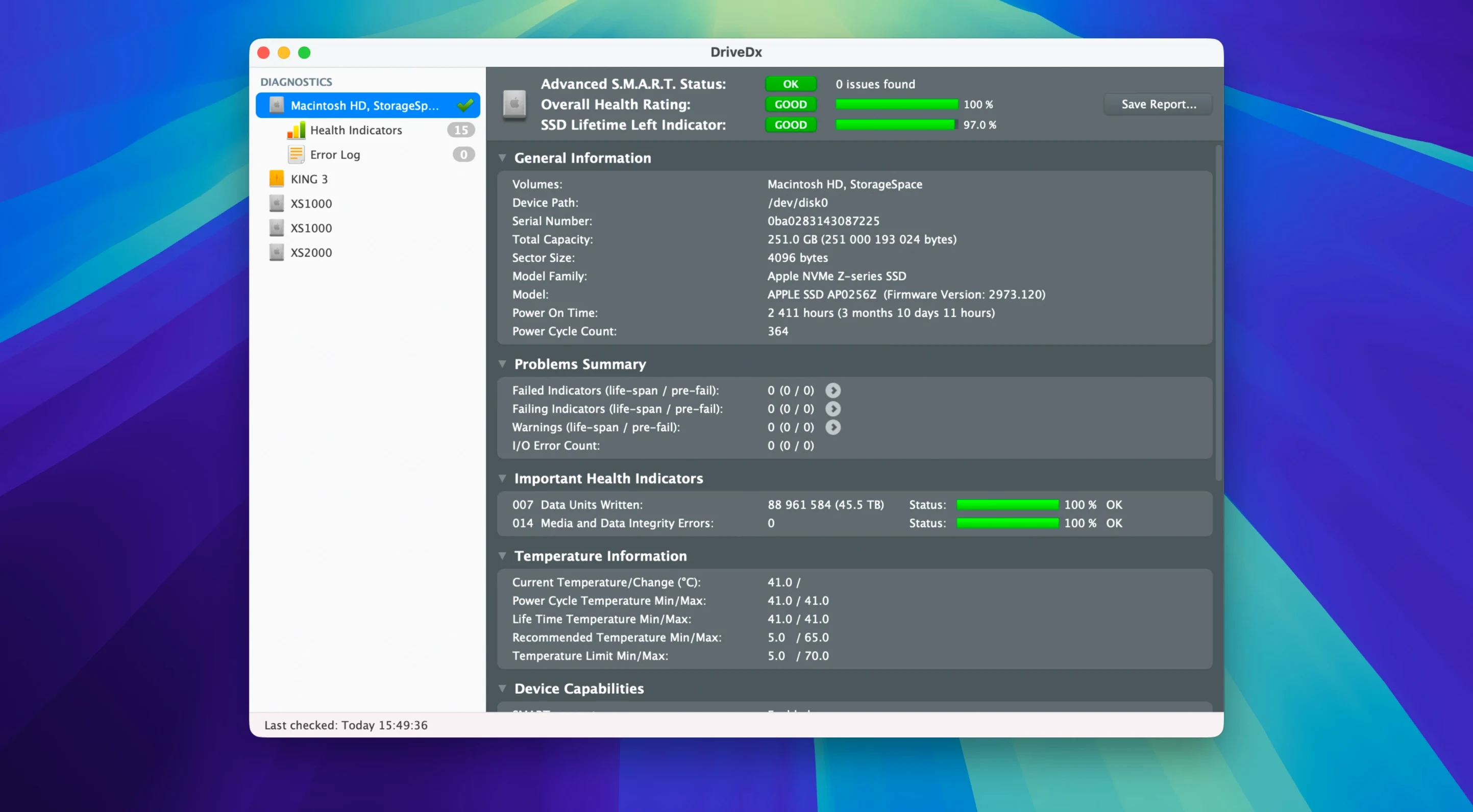
The heuristic drive-failure prediction engine doesn't just read SMART status. It cross-references reallocated sectors, pending bad sectors and I/O errors against a growing database of known failure patterns. You get a warning before Finder starts acting strange.
SSD wear monitoring tracks the exact percentage of remaining life on your solid-state drive. For spinning disks, DriveDx watches performance trends — slow reads, slow writes, command timeouts — and flags trouble early. The driver installer in 1.12.1 drops the Rosetta 2 requirement, so it runs native on Apple Silicon without an extra translation layer.
This is for people who keep a checklist for drive health. It fits between your weekly backup and your next upgrade plan. The notification thresholds were tightened in this release, so you hear about a Patriot P200 SSD's declining health sooner than before.
A drive that nearly walked off the cliff
A freelance motion designer in Bristol runs a Mac Studio with four external NVMe drives — media cache, project files, renders, library backups. One Tuesday, DriveDx pushes a notification: "SSD life left: 4% — Pre-fail". The drive that held current project renders was wearing out. She had thirty minutes of billable time left on that disk before Finder stopped recognising it.
She copied everything across to a spare Samsung T7, swapped the drive in her checklist, and carried on. Without background monitoring, that failure would have arrived mid-export, two days before a client deadline. The heuristic algorithms spotted the wear curve flattening days earlier than the raw SMART data suggests.
This is the scenario where DriveDx earns its place: early warning before the beach ball. Not when the drive fails — when it starts planning to.
First days with DriveDx
After dragging the app to Applications and launching, run through this list once:
- Open Preferences and enable 'Start at login.' Background monitoring only works if the app actually runs. No menu bar icon means no protection.
- Check notification settings. The default thresholds in 1.12.1 were updated — but verify you've got 'Warning' and 'Failing' states ticked for email alerts if you manage multiple Macs.
- Run a short self-test on every drive. Right-click a drive, pick 'Short self-test.' It takes under two minutes and gives you a baseline reading of electrical and mechanical health.
- Skim the drive health report. Look past the green "OK" badge. Note the 'SSD Lifetime Left' percentage, reallocated sector count, and any non-zero pending sectors. Zeros are good. Numbers above zero need a note on your calendar.
- Set a monthly full self-test reminder. The full test reads every sector. Schedule it for a Sunday morning when the Mac isn't busy.
If you're running a Patriot P200 SSD — now better supported in this release — pay extra attention to the wear indicator in the first week. Older firmware on those drives sometimes under-reported wear, and the improved diagnostic algorithms surface it more accurately now.
SSD wear hits 80% in 18 months for video editors
Video editors and colourists. Scratch disks and render caches eat SSD write cycles. A 2TB internal drive on a MacBook Pro used for DaVinci Resolve can hit 80% wear in eighteen months. DriveDx shows that number trending week by week, not suddenly.
System administrators managing ten or more Macs. You plug in the same external backup drives across multiple machines. One failing SSD can corrupt Time Machine snapshots before any Mac reports a problem. DriveDx's background checks run independently of Time Machine — it spots the drive failing, not the backup format.
Anyone still spinning rust. Spinning hard drives fail differently. They slow down first. DriveDx tracks raw read error rates, spin-up time, and seek error rates — metrics that creep up months before a click of death. If you're archiving to a 3.5-inch external drive, this is your canary.
Mac users running unsupported SSDs. Third-party NVMe drives in enclosures often don't report SMART data to macOS's built-in tools. DriveDx reads what's there via its own driver — no Rosetta 2 needed in 1.12.1 — and surfaces health data that Disk Utility simply doesn't show.
Heuristic failure prediction vs. repair-suite side feature
DriveDx vs. Drive Genius. Drive Genius is a repair-and-maintenance suite: defrag, repartition, secure erase. It checks SMART status as a side feature. DriveDx does one job — predict failure from heuristic analysis of drive attributes — and does it with more granularity. If you need to repartition a drive, reach for Drive Genius. If you need to know whether that drive will survive next week's project, DriveDx is the sharper tool.
DriveDx vs. Smartctl (smartmontools). Smartctl is the command-line Swiss army knife. It reads every SMART attribute raw, and it's free. But interpreting a 200-line terminal dump takes time. DriveDx translates those same attributes into a health percentage, a failure prediction, and a notification. Two different audiences: smartctl for the Terminal-first crowd who want raw data; DriveDx for anyone who wants a warning while they're working in After Effects, not while they're grepping a log.
DriveDx vs. Disk Drill's S.M.A.R.T. monitoring. Disk Drill bundles basic SMART status checks into its data-recovery toolset. It shows "OK" or "Failing" but doesn't track attribute trends over time or apply heuristic failure models. Disk Drill is about recovering files after the fact. DriveDx is about avoiding the recovery altogether.
If your workflow runs on external drives — especially multiple enclosures daisy-chained or swapped between machines — DriveDx closes the gap between "drive acts normal" and "drive is dead." The distinction matters most when a drive dx crack search leads someone here looking for the diagnostic tool itself. It's the same software, same heuristics, catching the same pre-fail signals.
- macOS 10.9 Mavericks or later
- Apple Silicon and Intel Macs




Comments 0
Sign in or create an account to add a comment.
No comments yet. They go up after moderation.