

DynamicLake Pro — Mac download
Ticked
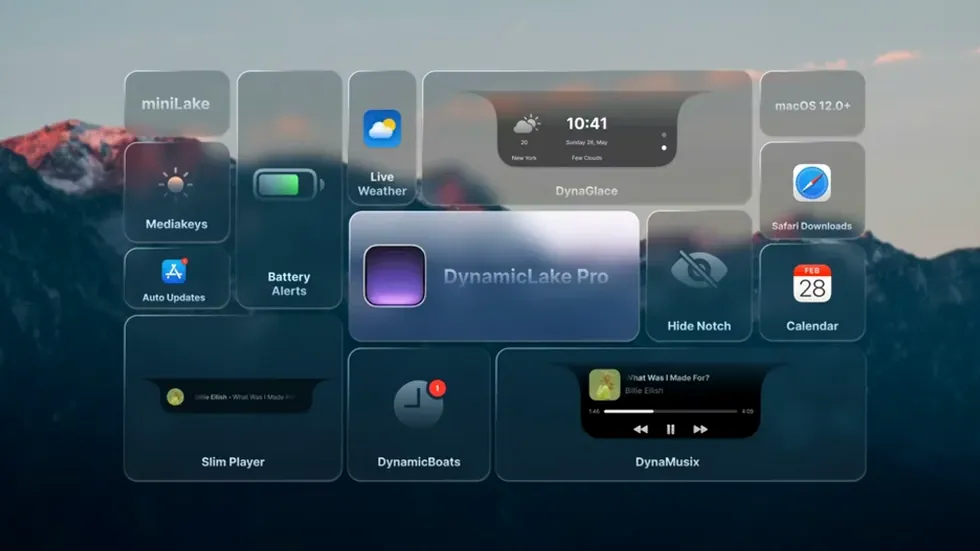
Dynamic Lake Pro runs on Apple Silicon and 64-bit Intel Macs with macOS 11 or later. It places a Dynamic Island-style notch at the top of your screen for widgets, notifications and quick controls. Here is one realistic task — setting up music control with the DynaMusic widget — from start to finish.
- Open Dynamic Lake Pro preferences and enable the DynaMusic module from the widgets list.
- Choose a trigger method: hover over the notch or set a keyboard shortcut that feels quick.
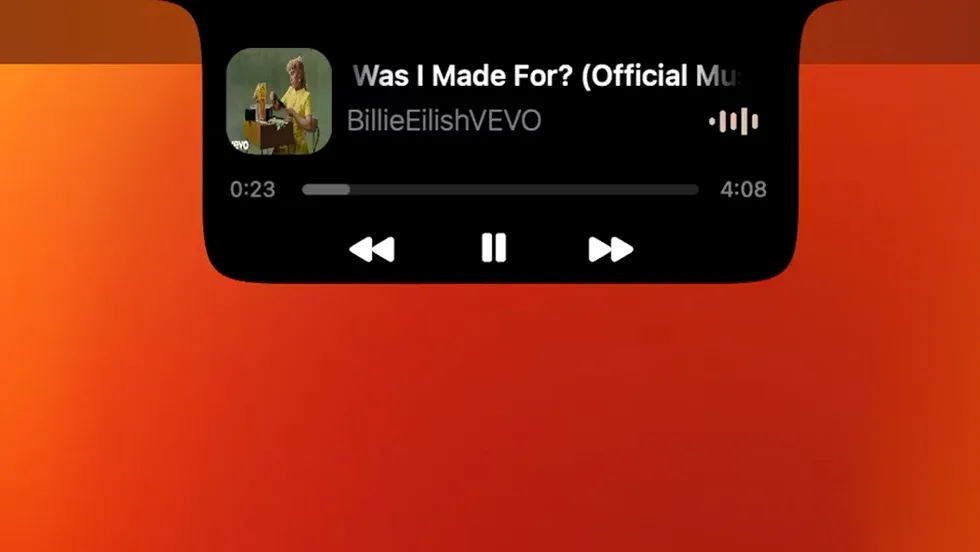
- Play a track in Apple Music or Spotify. The notch animates with album art and a waveform.
- Hover to reveal playback controls — play/pause, skip and a scrubber sit right in the notch.
- Adjust the animation style and widget size in the DynaMusic settings tab until it matches your desktop look.
Once DynaMusic is dialled in, the same preferences panel gives you access to the DynaSwitcher for Option+Tab app switching, miniLake for a compact widget strip, and DynaKeys for volume and brightness overlays. Everything stays tucked in the notch until you need it.
Move the notch so it blends into your desktop instead of shouting
Out of the box, the notch sits centre-screen and draws attention. A few tweaks make it feel less like a demo and more like part of your desktop.
- Position and size. Open preferences and drag the notch to a corner if centre-screen gets in the way. Shrink the widget scale to 80% — large enough to read, small enough to ignore when you are focused.
- Startup behaviour. Enable Launch at login so the notch appears after every restart. Turn off the welcome animation — it adds nothing after the first run.
- Notification filtering. Go to the notifications tab and disable apps you do not want pinging the notch. Slack and Messages earn a spot; marketing emails do not.
- DynaKeys overlay duration. Default is 2 seconds. Bump it to 3 if you miss the brightness indicator, or drop it to 1.5 if you want it gone fast.
A workflow: tracking a meeting with DynaGlance
Here is a task that plays to Dynamic Lake Pro's strengths — using the calendar and weather widgets to stay on top of an afternoon client call.
- Enable DynaGlance in preferences and grant calendar access when prompted.
- Set the widget to show the next 3 upcoming events. The notch now displays your next meeting title and start time.
- Enable the weather overlay. A small temperature icon and conditions summary sit beside the calendar entry.
- Thirty minutes before the call, a meeting alert slides out from the notch with the event name and a join button if the calendar entry contains a video link.
- Click the alert to open the meeting link. After the call ends, the notch returns to showing the next event and current weather.
- During the meeting, hover over the notch to check the time remaining without switching windows.
Rescue menu bar items that disappear behind the widget
People run into the same handful of issues. Most have a quick fix.
- Notch blocks menu bar items. If menu bar icons hide behind the widget, shift the notch position left or right in preferences. Apps like Bartender play nicely if you leave a gap.
- Music widget shows no album art. DynaMusic pulls artwork from the playing app. If it shows blank, check that Apple Music or Spotify has permission to access your media library in System Settings under Privacy & Security.
- Notifications appear for the wrong apps. The app reads from macOS Notification Centre. If an app you muted still shows up, check its notification settings inside System Settings > Notifications — Dynamic Lake Pro mirrors whatever the system allows through.
- High CPU usage after sleep. On some Intel Macs, the animation engine does not idle properly after waking. Quit and relaunch the app, or toggle the animation style to "minimal" in preferences. Apple Silicon machines rarely show this.
- DynaSwitcher conflicts with Option+Tab. If the app switcher overlay lags or doubles up with the native macOS switcher, set the shortcut to a different combo like Control+Option+Tab in the DynaSwitcher settings. That avoids the overlap entirely.
- macOS 11 or later
- Apple Silicon or 64-bit Intel processor
Questions the team asks
It adds music playback with DynaMusic, app switching with DynaSwitcher, and volume, brightness and keyboard backlight controls with DynaKeys, plus calendar, battery and Airdrop alerts.








Comments 0
Sign in or create an account to add a comment.
No comments yet. They go up after moderation.