

Flicker Free — Mac download
Ticked
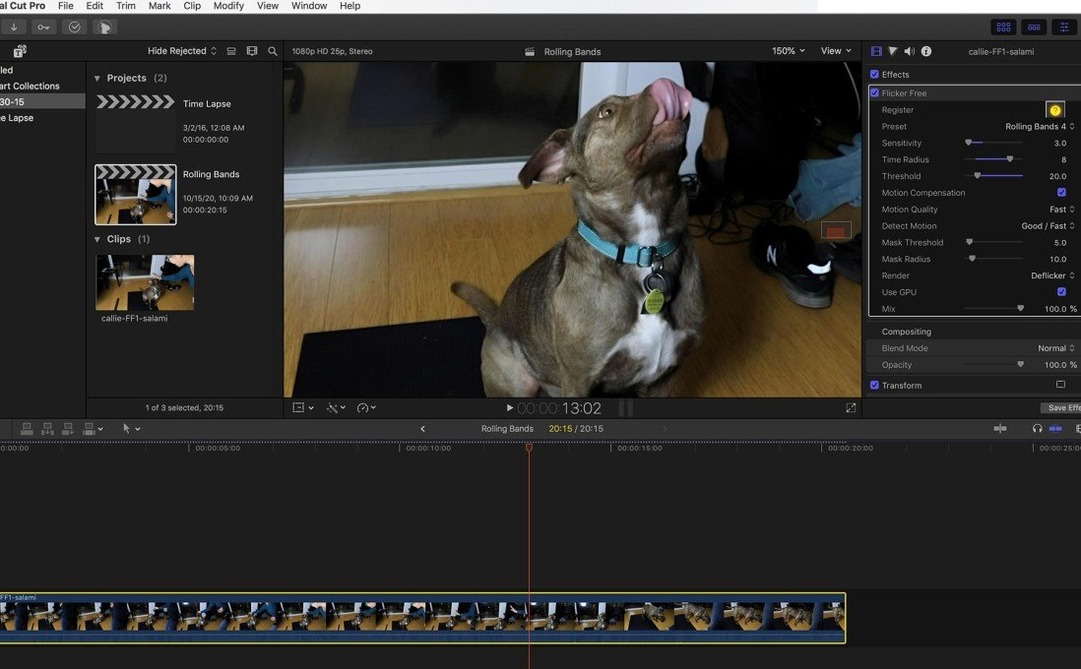
Up to 240 frames a second. That is the kind of frame rate where flicker from mismatched shutter speeds or fluorescent lighting becomes impossible to ignore. Flicker Free 2.1.6 targets exactly that problem.
Test a 10-second sample before processing the full timeline
Render a short, 10-second test clip before processing the whole timeline. The plugin analyses frames as they process, so a quick sample saves time and lets you check the result against the original footage.
Which camera formats give the best starting point?
Footage from a Phantom Flex, Sony FS700U, or GoPro HERO3 Black typically responds well. The deflicker is built for high-frame-rate material, especially slow-motion shots lit under fluorescent lamps where rolling bands appear.
How do I handle flicker across different hosts?
Apply the plugin inside any OpenFX-compatible editor. It runs natively on ARM and x86 Macs, so you can move a project between Final Cut Pro, DaVinci Resolve, After Effects, Premiere Pro or Avid without changing your deflicker settings.
What limits should I watch for?
Start with the default analysis setting. The plugin processes frames in one pass, so there is no separate analysis step to manage. If the flicker is irregular, step through the result frame by frame before committing to a full export.
ARM-native support speeds up analysis on Apple Silicon
The move to ARM-native support is the main event. On Apple Silicon Macs, frame analysis now runs noticeably faster — useful when you are checking a 240 fps clip shot under mixed lighting. No interface redesign, no menu reshuffle. Same presets, same one-pass workflow, just compiled for the newer architecture.
- ARM-native binary added — no Rosetta lag on M1/M2/M3 machines
- Preset list unchanged; existing project files open without adjustment
- OpenFX host compatibility list now includes current DaVinci Resolve builds
Apply after the rough cut, before any colour work
Flicker Free sits between your edit and your grade. Apply it after a rough cut, before any colour work. If you send a clip to a compositor in After Effects, the plugin travels with the project — same settings, same result.
On macOS, it taps into the system's Metal framework indirectly through the host app. No standalone application to launch. No background process. It appears in the effects browser of whichever editor you are in — Final Cut Pro, Premiere, Resolve — and behaves like any other filter in the stack.
Pair it with a waveform monitor. The plugin smooths luminance jumps; the scope confirms the frame-to-frame lift is gone.
Drag the plugin onto a clip showing a rolling dark band
- Open a timeline in DaVinci Resolve. A slow-motion clip of a workshop under LED panels shows a rolling dark band travelling upward every three frames.
- Drag Flicker Free from the OpenFX panel onto the clip. The default preset kicks in immediately.
- Mark an in/out range around a 10-second section where the band is clearest. Render that range to disk — it takes about 20 seconds on an M1 MacBook Pro.
- Scrub through the rendered file. The band is gone. A tiny amount of motion blur is visible on fast-moving edges, so you back off the strength slider by 15% and re-render the same section.
- Happy with the result, you copy the effect to the remaining five clips in the sequence. Settings transfer with the paste.
- The timeline goes to the colour page. No sign of the original flicker under the grade.
For editors pulling clips from a Phantom Flex or a GoPro HERO3 Black, the same steps apply — only the preset might change. Time-lapse sequences need the Time-Lapse preset; LED-heavy shots want the LED preset. One test render, tweak, commit. That is the loop.
- macOS (ARM and x86 64-bit supported)
- OpenFX-compatible host (Final Cut Pro, After Effects, Premiere Pro, DaVinci Resolve, Avid)
- Interface language: English
Questions the team asks
Yes, the plugin is built as a universal binary that runs on ARM and x86 64-bit Macs.









Comments 0
Sign in or create an account to add a comment.
No comments yet. They go up after moderation.