

Ghost Buster Pro — Mac download
Download (11 MB) Earlier builds
Ticked
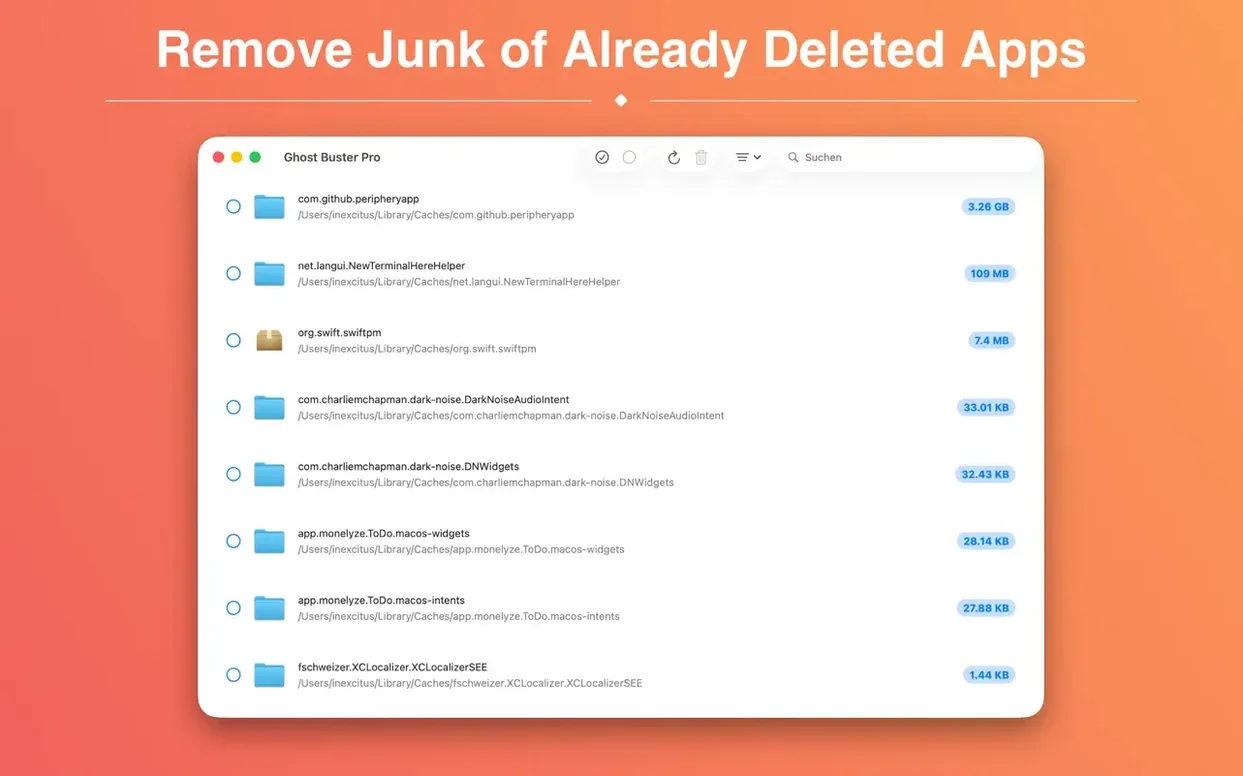
You drag an app to the Bin, but its preference panes, caches and support files sit in the Library forever. Ghost Buster Pro scans for those leftovers and lets you delete them in one go.
Digging out leftover caches from months-old uninstalls
- Digging out caches and .plist files from apps you removed months ago
- A clean second pass after a standard uninstall
- Users who prefer manual control over automated cleaners that make assumptions
Deletions are immediate with no restore function
- Requires macOS 15.6 — no backwards compatibility for older systems
- No restore function; deletions are immediate
Blind ‘Delete All’ before scrolling through results
- Scanning without checking the list first. Ghost Buster Pro starts searching the moment it opens. Some people click ‘Delete All’ before scrolling through results. A few system folders can show up alongside genuine app leftovers — deleting blindly is the fastest way to regret.
- Assuming every file is junk. The app flags files created by previously installed apps. That includes shared components like colour profiles or plug-in support folders still used by current software. If you do not recognise a path, leave it.
- Forgetting to quit background helpers. Uninstalled apps sometimes leave launch agents or daemons running. Ghost Buster Pro finds the files, but the process may still be active. A restart after a large cleanup prevents odd errors.
- Treating it as a duplicate finder. The utility hunts orphaned app data, not identical files scattered across folders. A few new users expect it to replace a deduplication tool and end up disappointed.
Scan starts instantly on launch with no button to press
- Immediate scan on launch. There is no ‘Start Scan’ button to hunt for. The window populates within seconds, which saves a click every session.
- One-click removal. Tick the files you want gone, press Delete, and they vanish. No confirmation dialog for each individual item — just a single prompt for the batch.
- Sortable columns. Click the ‘Name’, ‘Size’ or ‘Location’ headers to reorder results. Sorting by size surfaces the biggest space hogs first — useful when you are chasing gigabytes.
- Path column always visible. Every file shows its full location. If a path points to a current app’s support folder, you can spot it before deleting.
- Dark mode and new icon. Version 6.2.0 ships with a refreshed app icon for macOS 27 and blends neatly into both light and dark setups.
Two‑step uninstallers who clear what the .app bundle left behind
Mac users who treat uninstalling as a two‑step process benefit the most. The first step removes the .app bundle; the second step — launching Ghost Buster Pro — clears what the uninstall left behind. People who test a lot of software, especially beta builds and small utilities, accumulate support files fast. A single scan catches .plist preferences, container folders and cached data that manual hunting would miss. The app also suits anyone who inherited a Mac from another user and wants to wipe traces of long‑deleted programs without reinstalling macOS from scratch.
If you fall into one of these groups, the utility earns its place on your checklist:
- Developers and testers who install and discard builds regularly — every removed app leaves crumbs in
~/Library/Application Supportand~/Library/Caches. - Designers and video editors who cycle through plug‑ins, font managers and conversion tools. Ghost Buster Pro pulls leftover preference files and render caches that standard uninstallers ignore.
- Users migrating from an older Mac. After transferring data, files from apps that never made the move still linger. Ghost Buster Pro acts as a useful ghost buster mac cleanup pass, catching remnants a Migration Assistant skips over.
- Privacy‑conscious users. App preferences often store account tokens or usage history. Deleting the .app does not touch those. Ghost Buster Pro finds and wipes them in one batch.
- Built-in help now explains how the scan works and what's safe to remove.
- An info button next to each result tells you why an item was flagged as a leftover.
- Apple Silicon Mac required. Intel users can stay on the previous version.
- macOS 15.6 or later
- Apple Silicon, Intel 64-bit
Questions the team asks
No, it only finds leftover files from apps that have already been uninstalled. The original application must be removed first.









Comments 0
Sign in or create an account to add a comment.
No comments yet. They go up after moderation.