

HarborDrop — Mac download
Download (9 MB) Earlier builds
Ticked
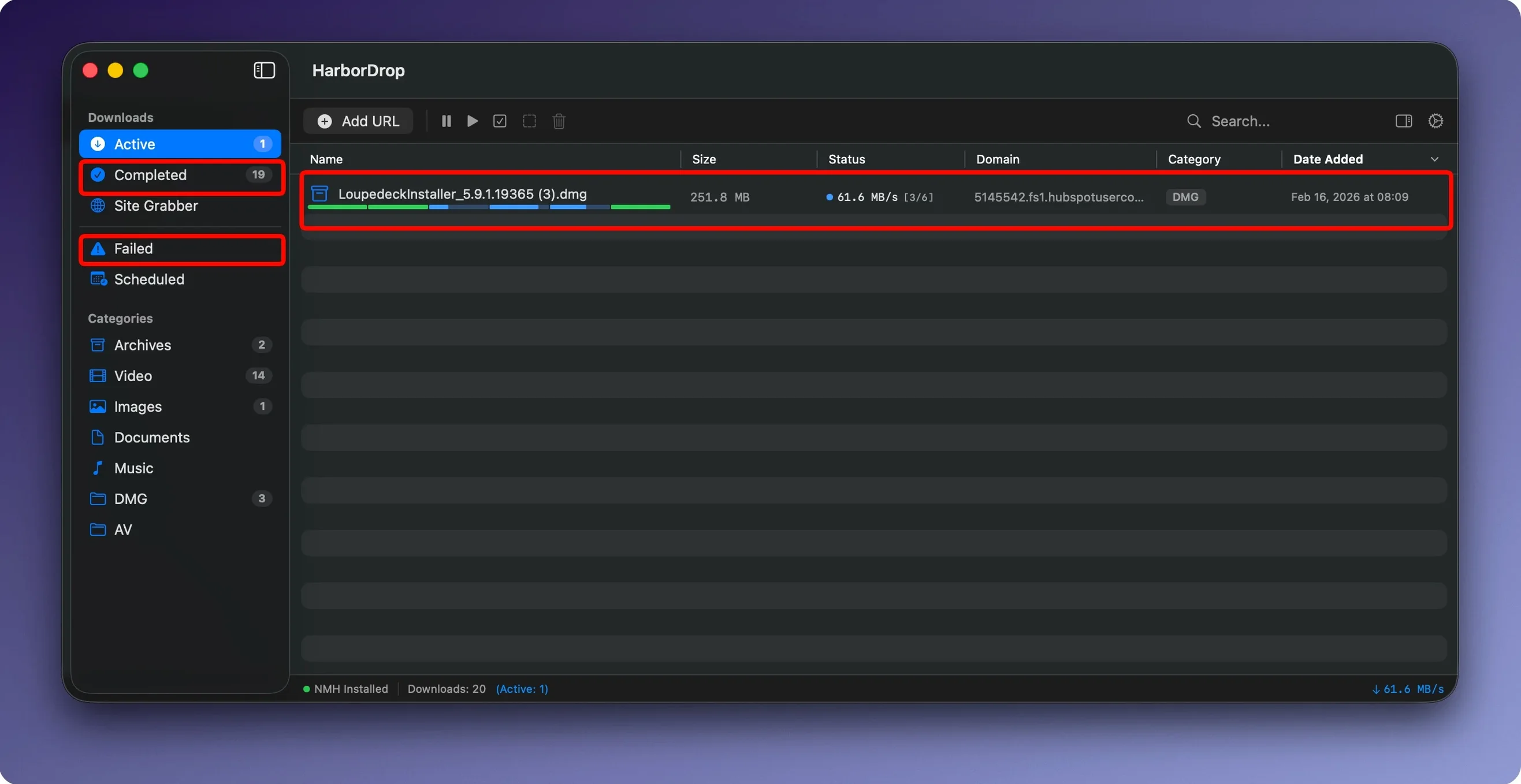
HarborDrop is a macOS download manager that splits files into configurable segments, grabs media from pages, and runs Shell scripts after a download finishes.
- Set the number of download segments for each file to maximise throughput on fast connections.
- Intercept file links and HLS streams directly from the page via the Firefox extension.
- Queue an m3u8 playlist or non-DRM video, let HarborDrop pull the segments, and have a finished MP4 ready for offline viewing.
- Point the Site Grabber at a URL, set a crawl depth of 2, and collect every downloadable link into one list.
- Attach a Shell script to the queue so the finished file is renamed, moved, or handed off to another tool without a manual step.
One realistic flow: the Firefox extension intercepts a batch of project assets from a staging page. While those download in four segments each, a post-download script sorts them into client folders. Site Grabber runs in the background collecting reference links from a second domain. Everything lands where it should, with no dragging files around afterwards.
How it performs day to day
HarborDrop stays light in daily use. On an Apple Silicon Mac with 16 GB of RAM it typically sits between 90–140 MB while handling five or six concurrent downloads split into 6 segments each. CPU use spikes briefly when a new segment starts, then drops back to near idle. You will not hear the fans spin up for a single queue.
The segmented approach is most visible on connections above 100 Mbps. A 2 GB file that takes the browser twelve minutes might land in four or five. On slower Wi‑Fi the difference shrinks, but you still get pause-and-resume without starting over. Stability holds up across long queues overnight — the app does not drift into beachball territory or leak memory over several hours.
When the extension says “No media found”
- Browser extension loses the download link. The extension button says “No media found” even though a video is playing. Right‑click the page, pick Inspect, refresh, and try again. Some single‑page apps hide their media behind a second request, so give the extension a moment after the video starts.
- Segmented download stalls at 99%. One segment lost its connection. Pause the download, drop the segment count from 6 to 4 in the file’s settings, and resume. The app renegotiates and finishes the job.
- Site Grabber collects hundreds of unwanted links. Tighten the crawl depth to 1 and add a domain filter before running it a second time. The initial crawl teaches you what the site structure looks like, so the second pass stays clean.
- Post‑download script fails silently. Test the script in Terminal first with a sample file. HarborDrop needs the full path to any command —
/usr/local/bin/ffmpegrather than justffmpeg. Check the app’s log window for the actual error line. - App quits after waking from sleep. Some versions of macOS Monterey show this. Uncheck Put hard disks to sleep when possible in Battery or Energy Saver preferences, or add a short launch agent that reopens HarborDrop after wake.
First days with harbordrop
A few habits make the first week smoother.
- Set default segments to 4, not 6. Some servers throttle or block connections when too many arrive at once. You can still bump individual files to 8 later, but 4 keeps the first batch running without HTTP 503 errors.
- Create a “Sort later” folder. Point HarborDrop’s default download location there. During the first few days you will tweak the auto‑sort rules. Having a single bucket means nothing gets misfiled while you test domain and file‑type patterns.
- Pick one post‑download action and stick to it for a week. A simple Shell script that moves completed MP4s into a “To watch” folder gives you a feel for the automation engine before you chain AppleScript or JavaScript into the mix.
- Feed the Site Grabber a known page first. Use a blog or a documentation site where you already understand the link structure. A crawl depth of 1 with no filters shows exactly what HarborDrop collects, so you learn what to exclude next time.
- Leave the log window open. It sits at the bottom of the main window. When something behaves unexpectedly — a script does not trigger, a speed drops — the log usually has the answer. Glance at it once a session and you will catch small issues before they stack up.
Once those patterns settle in, harbor drop mac feels less like a utility and more like a quiet co‑worker that puts files where you need them.
- macOS 12 or later
- Apple Silicon and Intel Macs
Questions the team asks
Yes, it supports HLS streams and m3u8 playlists for non-DRM content, pulling the segments and assembling a single offline file.
The browser extension supports Firefox, letting you intercept file links and send them straight to the download queue.








Comments 0
Sign in or create an account to add a comment.
No comments yet. They go up after moderation.