

iClip — Mac download
Ticked
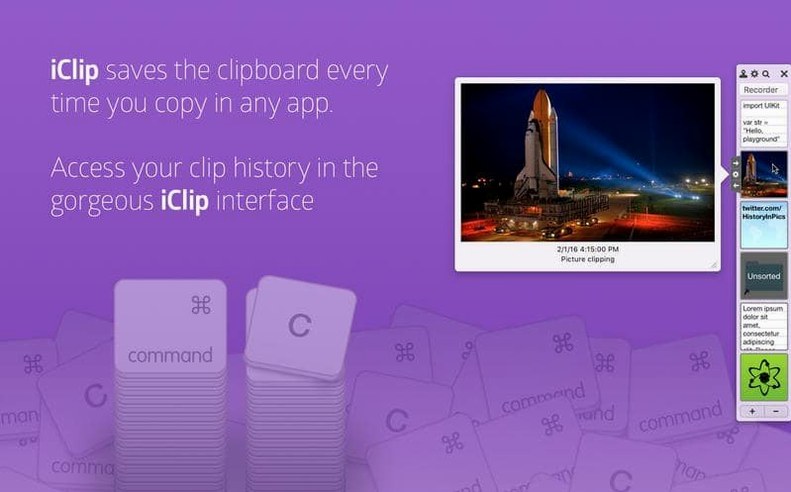
Apple's built-in clipboard holds one item. iClip Mac keeps the rest. It records copied plain text, rich text, images, files, and other content so you can get back to anything you copied earlier.
Check what it stores
Clips stay in a searchable history after you copy them. Arrows beside each clip bin let you copy or paste with one click.
Organise repeated copy-and-paste tasks
Saved clips can be grouped into multiple sets. This helps when the same text, image, or file gets used across different jobs.
Automate it
Scenario: weekly newsletter assembly
A marketing assistant builds a customer newsletter every Thursday. They copy a standard footer, three boilerplate disclaimers, a header image, and two tracking links — the same blocks, same order, every week.
Without a manager, that means hunting through old emails for each piece. With iClip, they set up a Clip Set called Newsletter parts. Each reusable block sits in a labelled bin. Thursday morning: open the set, paste the header image into Mailchimp, then step through the bins — disclaimer, footer, link one, link two. No searching. Seven minutes saved every week.
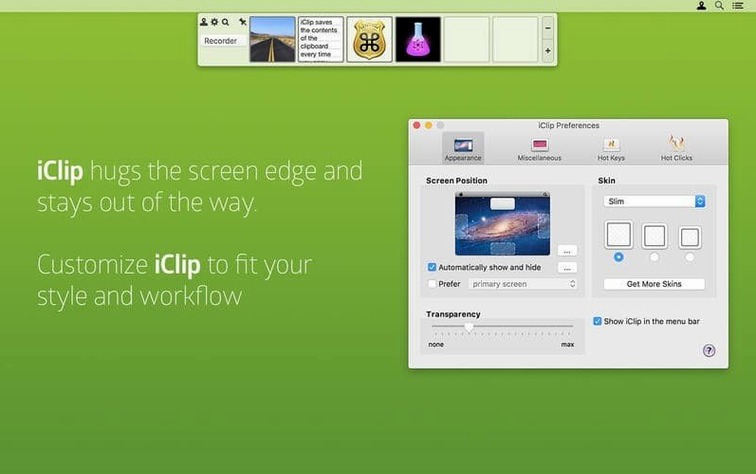
Make iClip open when your pointer touches the screen edge
- Open at screen edge. In Preferences > Activation, set iClip to open when the pointer touches a screen edge. No menu bar click, no shortcut to remember. Choose the right edge if you use a second monitor.
- Clip preview delay. Hover previews appear fast by default. Lengthen the delay under Preferences > Display if you browse bins quickly and don't want pop-ups flickering.
- Maximum clip size. Large images or long formatted documents can bloat the history. Set a cap under Preferences > Storage so the clipboard doesn't fill with multi-megabyte Photoshop grabs you don't need to keep.
- Auto-activate Clip Sets by app. Version 5.6.2 added automatic set switching. Name a Clip Set after an application — like "Mail" or "Sketch" — and iClip switches to it when that app is frontmost. Enable it once, then forget it.
- Keyboard shortcuts for the top bins. Assign shortcuts to your most-used bins (Preferences > Shortcuts). Two keys to paste a signature or a canned reply, without opening the interface.
Most people who download iClip for Mac leave the defaults untouched. Changing these five things makes the difference between a clipboard bin and a proper workflow tool.
iClip can be customised with AppleScript, JXA, Automator, and Services. Useful when a clipboard task repeats too often to manage by hand.
- Pop-up previews no longer show NSKeyedArchiver bplist text instead of the actual content.
- Crashes on macOS Tahoe are fixed.
- File and folder clip icons display correctly again on macOS Tahoe.
- Dropping items onto the menu bar icon works again.
- Requires macOS 10.10 or later
- Runs on Intel and Apple Silicon Macs
- Interface language: English








Comments 0
Sign in or create an account to add a comment.
No comments yet. They go up after moderation.