

Imagenomic Plugin Suite — Mac download
Download (71 MB) Earlier builds
Ticked
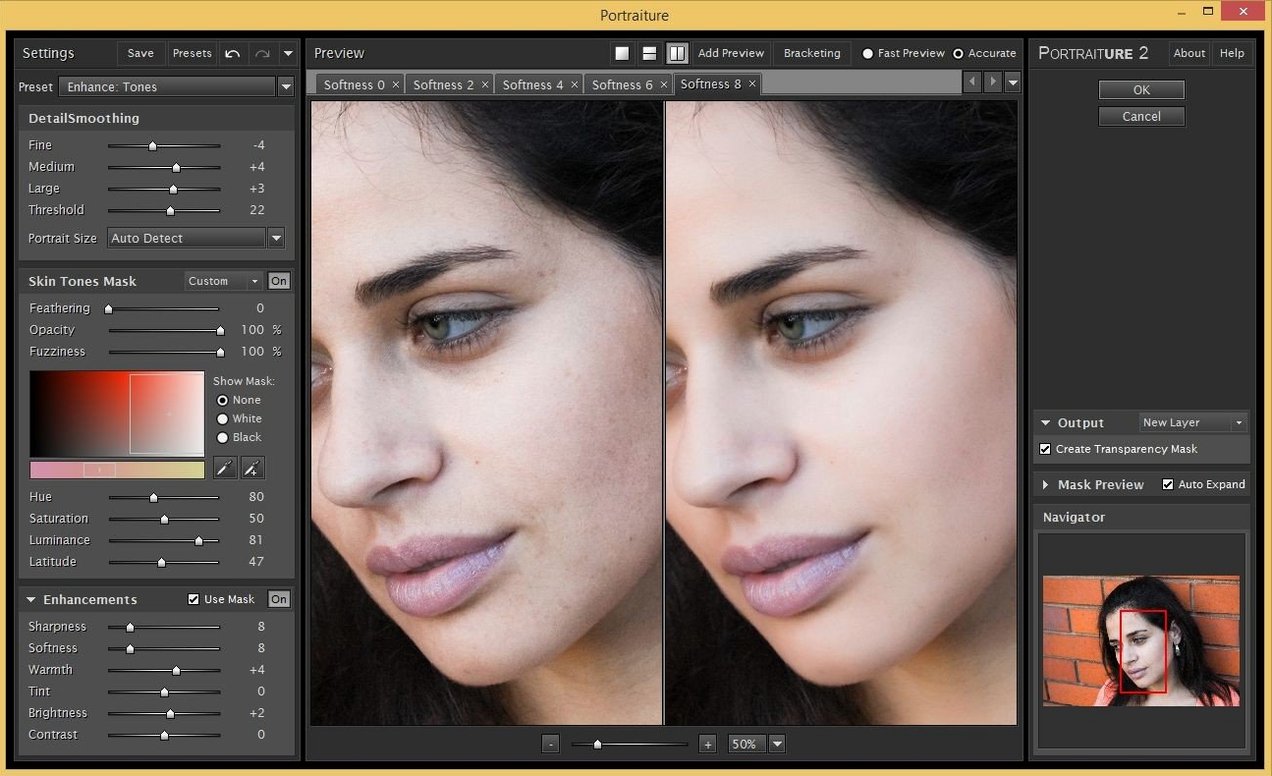
Imagenomic Plugin Suite is three plugins in one installer — Portraiture, Noiseware and Realgrain — for Photoshop, Lightroom Classic and Affinity.
What each control does
- Portraiture — skin smoothing, healing and enhancement. You pull a strength slider and mask fine detail manually or let it auto‑mask.
- Noiseware — luminance and colour noise reduction. A frequency‑based approach where you set noise level, detail protection and sharpening from a single panel.
- Realgrain — grain overlay with size, intensity and tonal range controls. You blend grain into shadows, mids or highlights independently.
Why they sit together
Portraiture cleans skin, Noiseware cleans the frame, and Realgrain puts texture back so a shot doesn’t look plastic. The suite keeps the three on one licence, one install, and a shared interface logic that skips menu‑hopping between them.
A wedding editor's Tuesday morning
A wedding photographer opens 600 ceremony shots from a dim stone chapel. ISO pushed to 6400 on an older body — chroma noise speckles every dress and suit jacket. The first pass is Noiseware on a Smart Object layer: Luminance at 70%, Colour at 90%, Sharpening at 25%. That kills the grain without smearing lace detail. Then Portraiture on the bride's close‑ups, auto‑mask on, strength dialled back to 60% to keep pores visible. One preset exported across all twelve bridal prep shots. Final pass — Realgrain with a Tri‑X 400 profile at 15% opacity, just enough texture to stop the skin looking airbrushed. Three plugins, one folder of RAW files, done by lunch.
Small conveniences that save clicks
- Alt‑click the mask preview in Portraiture to see the auto‑mask as a black‑and‑white matte. Makes it obvious where the plugin missed an ear or caught a necklace.
- Noiseware's Night Scene preset isn't just for night. It biases luminance reduction over colour, which suits astro shots and concert photos where you want grain kept as texture.
- Realgrain's Response curve doesn't just set intensity — drag the shadow point right and the grain pulls out of the blacks entirely. Clean dark suits, textured midtones.
- Cmd+F in Noiseware toggles the before/after split, but holding Shift while dragging the split line repositions it horizontally and vertically, which isn't in the tooltip.
- Realgrain's Size slider links to image dimensions by default. Uncheck "Auto" and you can force the same grain size across a batch of mixed‑resolution exports.
How the suite sits among similar Mac apps
Imagenomic vs Nik Collection. Nik's Dfine and Silver Efex cover noise and grain separately, but you're installing seven plugins to get the three functions Imagenomic packs into one installer. Nik gives you Control Points for local adjustments; Imagenomic gives you mask previews and presets that batch‑apply without leaving the host app. For a high‑volume editor, fewer UI switches matter.
Imagenomic vs Topaz Photo AI. Topaz bundles noise reduction, sharpening and face recovery in one window with an auto‑pilot mode. Imagenomic splits the tasks across three plugins, which means you can apply Noiseware to a duplicate layer, then Portraiture only where skin actually appears. More steps, but finer control — especially if you stack Realgrain afterwards to unify the edit.
Imagenomic vs ON1 NoNoise AI. ON1 does standalone noise reduction with AI‑driven detail reconstruction. Noiseware's frequency‑based approach doesn't try to rebuild lost detail, so it's less aggressive on fabric and foliage. The trade‑off: ON1 gets cleaner results on extremely underexposed frames; Noiseware lets you keep more of the original texture without a sharpening halo.
- macOS 13 or later
- Apple Silicon or Intel (x86 64‑bit)
- Interface language: English
Questions the team asks
It runs in Adobe Photoshop, Lightroom Classic and Affinity Photo on macOS 13 or later.
Yes — the suite supports both ARM (Apple Silicon) and x86 64‑bit Macs.
The suite bundles Portraiture, Noiseware and Realgrain together; Imagenomic also sells each plugin separately.







Comments 0
Sign in or create an account to add a comment.
No comments yet. They go up after moderation.