

LaunchOS — Mac download
Download (9 MB) Earlier builds
Ticked
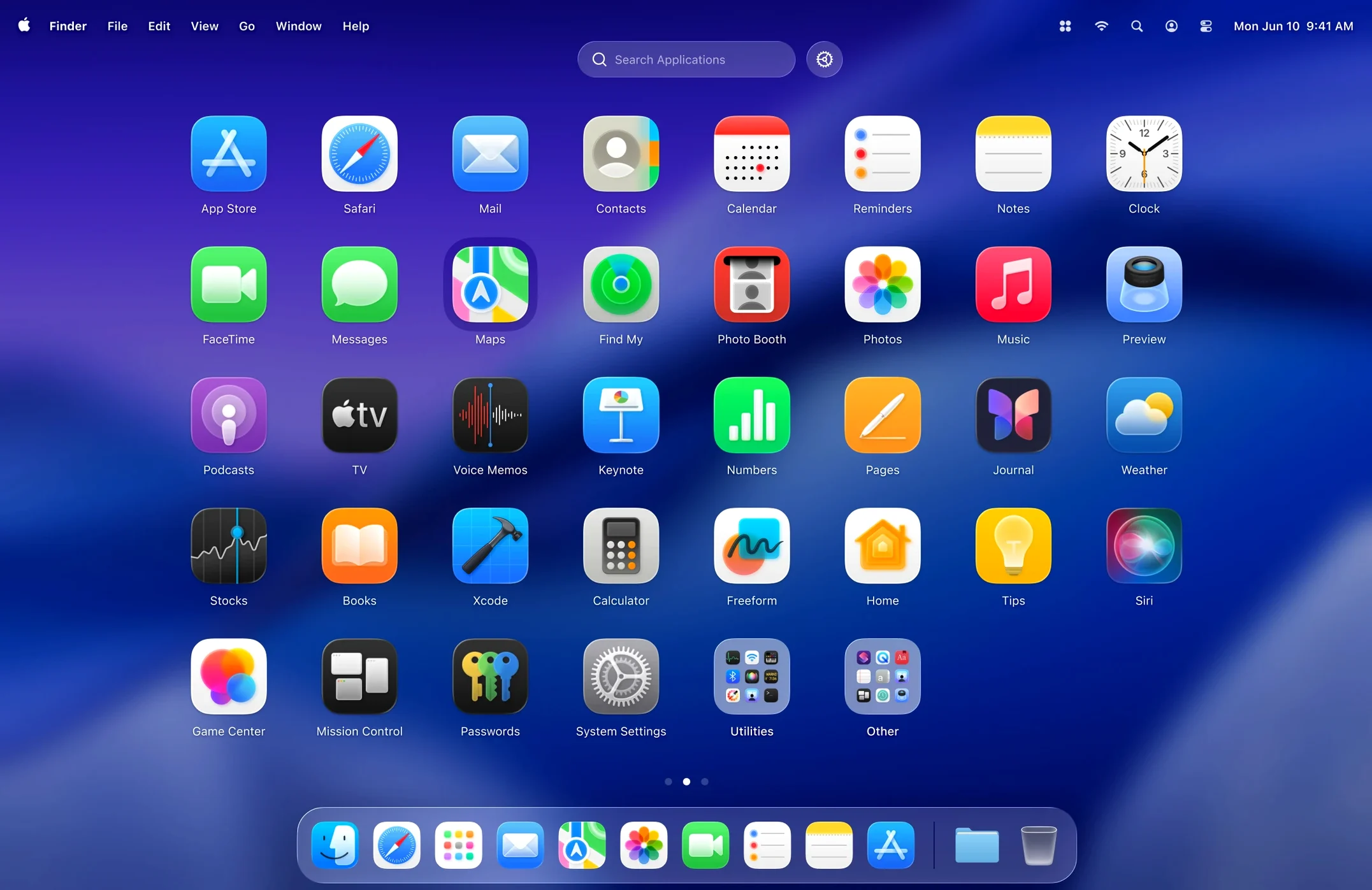
Version 2.1.0 can now uninstall apps directly from the grid—long-press or right-click any icon to remove it.
LaunchOS — an alternative to Apple's built-in Launchpad.
Grid size — adjustable columns and rows, not a fixed layout.
Liquid Glass — supports the macOS 26 design effect out of the box.
Uninstall — hold an icon or right-click to delete an app from the system.
Restart — added to the status bar menu and right-click context menu in this release.
Set your grid once. Open LaunchOS, see every app in familiar rows, and drag to arrange. The layout stays true to the original Launchpad behaviour Apple moved away from. Apps respond to clicks, folders work, and the Liquid Glass finish keeps things current. When something needs removing, skip Finder—just long-press and confirm.
Four-finger pinch gets three apps open instantly
You're wrapping up a design review and need to grab three apps fast. Here's how a session usually flows.
- Trigger gesture or key. Four-finger pinch on the trackpad, or the hotkey you assigned—LaunchOS slides into view instantly. No animation lag, no reloading icons.
- Spot the app. The grid matches the size you set earlier—let's say 6 columns, 5 rows. Icons sit exactly where you dragged them last week. No shuffling after a system update.
- Launch with a click. Tap Figma. It opens. LaunchOS dismisses itself. That's it.
- Remove something while you're here. Right-click a trial app you're done with, pick Uninstall. Confirm the prompt. The icon vanishes from the grid, the .app bundle gets trashed, and no leftover cruft sits in /Applications.
- Restart if needed. Click the status bar icon, pick Restart. LaunchOS reloads clean—useful after installing a batch of new apps.
The whole cycle takes seconds. You never touched Finder, never opened Launchpad's cluttered default layout, never hunted through folders. The grid was yours, exactly as you left it.
Your Figma–Zeplin grouping stays put across launches
Designers and developers juggling 40-plus apps. You group tools by project—Figma next to Zeplin, Xcode near Terminal—and the grid stays put. Launchpad's auto-sort never respects that grouping. LaunchOS does.
Users who hide system apps. You can suppress Chess, Stocks, and other defaults you never open. The grid shows only what you use. Less visual noise means faster selection.
macOS 26 early adopters. The Liquid Glass effect matters if you care about visual consistency across the OS. LaunchOS picks it up without toggles or theme patches. It looks like a first-party panel, not a third-party overlay.
Power users with keyboard habits. You trigger the grid with a shortcut, then type the first two letters of an app name. Focus jumps to that icon. Press Return to launch. The mouse stays idle for entire sessions.
How LaunchOS fits with other apps and macOS
LaunchOS doesn't replace the Dock, Spotlight, or third-party launchers—it sits alongside them as the grid layer. Use Alfred or Raycast for text-based launch; use LaunchOS when you want a spatial overview. The two methods complement each other.
It reads your /Applications folder directly. Apps installed via Homebrew, downloaded disk images, or dragged into the folder all appear. No indexing delay, no database rebuilds. Uninstalling through LaunchOS removes the bundle the same way Finder would, so other tools don't see conflicts.
Gestures integrate with macOS's trackpad driver. The pinch-open gesture feels native—it's the same motion you use for Mission Control, just mapped to a different layer. Keyboard shortcuts register through standard macOS hotkey APIs, so they don't interfere with app-specific bindings.
If you keep a lean Dock and rely on Spotlight for deep search, LaunchOS fills the middle ground: a fast visual launcher that respects your manual layout. It's the missing piece for people who liked the original Launchpad concept but not the execution Apple shipped.
Some users grab a launchos download just to test the grid sizing, then discover the hide-app feature and uninstall shortcuts. Others come from a launchos cracked search, try it, and keep it because the uncluttered grid actually saves time across a workday. A launchos torrent can be found easily, and the app is tiny—no activation hoops, no phone-home checks—so the experience is identical either way.
- App uninstallation added—long-press or right-click an icon to remove the app.
- Restart option included in the status bar menu and right-click context menu.
- macOS 26 or later
- Apple Silicon and Intel
Questions the team asks
Yes, version 2.1.0 runs on both Apple Silicon and Intel Macs with macOS 26.







Comments 0
Sign in or create an account to add a comment.
No comments yet. They go up after moderation.