

MacCleaner Pro — Mac download
Download (132 MB) Earlier builds
Ticked
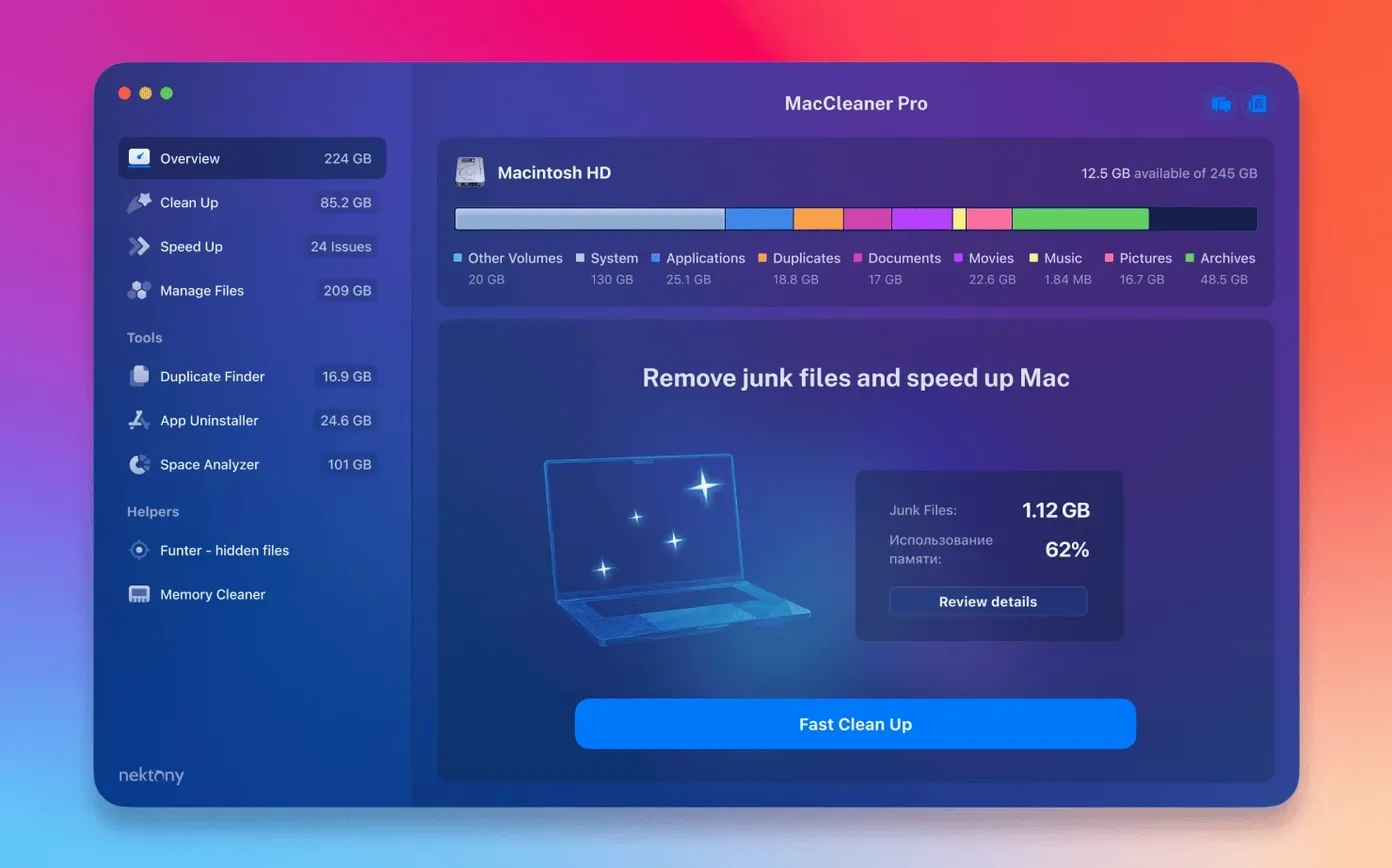
A slow Mac is rarely one big problem. It's hundreds of small ones: forgotten downloads, leftover app files, memory tied up by browsers that should have let go hours ago. MacCleaner Pro 4.0.2 bundles six Nektony tools to attack the mess from different angles, from app removal to RAM monitoring.
| Quick facts | |
|---|---|
| Developer | Nektony |
| Current version | 4.0.2 |
| Bundle contents | 6 apps |
| macOS | 10.13 and later |
It is a package, not a single utility. The six pieces are App Cleaner & Uninstaller 9.0.3 for removing apps and extensions, Disk Space Analyzer 6.0 for mapping what eats your drive, Duplicate File Finder 8.5.2 for hunting copies, Memory Cleaner 5.5 for freeing inactive RAM, Funter 7.1, and the MacCleaner Pro 4.0.2 hub itself. Together they cover the two things most people want: more free space and a snappier machine.
Scan times worth waiting through
Most problems come down to expectations. You launch Disk Space Analyzer and expect instant results, but a full scan of a 1TB drive takes a minute or two. That is normal. Let it finish before drawing conclusions.
- Scan results look out of date. iCloud folders can lag. Version 4.0.2 improved detection of items stored in an iCloud folder, but files still being downloaded or uploaded may not appear until the sync settles. Run the scan again after iCloud catches up.
- Custom Home folder items missing. This was a known pain point. The 4.0.2 update enhanced detection of items in a custom Home folder. If you moved your Home folder to another volume, update to this version before troubleshooting.
- App Cleaner finds few leftovers. Some apps spread files outside the obvious Library folders. Use the PRO extension list in App Cleaner & Uninstaller to see launch agents, login items and browser extensions that the basic scan may not surface.
- Memory Cleaner shows high pressure right after a clean. macOS reuses freed RAM quickly. That is the system doing its job, not a fault in the tool. Watch the trend over a few minutes rather than the number right after you click.
- Duplicate File Finder flags similar-looking files. Check the preview before deleting. Files with the same name but different sizes are often different versions. The finder shows size and path for each match.
Right-click a folder for hidden files
A few things are easy to miss because the icons do not advertise them.
- Right-click a folder in Finder. Funter adds a menu item to show hidden files inside that folder only. Faster than toggling Finder's own hidden-file view for the whole system.
- Drag and drop into Disk Space Analyzer. You can drop any folder onto the app window to scan just that location, skipping the full-drive pass.
- Memory Cleaner lives in the menu bar. Click the icon to see current pressure, then hit the clean button without opening the main window. The dashboard is useful once a week, not daily.
- App Cleaner & Uninstaller keeps a removal log. Check it after a big uninstall session to confirm which leftovers went where.
- Scan history in Disk Space Analyzer. Previous scans stay available, so you can compare before and after a cleanup without rescanning the entire drive.
Menu bar sits quiet until a scan starts
In daily use, the bundle sits quiet. Memory Cleaner holds a small menu bar presence and uses minimal CPU when idle. The heavier tools — Disk Space Analyzer and Duplicate File Finder — only draw power during active scans. Expect a short CPU spike while a scan runs, then nothing.
App Cleaner & Uninstaller is responsive. Removing a large app with many support files takes seconds, not minutes. The PRO features for extensions and startup items run with the same speed as the basic removal flow.
Stability is what you would want from a maintenance suite. It does not install background daemons that phone home. The tools run on demand. Over several weeks of use, none of the six apps caused crashes or beachballing on Apple Silicon or Intel 64-bit Macs running macOS 10.13 and later.
One note: the first launch of each tool after installation shows a short setup dialog. Accept the defaults and move on. There is no activation step to complete.
Files hit the Trash, not permanent deletion
The bundle respects the OS rather than fighting it. It uses standard macOS mechanisms for file deletion, so files go to the Trash and remain recoverable until you empty it. That is a deliberate safety choice.
App Cleaner & Uninstaller works alongside macOS's own uninstall routines. Use it instead of dragging an app to the Trash when you want the extras gone too. It reads the same Launch Services database as the Finder, so apps installed via drag-and-drop or package installers are both covered.
Funter integrates with Finder's context menu, which makes it feel native. No separate browser or window to manage. Hidden files appear and disappear through the same right-click workflow you already use.
For people also running Time Machine, Disk Space Analyzer's local snapshots view helps explain why free space shrinks overnight. You can see how much space snapshots hold, then decide whether to delete older ones through Time Machine itself. The bundle does not touch backup data.
Memory Cleaner plays nicely with Activity Monitor. Use Activity Monitor to identify the app holding memory, then Memory Cleaner to reclaim inactive RAM after closing it. The two tools answer different questions.
If you search for maccleaner pro reviews that mention integration, the consistent point is that the bundle fills gaps in stock macOS without duplicating what the system already does well. Disk cleanup, duplicate hunting and app leftovers are weak spots in a default install. The six tools cover those spots, then get out of the way.
- macOS 10.13 or later
- Apple Silicon or Intel 64-bit
Questions the team asks
The package installs six: App Cleaner & Uninstaller 9.0.3, Disk Space Analyzer 6.0, Duplicate File Finder 8.5.2, Memory Cleaner 5.5, Funter 7.1, and MacCleaner Pro 4.0.2.
It monitors RAM usage and clears inactive memory that apps have reserved but are no longer using, which can help a Mac feel more responsive during long sessions.
It requires macOS 10.13 or later and runs on both Intel and Apple Silicon Macs.








Comments 0
Sign in or create an account to add a comment.
No comments yet. They go up after moderation.