

Radio Silence — Mac download
Ticked
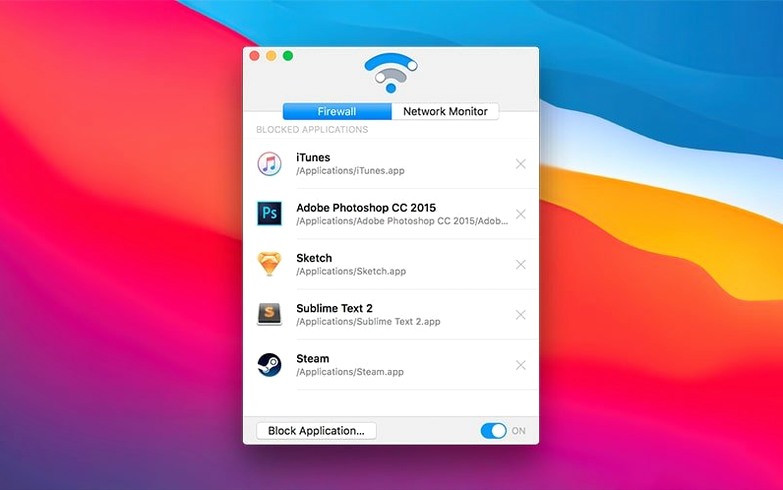
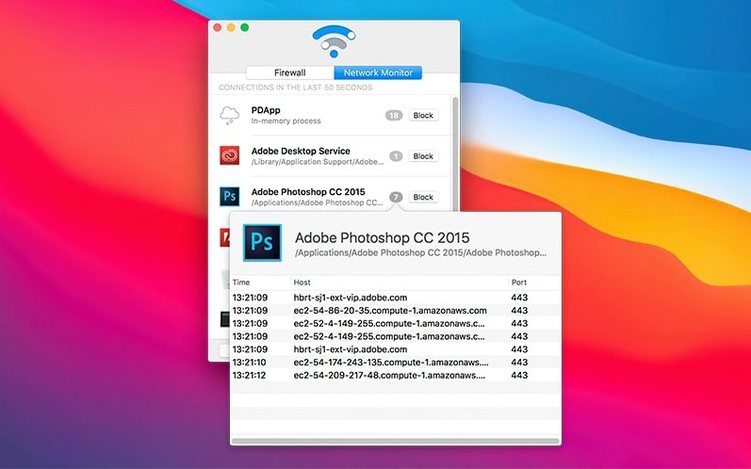
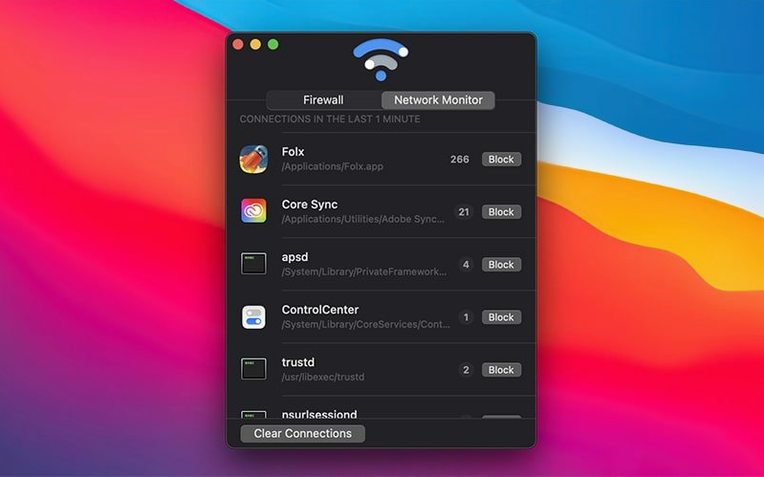
Radio Silence suits anyone who wants to stop specific Mac apps from phoning home — developers testing offline behaviour, privacy-conscious users, or people on metered connections.
macOS 10.15 Catalina or newer needed
Radio Silence 3.4 requires macOS 10.15 or later. It runs natively on both Intel and Apple Silicon machines.
See which apps are connecting
The network monitor shows live connections, so you can spot which apps are sending data before you decide to block them.
Block an app in one click
Pick an app from the list and hit the Block Application button. The Firewall tab keeps a running list of everything you have silenced — remove any app from the block list whenever you like.
Idles at near-zero CPU, spikes only when you open the monitor
Radio Silence sits quietly in the background. CPU usage stays near zero during normal work — it spikes only for a second when you open the monitor to refresh the connection list. Memory use hovers around 30–40 MB on an Apple Silicon Mac, which is lean for a firewall tool.
Stability holds up well across long sessions. The firewall rules persist through sleep, wake and network changes without dropping your block list. If you toggle the firewall off temporarily with the pause button, blocked apps reconnect within a second or two — no lag, no need to restart anything.
One detail worth noting: the app has no menu bar icon. That saves a slot, but it also means you cannot glance up to check whether the firewall is active. You open the main window or you trust it is working.
Install guidance tightened for macOS Tahoe permissions
Version 3.4 focused on smoothing out the install experience, especially for users moving to macOS Tahoe. The release added explicit installation guidance for the newer OS, so the setup steps are clearer when system permissions shift.
Two practical fixes landed in the same update:
- Better handling of installation errors and missing permissions — the app now catches common failure points and surfaces what needs fixing instead of failing silently
- A help view with troubleshooting information that appears if the app fails to launch, so you are not left guessing
These are under-the-hood changes. The core blocking engine did not need rework — it was already solid. The focus was on making the first five minutes less frustrating for new users.
No per-domain rules like Little Snitch; just per-app toggles
Three apps tend to come up in the same conversation: Little Snitch, LuLu and Radio Silence. They overlap in purpose but feel quite different day to day.
Radio Silence vs Little Snitch. Little Snitch gives you per-process, per-port, per-domain rules with a connection alert for every new request. That is powerful — and noisy. Radio Silence takes the opposite approach: block an entire app or leave it alone. No pop-ups, no rule editing. If you want forensic detail, Little Snitch is the pick. If you want a list of blocked apps and nothing else, Radio Silence gets out of your way faster.
Radio Silence vs LuLu. LuLu is open-source and free, with a similar block-by-app model plus the ability to approve or deny individual connections. It is more granular than Radio Silence but less so than Little Snitch. The trade-off is polish — LuLu's interface feels functional rather than finished, and updates depend on community momentum. Radio Silence is smaller, smoother and maintained by a single developer with a consistent release cadence.
Where Radio Silence fits. It is the app you set once and forget. No daily decisions, no alert fatigue. That makes it the right choice if your goal is simply to cut off a handful of apps — a text editor that insists on checking for updates, a utility that sends analytics — without managing a firewall ruleset.
One-click pause to instantly rule out the firewall
A few details in Radio Silence are not obvious on first launch:
- The pause button disables all blocking instantly — useful when an app breaks and you need to rule out the firewall in one click, then resume without rebuilding your list
- Removing an app from the Firewall tab does not require a restart or a network toggle; the app can connect again immediately
- The monitor refreshes in real time but does not log history — it is a snapshot, not a database, so there is nothing to clear or archive
- Because there is no menu bar icon, the app cannot be quit accidentally from a status menu; you close the window and it keeps running
If you download Radio Silence for Mac and block a few apps on day one, you probably will not open it again for weeks. That is by design.
- Installation guidance added for macOS Tahoe.
- Better handling for installation errors and missing permissions.
- New help view with troubleshooting info if the app fails to launch.
- macOS 10.15 or later
- Intel or Apple Silicon Mac
Questions the team asks
No, the app runs without a menu bar icon so it stays out of your way.








Comments 0
Sign in or create an account to add a comment.
No comments yet. They go up after moderation.