

rcmd • App Switcher — Mac download
Download (6 MB) Earlier builds
Ticked
Tighter macOS 13 foundations in the latest release
Version 3.5.5 is a maintenance release. No new features landed, but the foundations are tighter for macOS 13 and above.
Here is one realistic task with rcmd.
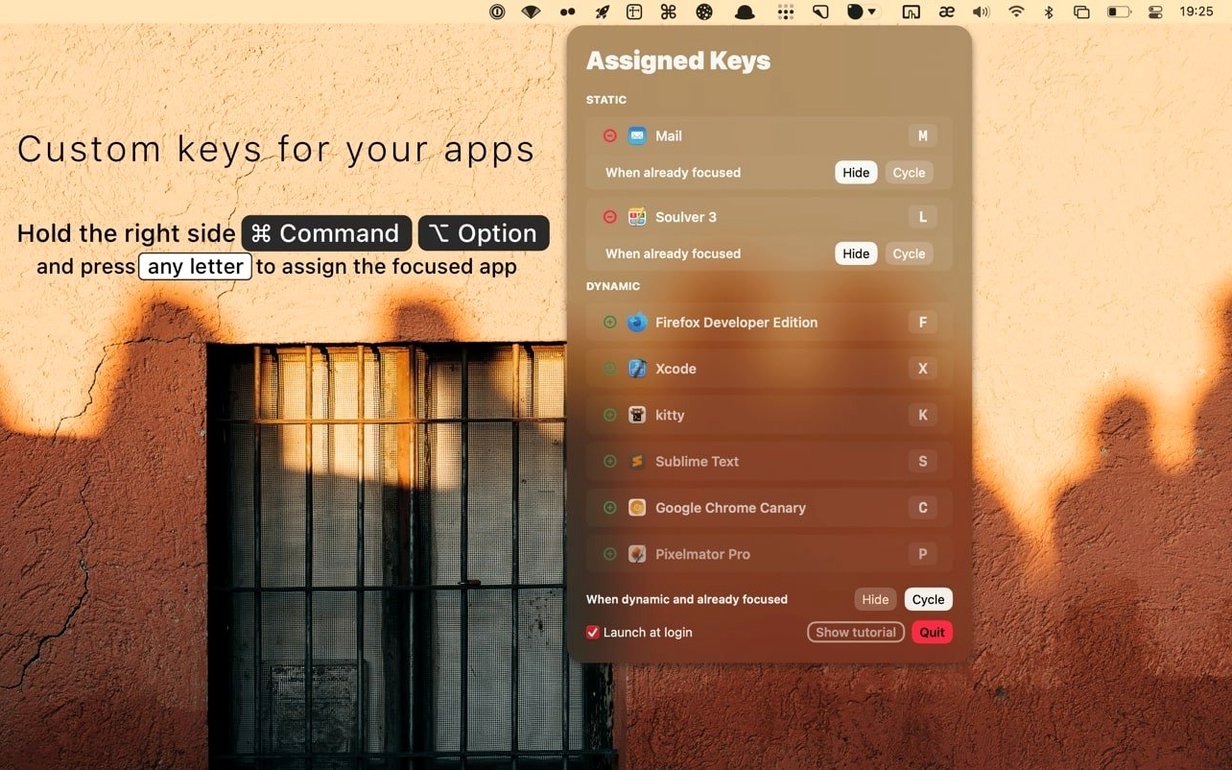
I keep Safari on S, Notes on N, and Terminal on T. To jump from a browser page to a terminal window, I hold the right Command key and tap T. Terminal appears instantly. If Terminal was on another desktop, rcmd moves me there without a pause. Another tap of the same key hides Terminal and puts me back where I was. That single-key toggle keeps the flow fast: no Command-Tab cycling, no searching with a cursor.
Jump to any app by its first letter
- Switching straight to a known app by its first letter
- Moving between apps on different spaces without extra gestures
- Replacing long Command-Tab sequences with a single key press
- Launching an app that is not running yet via its assigned key
HIDE and CYCLE are set per app, not globally
- HIDE and CYCLE behaviour is set per app, not globally
- The trigger is the right Command key by default; modifier can be changed
- Only running apps with assigned letters appear while the trigger is held
- Specific keys can be disabled in settings if they clash with other shortcuts
Double-tap S to cycle between Safari and Slack
- Double-tap to cycle. When two apps share a first letter — say, Safari and Slack — holding right Command and tapping
Stwice cycles through them in order of last use. No need to assign separate keys. - Holding the trigger shows the map. Keep right Command held for a beat. A translucent overlay lists every running app with its current letter. Let go, and the overlay vanishes without switching.
- Command-Option letters are permanent. Assign a favourite app with Command-Option and a letter, and that binding sticks across restarts. The app launches cold if it is not already open.
- Space-aware switching. rcmd follows macOS spaces natively. Switching to an app on another desktop moves you there; hiding it snaps you back to the space you left.
Swap the right Command trigger to right Option
Open preferences right after install. Three adjustments make the app feel like yours.
- Switch the trigger key. If right Command belongs to a keyboard layout or another tool, change the modifier to something free — right Option or right Control both work well.
- Disable keys that clash. In the Keys tab, uncheck any letter you want rcmd to ignore. This stops it from intercepting a key another app switcher for Mac free download might also watch.
- Set per-app behaviour. For each assigned app, choose whether a repeat keypress hides the app, cycles to the next one, or does nothing. A messaging app might be set to hide; a terminal might be set to cycle.
- macOS 13 or later
- Apple Silicon and Intel 64-bit Macs
Questions the team asks
Yes. Press the assigned key again while the app is already focused, and it hides. This behaviour is configurable per app.
No. The modifier combination can be changed in settings to something else that suits your workflow.
An assigned key launches the app when it is not running, so the same letter always delivers the app.









Comments 0
Sign in or create an account to add a comment.
No comments yet. They go up after moderation.