
BatchOutput XLS — Mac download
Download (10 MB) Earlier builds
Ticked
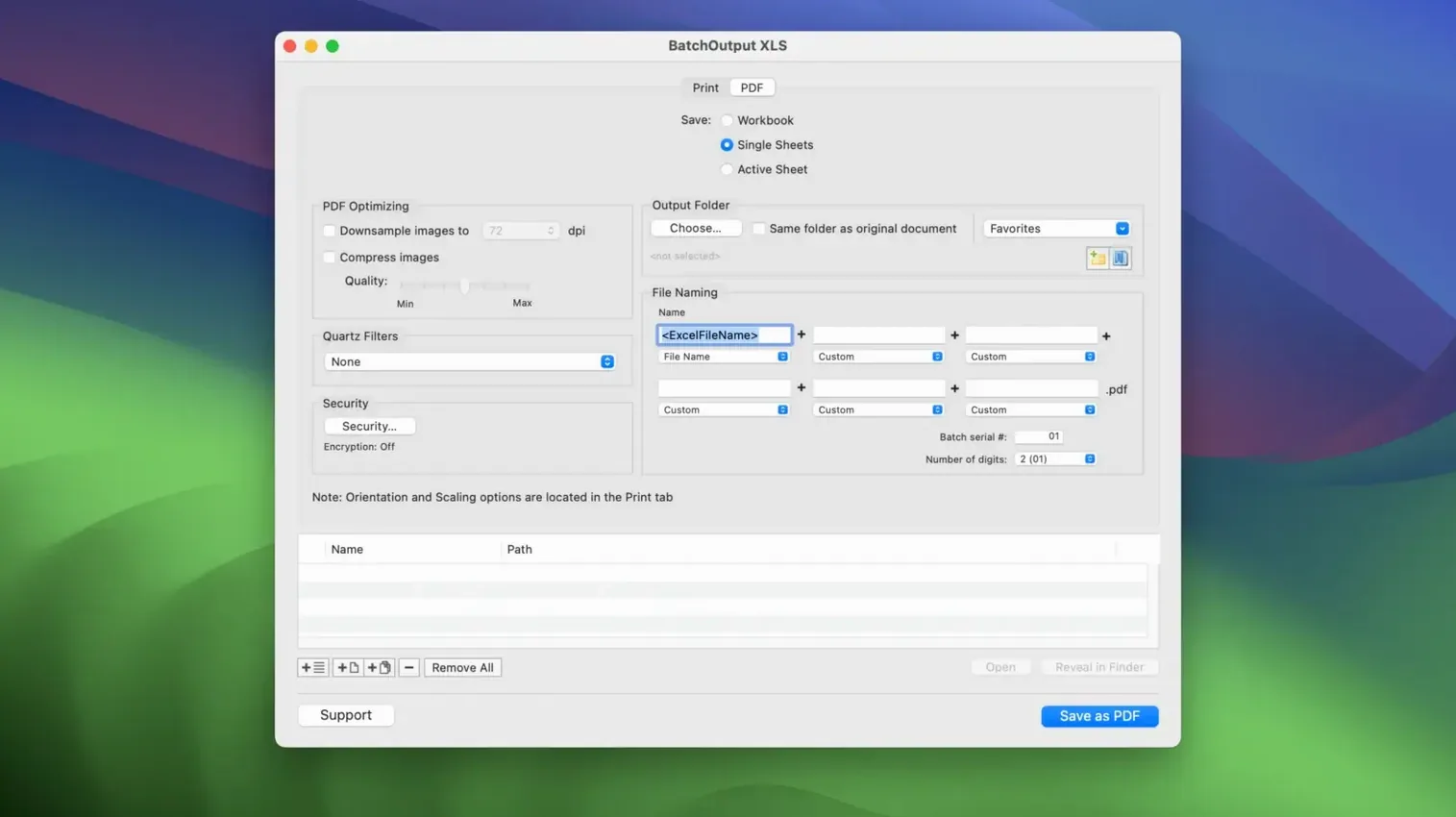
The variable PDF filenames feature is the one I reach for most. You set up a rule once — date, user name, custom text — and every PDF that BatchOutput XLS 3.0.1 generates follows that pattern. No more renaming fifty files after a batch run.
The workflow is straightforward. Open the app, drop in your Excel files, and choose print or save as PDF. It splits workbooks into individual sheets automatically if you need that. One click processes everything. The app works on 64-bit Intel Macs running macOS 12 or later.
The install is a disk image with a Gatekeeper bypass. Mount it, run the helper in Terminal, drag the app to Applications. That is it. For anyone managing weekly report prints or PDF exports from Excel, this cuts the repetitive clicks down to nearly zero.
For anyone who repeats the same Excel-to-PDF routine weekly
BatchOutput XLS suits anyone whose week includes the same Excel-to-PDF routine more than once. Finance teams sending monthly statements. Operations managers compiling shift reports. Freelancers who invoice from spreadsheets and need clean PDF copies for clients. If you open Excel, click Print, choose destination, name the file, repeat — this app is built for that loop.
It also fits users who need consistency. When you process ten workbooks manually, the odds of one PDF getting a different filename format or a forgotten print setting go up. BatchOutput XLS applies the same rules to every file in the queue. The output is uniform, which matters when those PDFs go to a shared folder or a client portal.
Set the default PDF filename pattern before your first batch
Before your first real batch, open the app and set the default PDF filename pattern. By default it uses the source workbook name, but you can add date tokens, user name, or custom text. I set mine to ProjectReport_2025-03-14 format on day one and never looked back.
Next, check the compression settings. The app can reduce PDF size by compressing images inside the file. If your spreadsheets include charts or screenshots, toggle this on. It keeps file sizes under control without visible quality loss for on-screen review.
Password and encryption settings are worth a look even if you do not plan to use them immediately. You can set an open password or restrict copying and printing. It takes ten seconds to enable, and it saves hunting for the option mid-batch later.
Part of the BatchOutput suite for Word and PowerPoint too
BatchOutput XLS lives in the BatchOutput Office suite, alongside versions for Word (DOC) and PowerPoint (PPT). If you ever batch-convert documents from multiple Office apps, the suite keeps the same interface and workflow across all three.
On macOS, the app respects your default print system. Output goes through the same printer dialogue you already use, so network printers, PDF printers, and paper size presets all carry over. No extra drivers to configure.
For users who keep organised file structures, the variable filename feature integrates well with macOS Finder search and tags. A filename like Invoice_AcmeCorp_2025-03-14 is searchable and sortable immediately.
Drag and drop files from Finder; app remembers last output folder
You can drag and drop files directly from Finder into the queue window. No need to click an Add button each time.
The app remembers the last output folder you chose. If you process the same client every month, set the destination once and the next batch run uses it automatically.
If you hold the modifier key while starting a batch, the app prompts for confirmation before processing. Useful when you are still testing your settings and want to avoid accidentally printing fifty PDFs.
The Quartz filter option for colour adjustment sounds advanced, but for basic needs you can ignore it. The default conversion is fine for most spreadsheet-to-PDF tasks.
- macOS 12 or later
- Intel Mac (64-bit)
Questions the team asks
Yes, it can split workbooks into individual sheets when printing or creating PDFs.
It is compatible with macOS 12 and later, and runs on 64-bit Intel Macs.









Comments 0
Sign in or create an account to add a comment.
No comments yet. They go up after moderation.